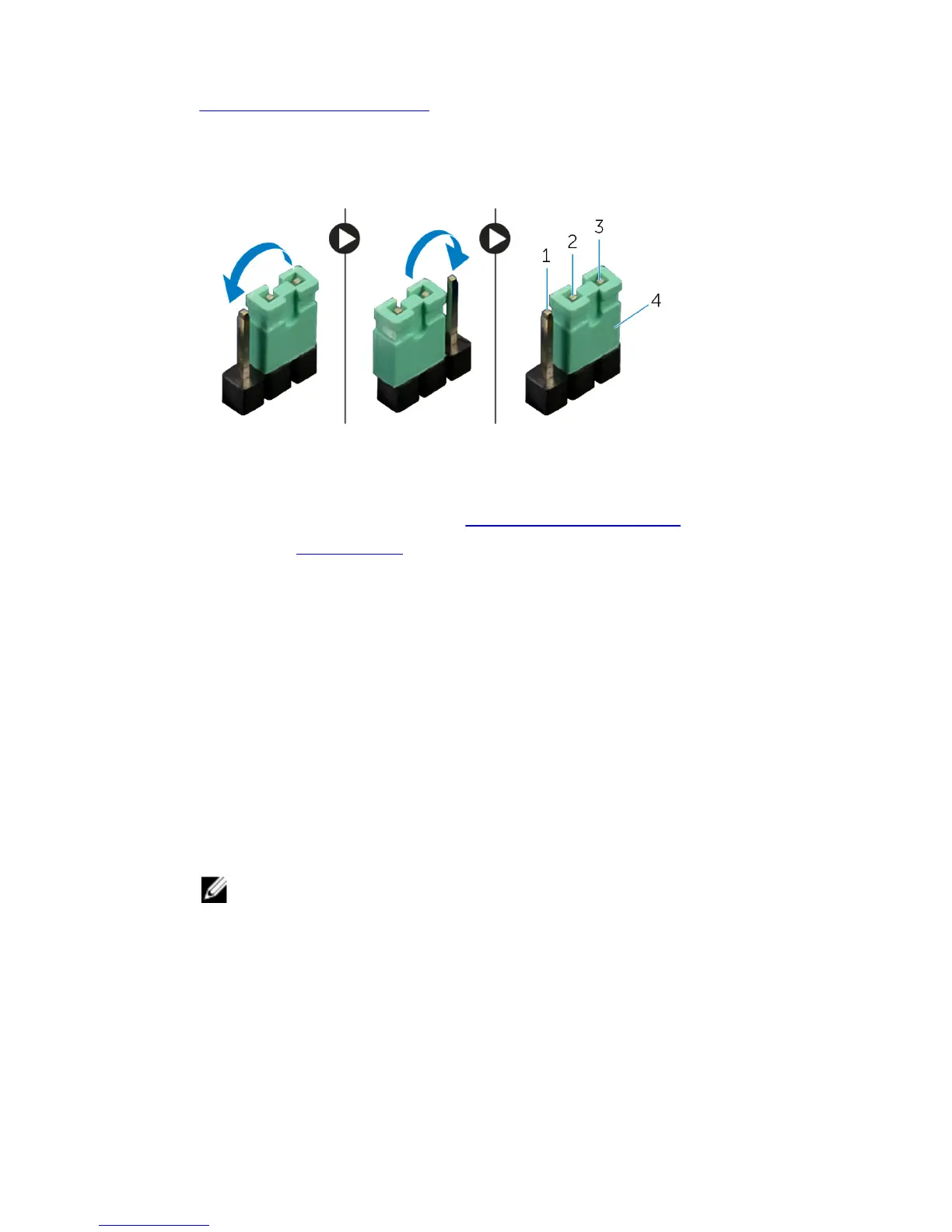
4 Locate the CMOS jumper (CLEAR_CMOS1) on the system board. See
“System-Board Components”.
5 Remove the jumper plug from pins 2 and 3 and fix it on pins 1 and 2.
6 Wait for approximately five seconds to clear the CMOS setting.
7 Remove the jumper plug from pins 1 and 2 and replace it on pins 2 and 3.
1 pin 1 2 pin 2
3 pin 3 4 jumper plug
8 Replace the left side-panel. See "Replacing the Side Panels”.
9 Replace the stability foot.
Flashing the BIOS
You may need to flash (update) the BIOS when an update is available or when
you replace the system board. To flash the BIOS:
1 Turn on the computer.
2 Go to dell.com/support.
3 If you have your computer's Service Tag, type your computer's Service Tag
and click Submit.
If you do not have your computer's Service Tag, click Detect My
Product to allow automatic detection of the Service Tag.
NOTE: If the Service Tag cannot be detected automatically, select
your product under the product categories.
4 Click Get Drivers and Downloads.
5 Click View All Drivers.
6 In the Operating System drop-down, select the operating system
installed on your computer.
7 Click BIOS.
132















 To Next Page