7
3
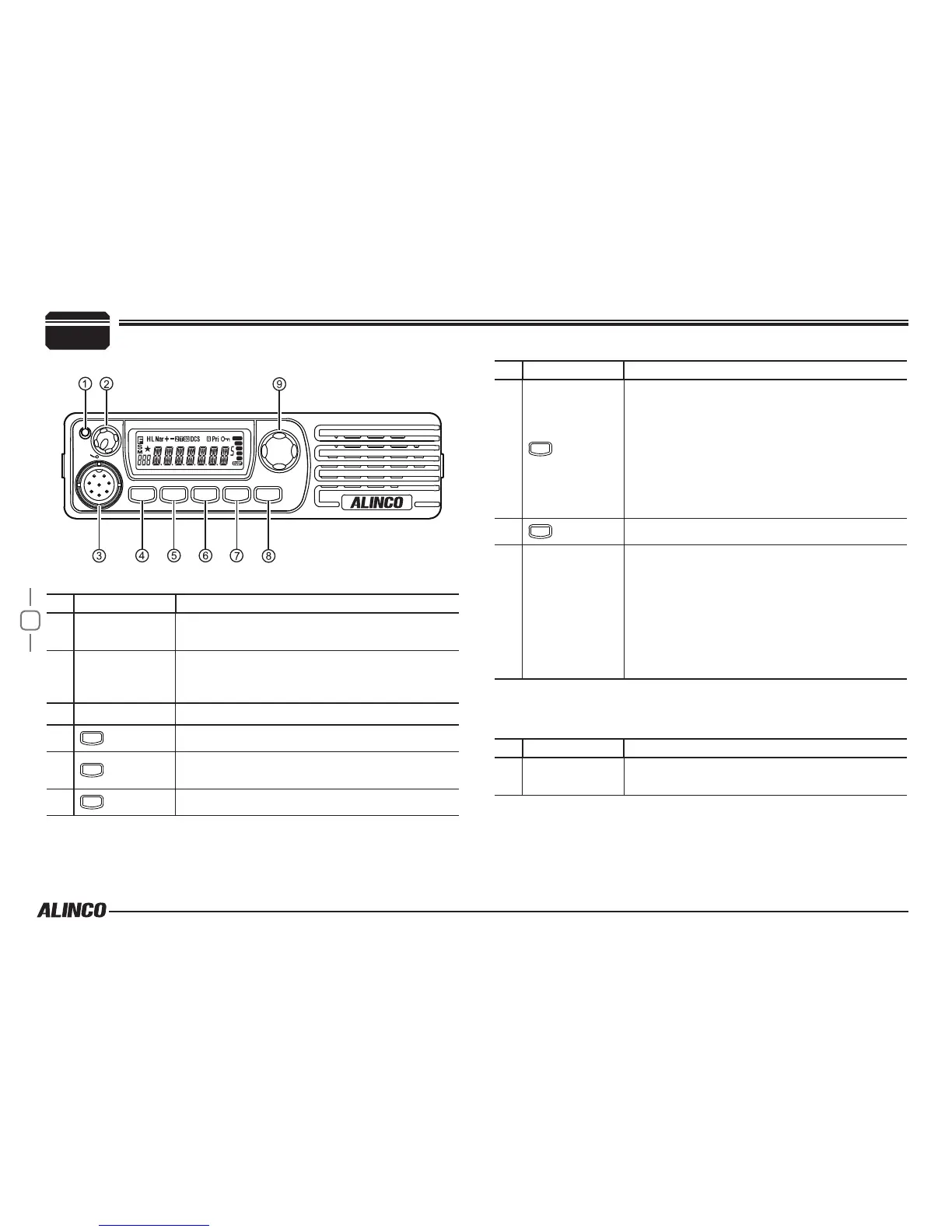
Basic Functions
NO. KEY FUNCTION
1 TX/Busy
Lights green when channel is busy and red
when radio is transmitting
2 VOL knob
Rotate to adjust the audio level.
Press to switch the power on/off. (Press and
hold to turn off the power.)
3 Mic.connector Microphone connection port
4
FUNC
Switches to function mode.
5
V/M
Switches between VFO mode and Channel
mode
6
TS/DCS
Sets the tone squelch and DCS value
Getting Acquainted
Front panel
SQL
VOL
PWR
TX
SET
FUNC
MW
V/M
LOCK
TS/DCS
H/L
CALL
REV
NO. KEY FUNCTION
7
CALL
• In VFO mode
Switches the CALL channel/VFO mode (for
the frequency being edited).
• In memory mode
Switches the CALL channel/memory mode.
• In channel display mode
Switches the CALL channel/currently
displayed channel.
8
SQL
Adjust Squelch level
9 Dial
• In VFO mode
Rotate to switch frequencies and various
settings.
Press to enter the settings.
• In memory mode/channel display mode
Rotate to change memory channels and
various settings.
Press to enter the settings.
Operations by pressing and holding the following
respective keys
NO. KEY FUNCTION
2 VOL knob
Press to switch the power on/off. (Press and
hold to turn off the power.)


 To Next Page