11
3
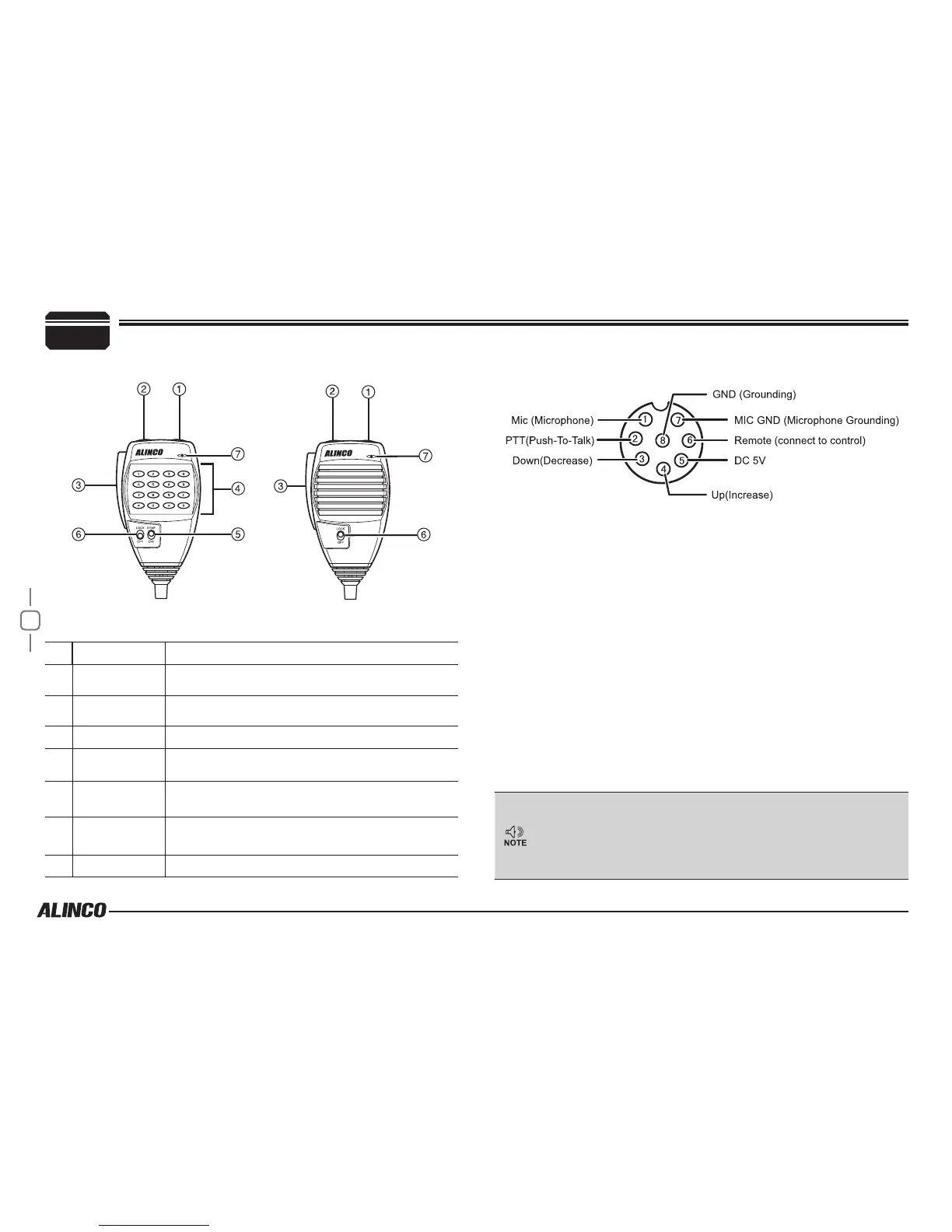
NO. KEY FUNCTION
1
UP Increase frequency, channel number or setting value.
2
DOWN Decrease frequency, channel number or setting value.
3
PTT Push-To-Talk key to transmit.
4
Numerical Keys Input VFO frequencies and other various oprations
5
DTMF ON/OFF Switches between DTMF and function operations.
6
LOCK Switch Locks all keys excep PTT.
7
MIC Microphone element is located inside.
microphone
MIC Connector Diagram(in the front view of connector)
Getting Acquainted
EMS-57 EMS-53
Press and hold [UP]/[DOWN] keys until 2nd beep is heard then
release it immediately to start scanning.
Press another key to change scanning direction. Press [PTT]
to stop. Holding the key will change the frequency continuously
until the key is released.


 To Next Page