8
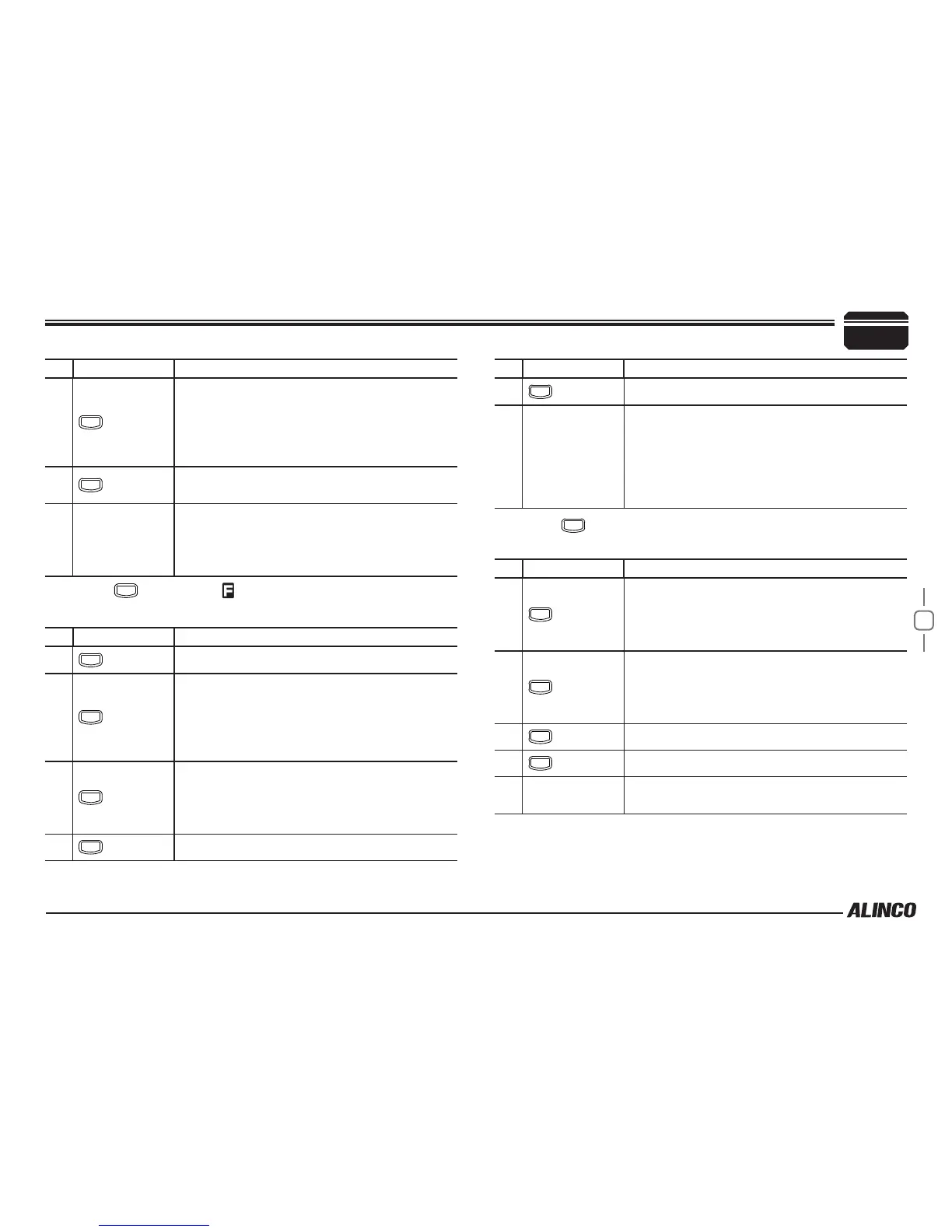
NO. KEY FUNCTION
4
FUNC
• In VFO mode/memory mode
Press and hold for 2 seconds to enter
parameter setting mode.
• In channel display mode
Operation is invalid.
8
SQL
Press and hold for 1 second to activate the
monitoring function. Press again to stop.
9 Dial
• In VFO mode
Starts MHz scan.
• In memory mode/channel display mode
Starts group scan.
Press
FUNC
key until icon appears then press the
following key.
NO. KEY FUNCTION
4
FUNC
Exits from the function mode.
5
V/M
• In VFO mode
Stores a frequency on a memory channel.
• In memory mode/channel display mode
Set a skip channel stored on a memory
channel.
6
TS/DCS
• In VFO mode/memory mode
Sets the operation lock function.
• In channel display mode
Exits from function mode.
7
CALL
Sets transmission output.
NO. KEY FUNCTION
8
SQL
Sets the reverse function.
9 Dial
• In VFO mode/memory mode
Rotate to select a channel.
Press to set the shift function.
• In channel display mode
Rotate to exit from function mode.
Press to set the shift function.
Press
FUNC
key and following key together to activate
following function:
NO. KEY FUNCTION
5
V/M
• In VFO mode/channel display mode
Operation is invalid.
• In memory mode
Deletes a memory channel.
6
TS/DCS
• In VFO mode/memory mode
Sets the automatic dialer.
• In channel display mode
Operation is invalid.
7
CALL
Enters clone function mode. (Turn off to exit.)
8
SQL
Switches to power supply voltage display mode.
9 Dial
Pressing switches to the 2Tone setting.
(Pre-setting required)
3
Getting Acquainted


 To Next Page