Publication 1756-UM001G-EN-P - January 2007
58 Place, Configure, and Monitor I/O Modules
Configure Distributed I/O on
a ControlNet Network
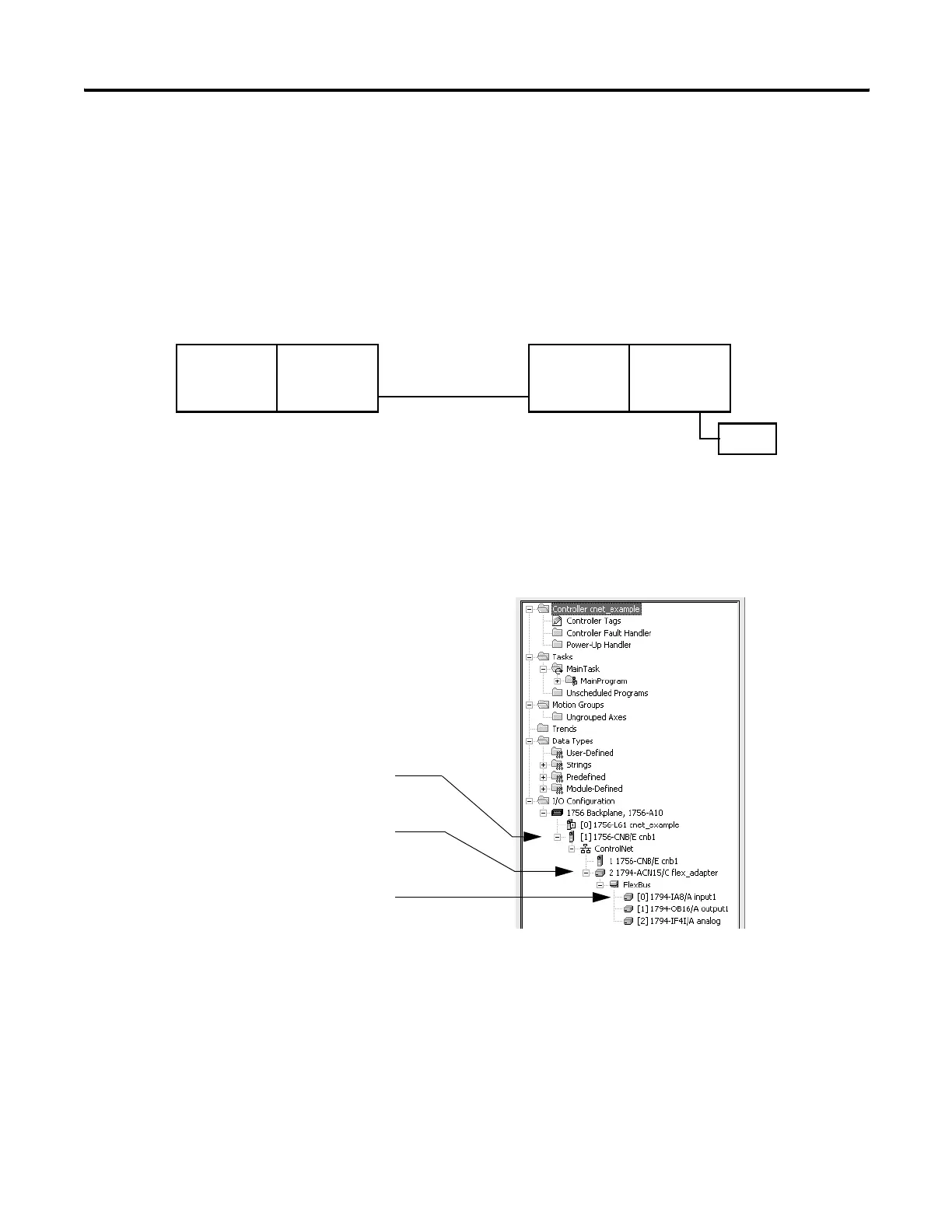
To communicate with the I/O modules over a ControlNet network,
add a ControlNet bridge, ControlNet adapter, and I/O modules to the
I/O Configuration folder of the controller.
Within the I/O Configuration folder, organize the modules into a
hierarchy of tree/branch and parent/child.
Configuring I/O on a ControlNet Network
Additional Resources
For additional information, consult ControlNet Modules in Logix5000
Control Systems User Manual, publication CNET-UM001.
Local
Communication
Module
Device
…you build the I/O configuration in this order
For a typical distributed I/O network…
Controller
I/O
Module
Remote
Adapter
1.Add the local communication module
(bridge).
2.Add the remote adapter for the
distributed I/O chassis or DIN rail.
3.Add the I/O module.



 To Next Page
 Loading...