COPYR IG H T
200 9-2010
ALL O.CO M
-
VISIT
US
ONLIN E
AT
W W W. ALLO.C O M
18
3.4.1 Configuring a Queue
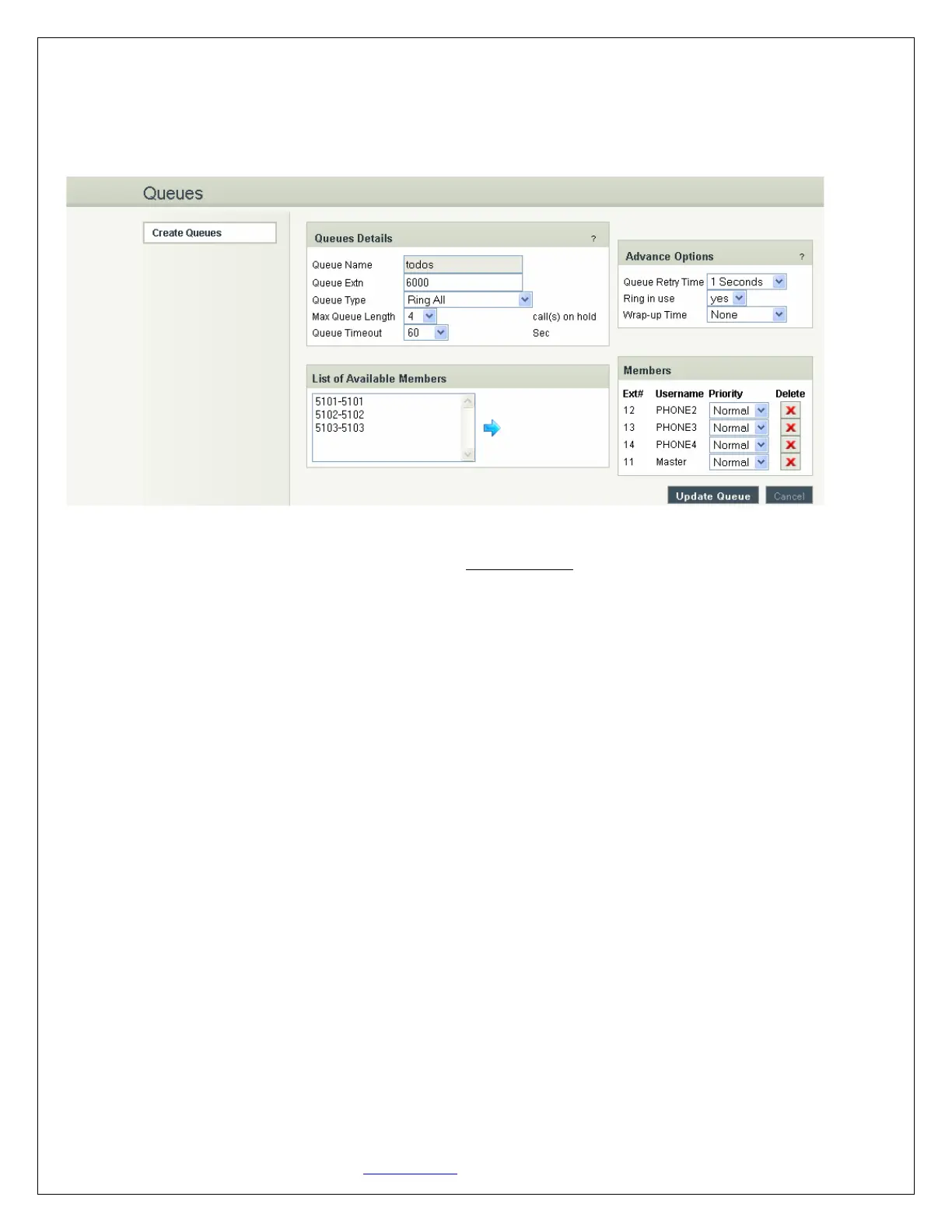
Navigation: CREATE > Queues > Create Queue: This is where you setup your Queues.
To create a Queue, simply fill in all the required details including Queue Name, Type, Max Queue Length,
and select the other options. When done, click the Create Queue button.
Queue Details
1. Queue Name: The name of the Queue
2. Queue Extn: Extension number to reach the Queue directly
3. Queue Type:
a. Ring All: Rings all available extensions
b. Round Robin: Takes turns ringing each available extension
c. Least Recent: Rings the extension which was least recently called by this queue
d. Fewest Calls: Rings the extension with fewest complete calls from
this queue
e. Random: Rings a random extension
f. Round Robin Memory: Performs a Round Robin remembering where we left off with the
last ring pass
4. Max Queue Length: The maximum number of callers waiting in queue for an available extension.
5. Queue Timeout: Select the required seconds so that the queue will get terminated after the given
seconds
Advanced Options
1. Queue retry Time: This is the time delay to ring the queue members again after queue timeout
2. Ring in use: Set this to no if you want the queue to avoid sending calls to members who are on
phone (in use state)
3. Wrap-Up Time: After a call is finished, the time it takes an extension to become available again to
become available in the queue


 To Next Page