COPYR IG H T
200 9-2010
ALL O.CO M
-
VISIT
US
ONLIN E
AT
W W W. ALLO.C O M
23
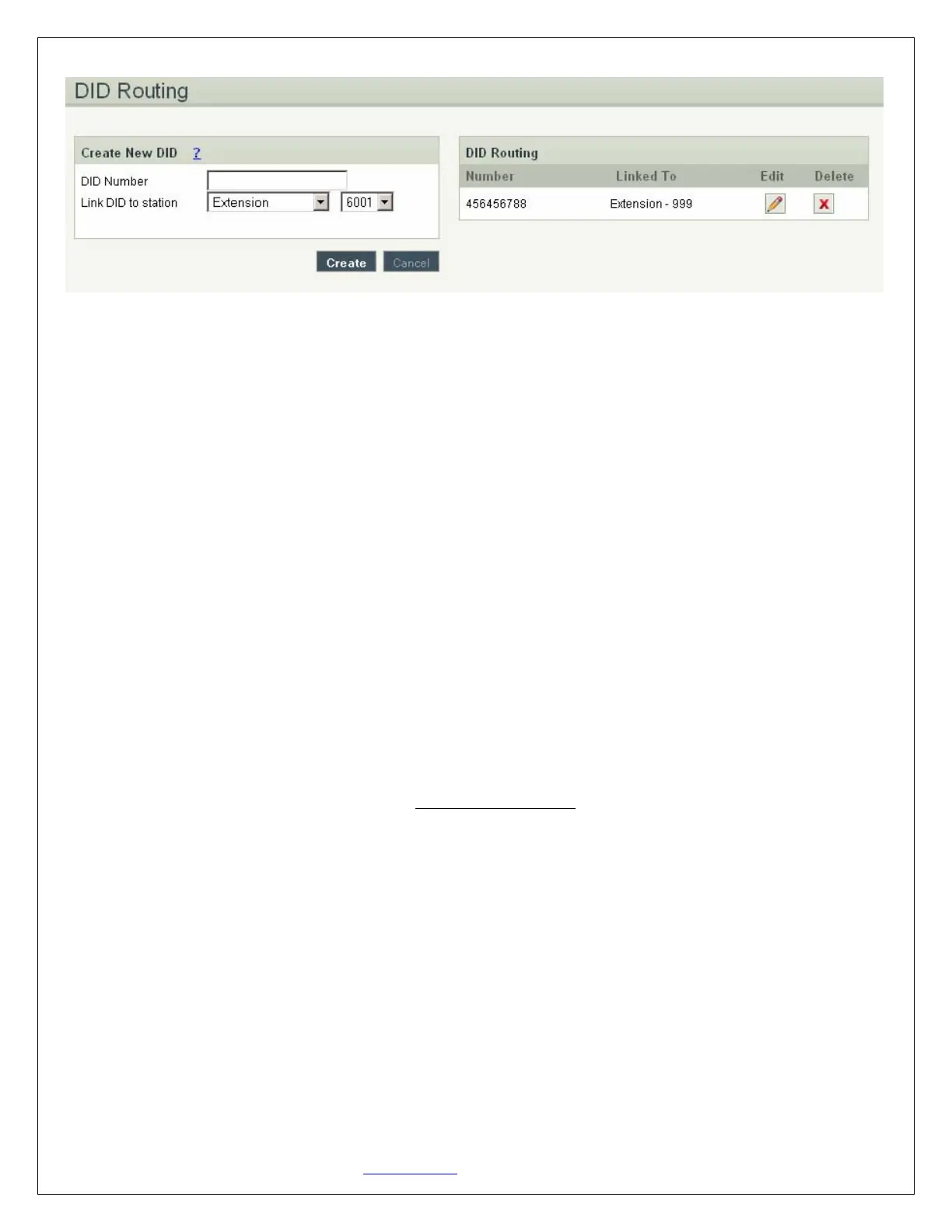
DID Routing Details
1. DID Number: a virtual number associated with your VoIP service
2. Link DID to station: when selected to any Extension/Queue/IVR/Voicemail Group, all incoming
calls through this DID are going to be redirected to the selected station
4.3 VoIP Settings
Navigation: SETTINGS > VoIP Settings: This is where you setup VoIP Account(s), or manage existing
ones
4.3.1 Adding a New VoIP Account:
In this page, fill in the Account Name, Username, Password and Proxy information given to you by your
VoIP provider (known as SIP Credentials). You will also need to configure the Dial Settings for that
account (allowing you to route the incoming calls to a particular destination, i.e.: IVR or IVR Schedule).
Apply any Codec Settings required. You can prioritize your active codec’s by using the up and down
buttons.
After you have entered the details, click the Create VoIP Account button at the bottom.


 To Next Page