COPYR IG H T
200 9-2010
ALL O.CO M
-
VISIT
US
ONLIN E
AT
W W W. ALLO.C O M
26
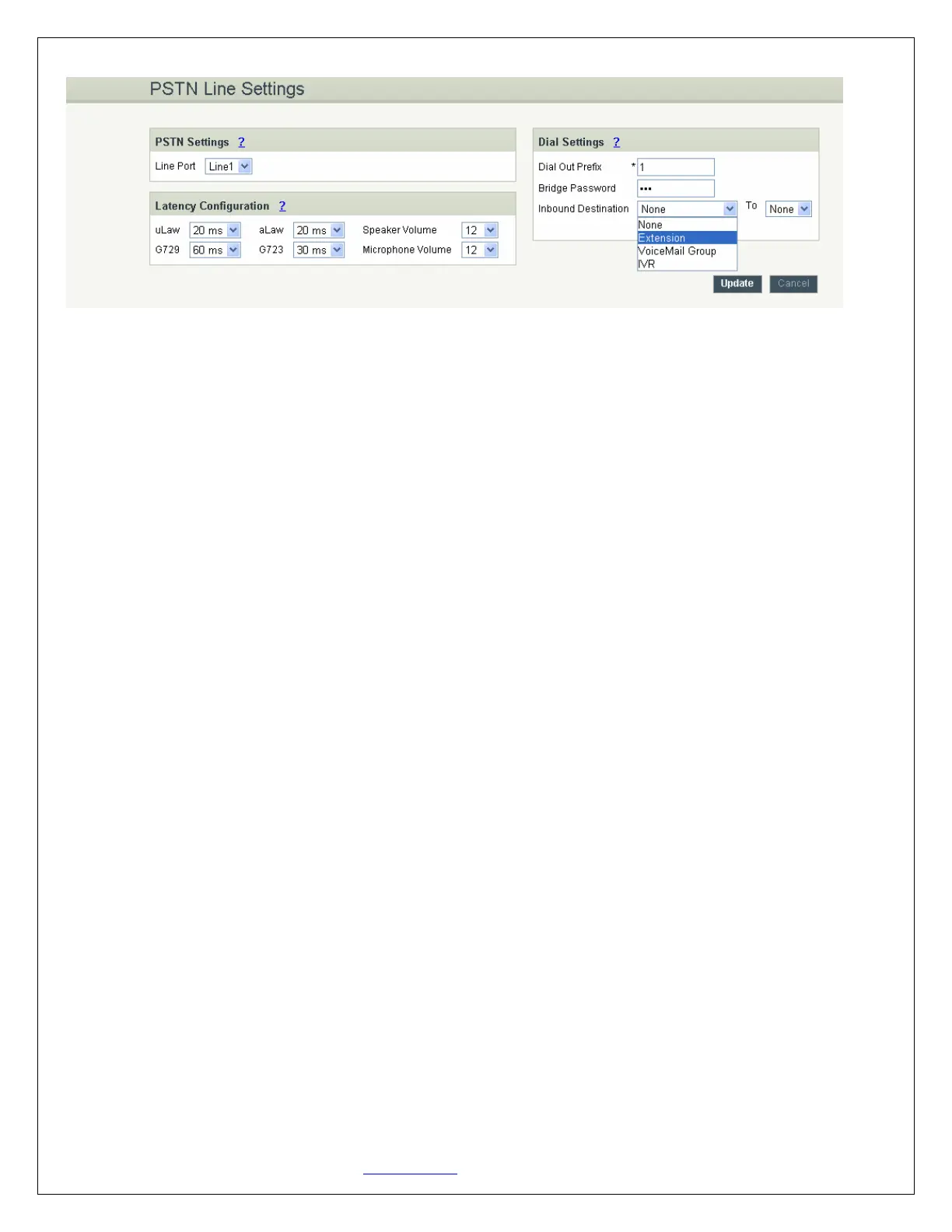
PSTN Line Settings Details
1. PSTN Settings: This field allows you to select the particular line
2. Latency Configuration: This will allow you to configure the Jitter Buffer values
3. Dial Settings:
a. Dial out Prefix: A numeric identifier value to cease the line.
b. Bridge Password: This password is required to bridge the VoIP / IP calls to PSTN
c. Inbound Destination: This feature allows you to route incoming calls to a particular destination
i.e. IVR or extension or queues available from the drop down box.
Once the settings for the PSTN line were made click on the update button and then click on the apply
changes button to save the changes made.
4.5 DialOut Rules
What are DialOut Rules?
DialOut Rules represent the prefix sequence used to dial when making an outgoing call either through
PSTN or VoIP.
It is prefix used to configure to enable system to judge outgoing call via FXO or VOIP and also used to
select a Least cost Routing provider. This will allow user to configure add/delete of rule.
There are two ways to make outgoing calls for the registered extension users:
=> VoIP / SIP trunk via ITSP gateway
=> LINE / PSTN trunk via FXO port
4.5.1 Configuring Dial Out
Navigation: SETTINGS > DialOut Rules: This is where you configure DialOut Rules.


 To Next Page