COPYR IG H T
200 9-2010
ALL O.CO M
-
VISIT
US
ONLIN E
AT
W W W. ALLO.C O M
19
List of Available Members
This is the list of available extensions that could be part of this queue
Members
1. Ext#: Refers to the Extension number of the user
2. Username: This is the name of the user
3. Priority: The frequency a member is sought out to answer the incoming call
3.5 Voicemail Group
What is a Voicemail Group?
A Voicemail Group is a pre-programmed group of voicemail recipients. All the members of this group will
receive the same voicemail message.
3.5.1 Configuring a Voicemail Group
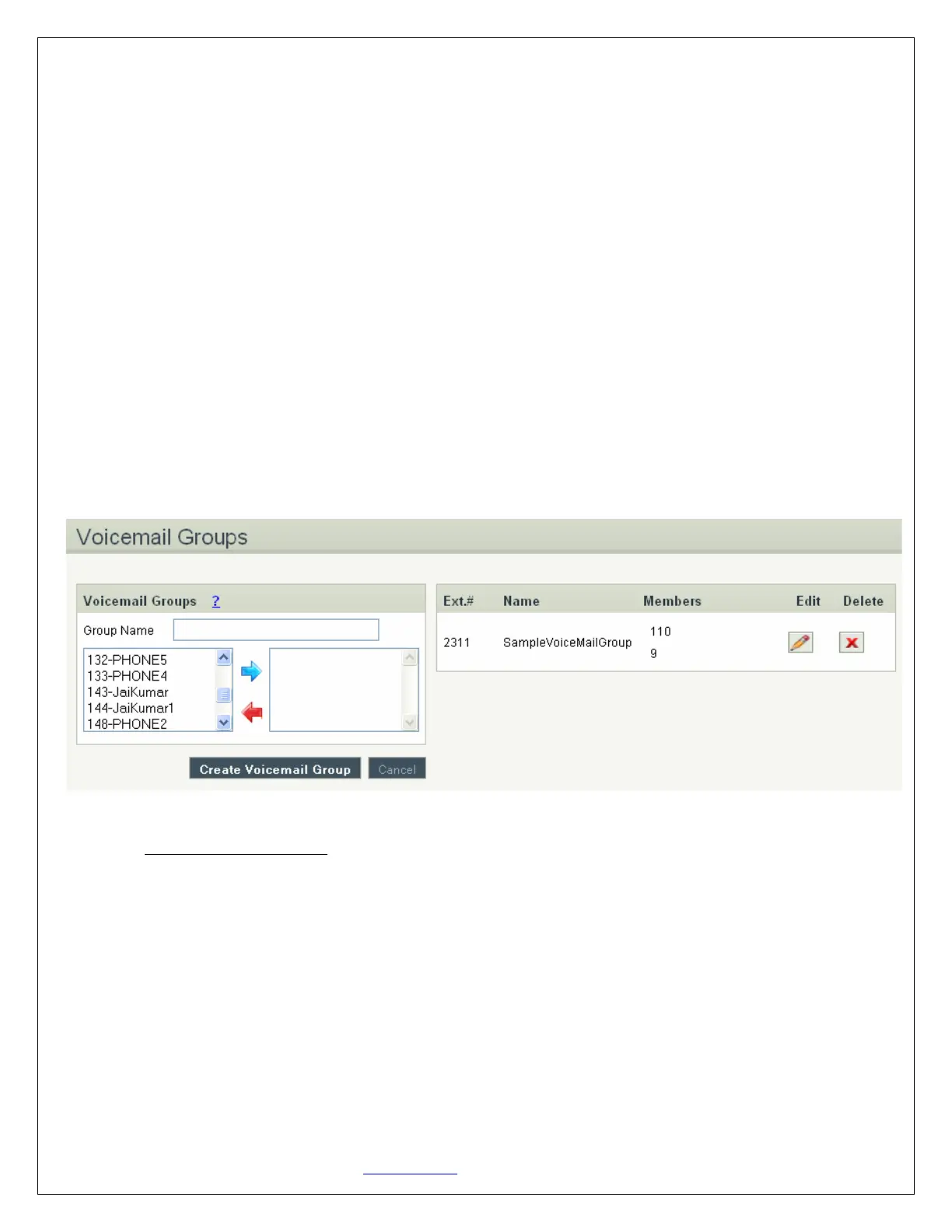
Navigation: CREATE > Voicemail Group: This is where you setup your Voicemail Groups
To create a Voicemail Group, select a Group Name, choose the users who will belong to that Group, and
press the Create Voicemail Group button.
On the right-hand side of the screen, you can see all existing groups, which are assigned Extension #.
You can also edit or delete groups.
Voicemail Group Details
1. Group Name: the name of the Voicemail Group
2. Available Members: the list of available extensions that could be part of this Voicemail Group
3. Members in Group: the list of extensions that belong to this Voicemail Group


 To Next Page