COPYR IG H T
200 9-2010
ALL O.CO M
-
VISIT
US
ONLIN E
AT
W W W. ALLO.C O M
27
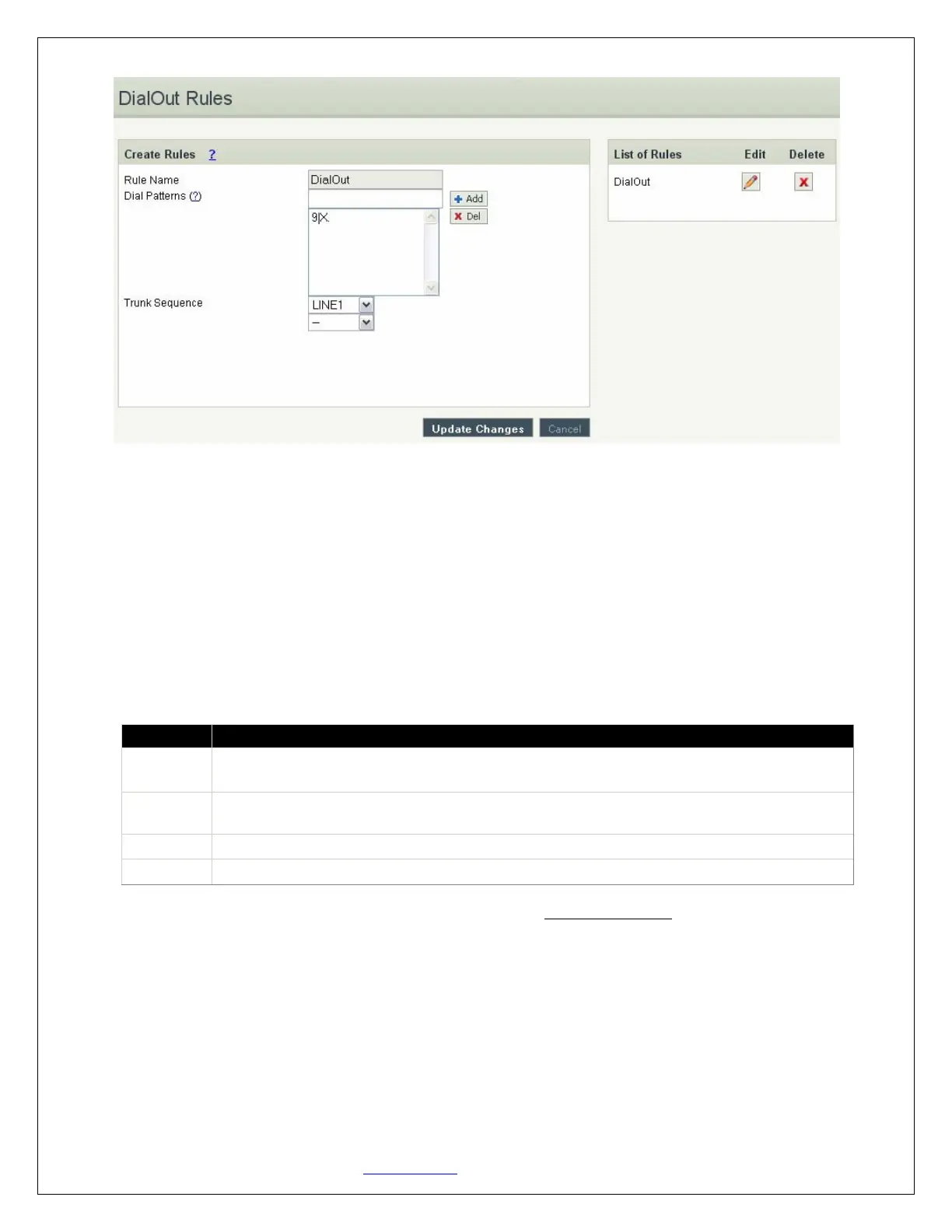
DialOut Rules Details
Please go through the Dial Pattern section to know about how to choose outgoing trunks.
1. Rule Name: Provide proper rule name
2. Trunk Sequence: Outgoing calls go through these sequences. If it fails, it will go through the next
selected sequence, and so on
3. Dial Pattern: A unique set of digits that will select this trunk. Enter one dial pattern per line.
A pattern consists of digits 0-9, digit set [digits], and wildcard characters like "." and "X". Below
table explains digit set and wildcard characters.
Expression Description
[digits]
Match any single digit listed explicitly. E.g., digit set [13579] match odd digits.
One may use
. (dot)
Is a wildcard, match any digit in any length i.e. one or more digits. Usually given
in the end
X Match any single digit from 0 to 9.
| Is a wildcard, matches any digit i.e. zero or more digits
When you have finished adding your DialOut Rules, click the Update Changes button.
Here we will discuss about how to choose outgoing trunks in two different ways.
The First way is, choose a provider or a trunk based on prefix.
This type of rule will allow user to create a prefix for choosing SIP (VoIP) or LINE (PSTN / FXO) trunk to
make an outgoing call.
For e.g. adding '01|X.' in the Dial Pattern and selected a VoIP Provider1 in Trunk Sequence, will allow
user to dial 014567807890 numbers, so that 01 will be stripped off from the dialed digits and only
4567807890 are dialed through VoIP Provider1. (Where as a VoIP Provider1 is an account which is


 To Next Page