COPYR IG H T
200 9-2010
ALL O.CO M
-
VISIT
US
ONLIN E
AT
W W W. ALLO.C O M
34
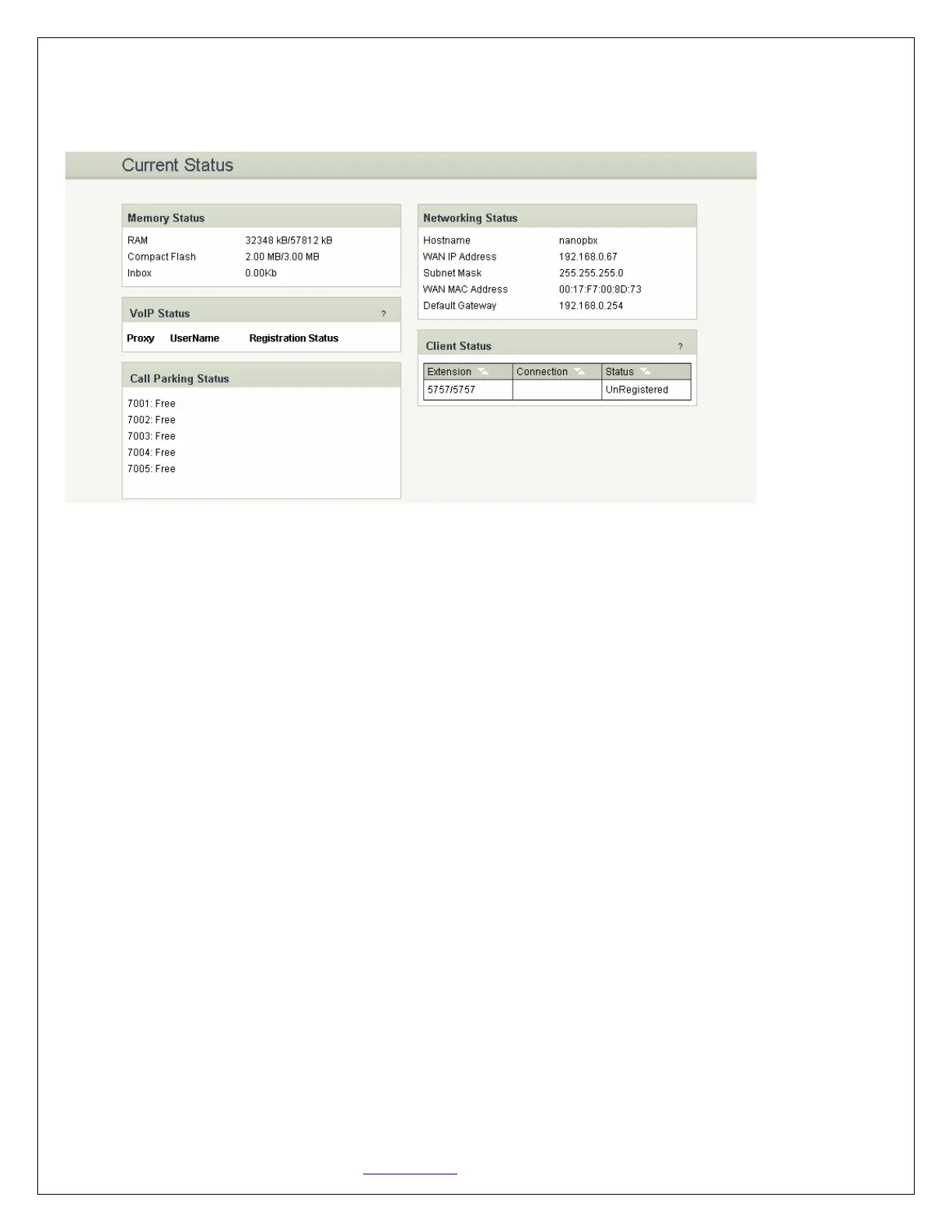
Status, VoIP Status, Networking Status and Client Status (to see which clients are connected to the
system).
• Under “Memory Status” you will see total memory resources, including RAM usage, Compact Flash
usage (to store voice files and voicemail) and Inbox status (for voicemail inbox).
• Under “VoIP Status” you will see the Registration Status of the VoIP Account(s) configured. If it
displays “Available” then it is successfully configured and connected. If there is a problem, refer
back to section Settings > VoIP Settings.
• Under “Call Parking Status” you will see all Parking Extensions available or unavailable.
• Under “Netwok Status” you will have a summary of your Network information, such as Hostname,
WAN IP Address, Subnet Mask, WAN MAC Address and Default Gateway (you may refer to Settings
> Network Settings for more info).
• Under “Client Status” you will see all the users and the extensions connected to the NanoPBX. Also
you can sort out the extension by clicking in the extension.


 To Next Page