MTX-30F Push Installation & Operation Guide Page 8
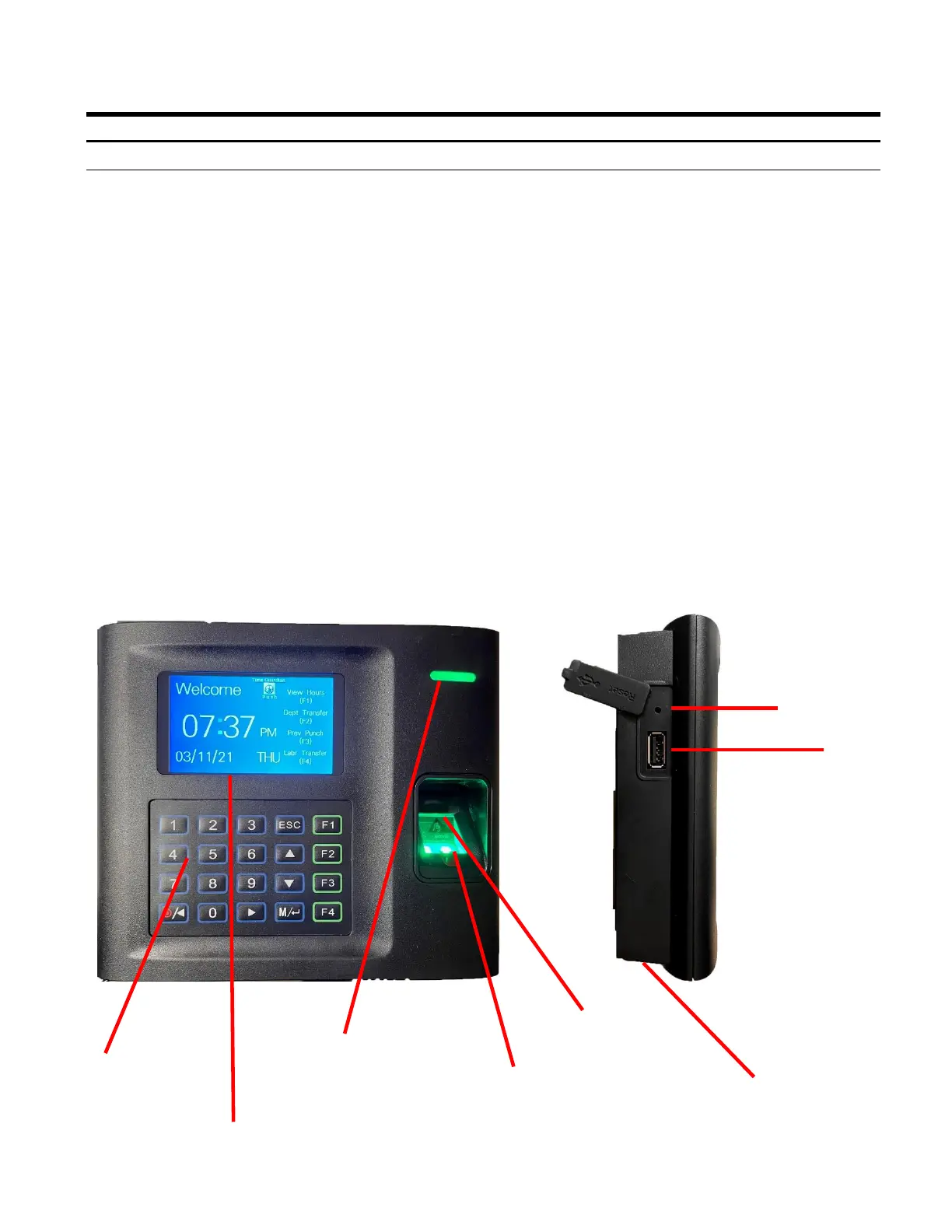
The front panel of the MTX-30F Push terminal contains the following controls:
• LED Indicator: During normal standby operation (power on), the Green LED will flash
once per second. When a user successfully verifies the Green LED will stay solid for
three seconds. If a user fails to verify, the Red LED will stay on for three seconds.
Note: If the fingerprint reader does not follow the standard LED operational parameters,
please consult support.
• Speaker: Provides audible voice verification of operations, i.e., "Thank you", "Incorrect
Password", "Access Denied", "Invalid Id", "Please try again", etc.
• TFT Display Screen: Displays time, date, day, and operational information.
• Fingerprint Sensor: Enrolls (creates) template and verifies fingerprint.
• Proximity Senor: Proximity card must be presented approximately 1 inch in front of the
reader to punch.
• Keypad: Used to input User ID, password, and perform menu operations.
• USB Port: Insert USB to download software, copy over passwords, etc.
• Reset Button: Clear all current settings and go back to all factory default settings.
Front View Side View
USB Port
Reset Button
TFT Display Screen
Fingerprint
Sensor
LED Indicator
Keypad
Speaker
Understanding the MTX-30F Push Terminal Front Panel
Front/Side Panel Features
Proximity Card
Sensor



 To Next Page