Putting into operation
29
DB 534 02. 02
7.2 Setting the mounting height
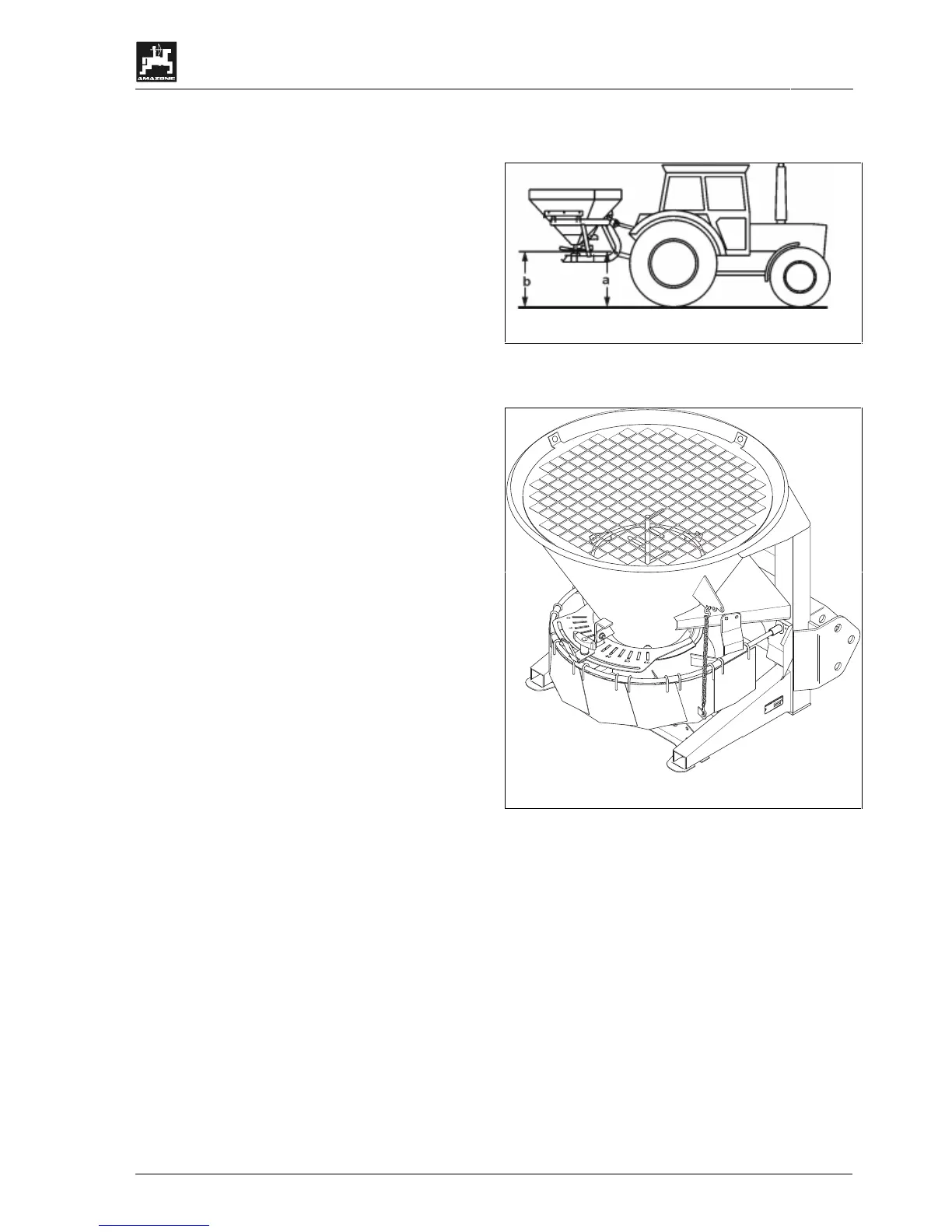
Set the mounting height of the spreader with filled
hopper on to 60 cm (up to 4 m working width)..
Measure on the spreading disc front side -
(a = 60) and rear side (b = 60) from ground
surface.
7.3 Setting the working width
Working widths of between 1 m and 6 m can be set,
depending on the kind of spreading material. For this
the multiple spreading width reducer (1) is adjusted
via the chain suspension (2) according to experience
values.
I
No accurate spread pattern will be
achieved with damaged or bent
spreading width reducer elements.
Please also refer to para. 7.4 "Swivelling the spread
fan".
D
49205
H
asb
ergen
-
zul.Nutzl.:
Typ:
M
a
s
c
h
.
N
r.:
7.3.1 Checking the spreading width
Check the set working width with the aid of
• a yard stick or
• by sight.
If the actual and the required working width do not
coincide, re-adjust the selected working width setting.
Correction of working width setting:
1. Increasing the working width
- Lift the spread width reducer by shortening the
chain.
- Increase the drive speed of the spreading discs
depending on the spreading material.
-
2. Reducing the working width
- Lower the working width reducer by extending
the chain.
- Reduce the drive speed of the spreading discs
depending on the spreading material.





 To Next Page