EasyManua.ls Logo

Amiga A4000 - Rear Panel; Connecting the Basic Equipment; Attaching the Keyboard

Default Icon
113 pages
Print Icon
To Next Page IconTo Next Page
To Previous Page IconTo Previous Page
Loading...
1-4
Rear Panel
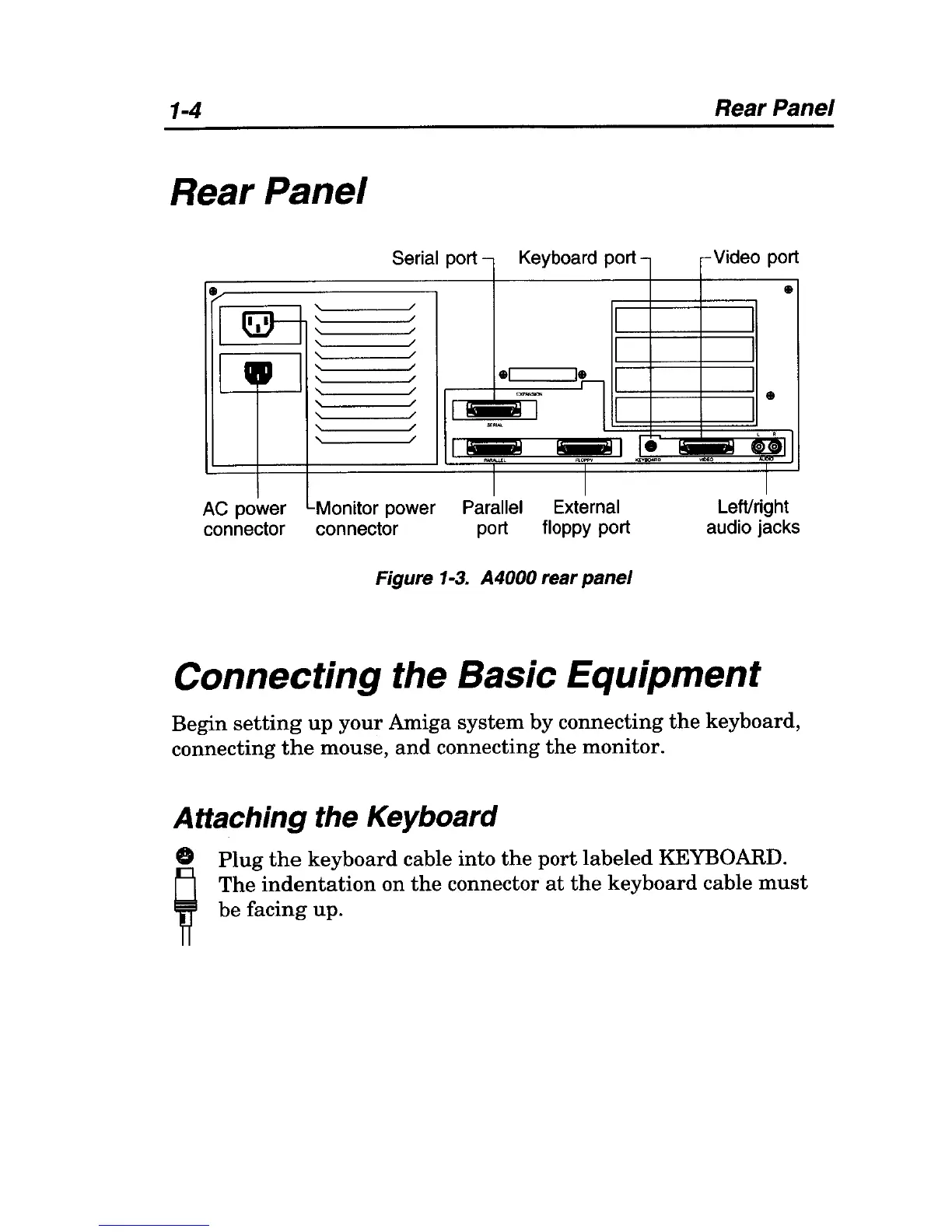
Serial port
-
Keyboard port
-
I
~
,
/
,
/
,
/
,
/
I I
,
/
..-
,
/
,
/
-I
1
,
/
EXPN<SOON
"
/
,
/
I~I
"
/
."~
"
/
I
I&Ii!!l
!
"~
! I
~,
1 1
AC
power Momtor power Parallel External
connector connector port floppy port
Figure
1-3.
A4000 rear panel
le
Rear Panel
c-
Video port
-
-
~ull
.1
LeWnght
audio jacks
Connecting the Basic Equipment
Begin
setting
up
your
Amiga system
by
connecting
the
keyboard,
connecting
the
mouse,
and
connecting
the
monitor.
Attaching the Keyboard
o
Plug
the
keyboard
cable into
the
port
labeled
KEYBOARD.
El
The
indentation
on
the
connector
at
the
keyboard
cable
must
11
be facing up.

Table of Contents

Related product manuals