ChapterS
Installing Expansion
Boards
This
chapter
explains installation
of
expansion boards
in
the
slots
on
the
A4000 daughterboard.
The Daughterboard
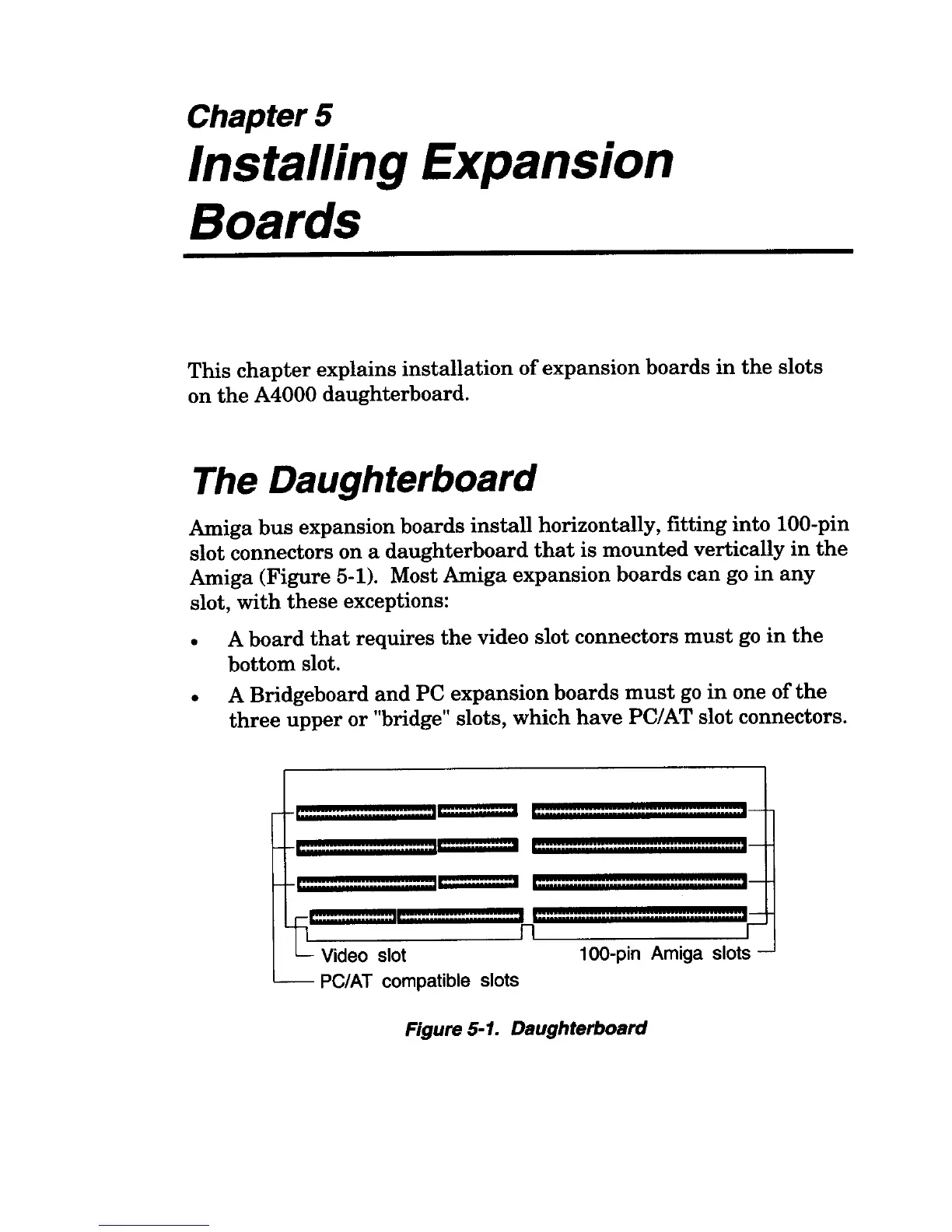
Amiga
bus
expansion boards
install
horizontally, fitting into lOO-pin
slot connectors on a daughterboard
that
is
mounted
vertically
in
the
Amiga (Figure 5-1). Most Amiga expansion boards
can
go
in
any
slot,
with
these exceptions:
• A
board
that
requires
the
video slot connectors
must
go
in
the
bottom slot.
• A Bridgeboard
and
PC expansion boards
must
go
in
one
of
the
three
upper
or
"bridge" slots, which
have
PC/AT slot connectors.
[:::::::::::::::::::::::::::::::::'C:::::::::::::::::'
1:::::::::::::::::::::::::::::::::":::::::::::::::::1
e::::::::::::::::::::::::::::::::,«:::::::::::::::::>
'::::::::::::::::=:::][::::::::::::::::::::::::::::=1
llL nL-______________
~r
L Video slot 100-pin Amiga slots -
'--
PC/AT
compatible slots
Figure 5-1. Daughterboard


 To Next Page