EasyManua.ls Logo

Amiga A4000 - MOUSE Ports; Connector 1: Mouse

Default Icon
113 pages
Print Icon
To Next Page IconTo Next Page
To Previous Page IconTo Previous Page
Loading...
MOUSE
Ports
8-9
MOUSE Ports
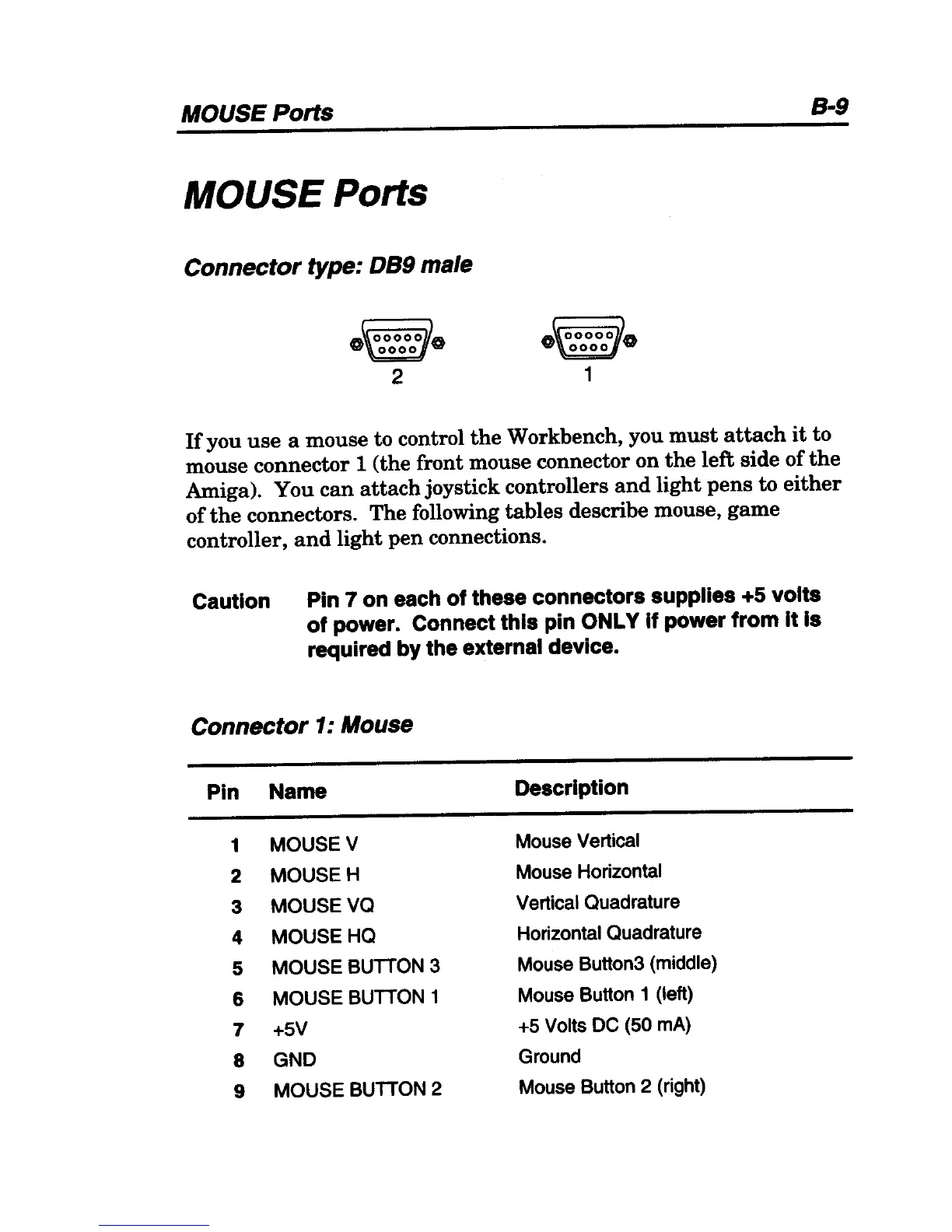
Connector type: DS9 male
2 1
If
you
use
a mouse to control
the
Workbench, you
must
attach
it
to
mouse
connector
1 (the front mouse connector
on
the
left
side
of
the
Amiga). You
can
attach
joystick controllers
and
light
pens
to
either
of
the
connectors.
The
following
tables
describe mouse,
game
controller,
and
light
pen
connections.
Caution Pin 7
on
each of these connectors supplies +5 volts
of power. Connect this pin ONLY If power from It Is
required
by
the external device.
Connector
1:
Mouse
Pin Name
Description
1 MOUSE V
Mouse Vertical
2
MOUSEH
Mouse Horizontal
3
MOUSEVO
Vertical Ouadrature
4 MOUSE HO
Horizontal Ouadrature
5 MOUSE
BUnON
3
Mouse Button3 (middle)
6 MOUSE
BUnON
1
Mouse Button 1 (left)
7
+5V
+5 Volts DC (50 mAl
8
GND
Ground
9
MOUSE
BUnON
2
Mouse Button 2 (right)

Table of Contents