EasyManua.ls Logo

Amiga A4000 - SIMM Size Jumper; Chip Memory; Chip RAM Simms

Default Icon
113 pages
Print Icon
To Next Page IconTo Next Page
To Previous Page IconTo Previous Page
Loading...
Adding Memory
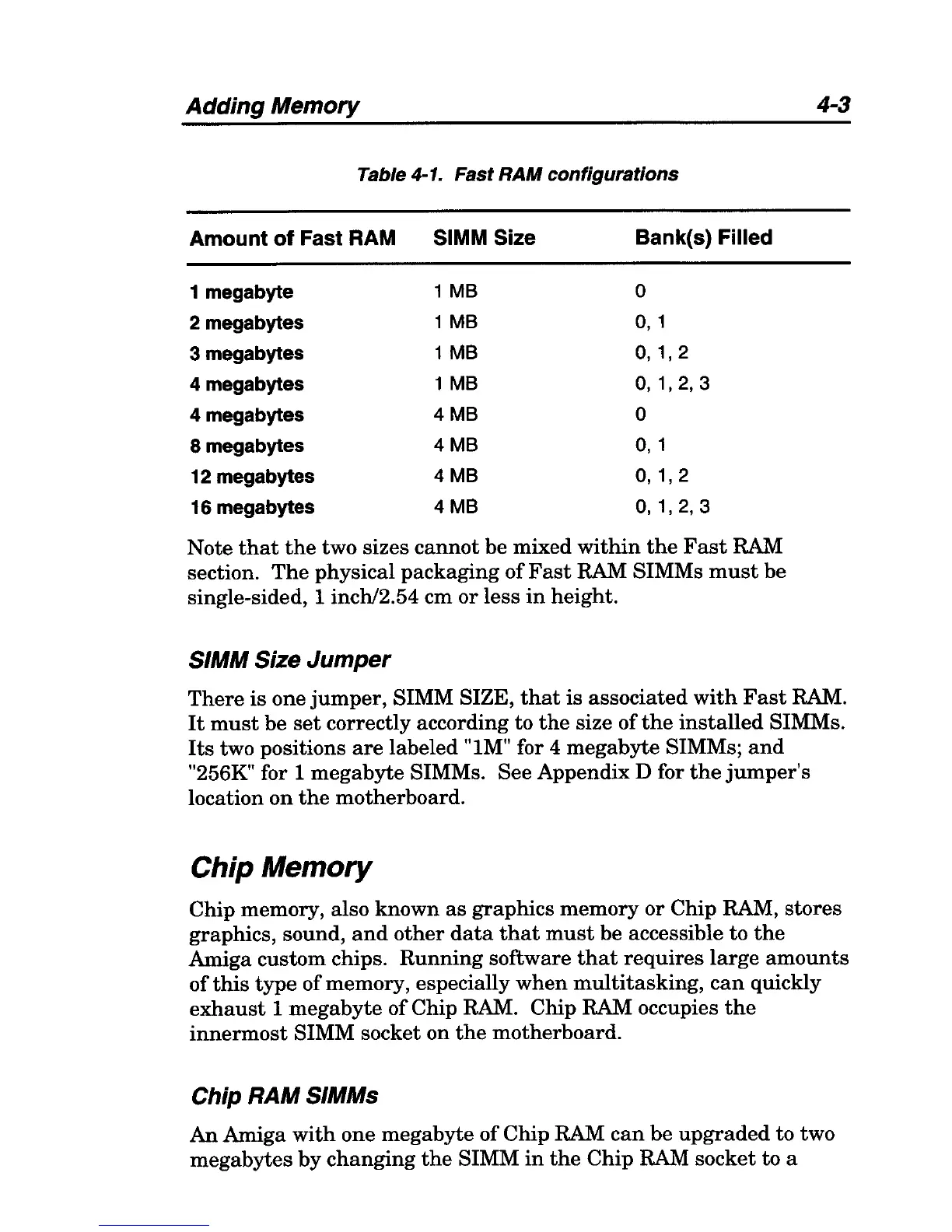
Table 4-1. Fast
RAM
configurations
Amount
of
Fast RAM
SIMM Size 8ank{s) Filled
1 megabyte
1
MB
°
2 megabytes
1
MB
0,
1
3 megabytes
1
MB
0,1,2
4 megabytes
1
MB
0,1,2,3
4 megabytes
4MB
°
8 megabytes
4MB
0,1
12 megabytes
4MB
0,1,2
16 megabytes
4MB
0,
1,2,3
Note
that
the
two sizes
cannot
be mixed
within
the
Fast
RAM
section.
The
physical packaging
of
Fast
RAM SIMMs
must
be
single-sided, 1 inchl2.54 cm or less
in
height.
SIMM Size Jumper
4-3
There
is
one
jumper,
SIMM SIZE,
that
is
associated
with
Fast
RAM.
It
must
be
set
correctly according to
the
size of
the
installed
SIMMs.
Its
two positions
are
labeled "lM" for 4 megabyte SIMMs;
and
"256K" for 1 megabyte SIMMs. See Appendix D for
the
jumper's
location
on
the
motherboard.
Chip Memory
Chip memory, also known
as
graphics
memory
or
Chip RAM,
stores
graphics, sound,
and
other
data
that
must
be accessible to
the
Amiga custom chips.
Running
software
that
requires
large
amounts
of
this
type
of memory, especially
when
multitasking,
can
quickly
exhaust
1
megabyte
of
Chip RAM. Chip RAM occupies
the
innermost
SIMM socket on
the
motherboard.
Chip RAM SIMMs
An
Amiga
with
one megabyte
of
Chip RAM
can
be
upgraded
to two
megabytes
by
changing
the
SIMM
in
the
Chip
RAM socket to a

Table of Contents