EasyManua.ls Logo

Amiga A4000 - Rear Bay Installation

Default Icon
113 pages
Print Icon
To Next Page IconTo Next Page
To Previous Page IconTo Previous Page
Loading...
6-6
Rear Bay Installation
, '
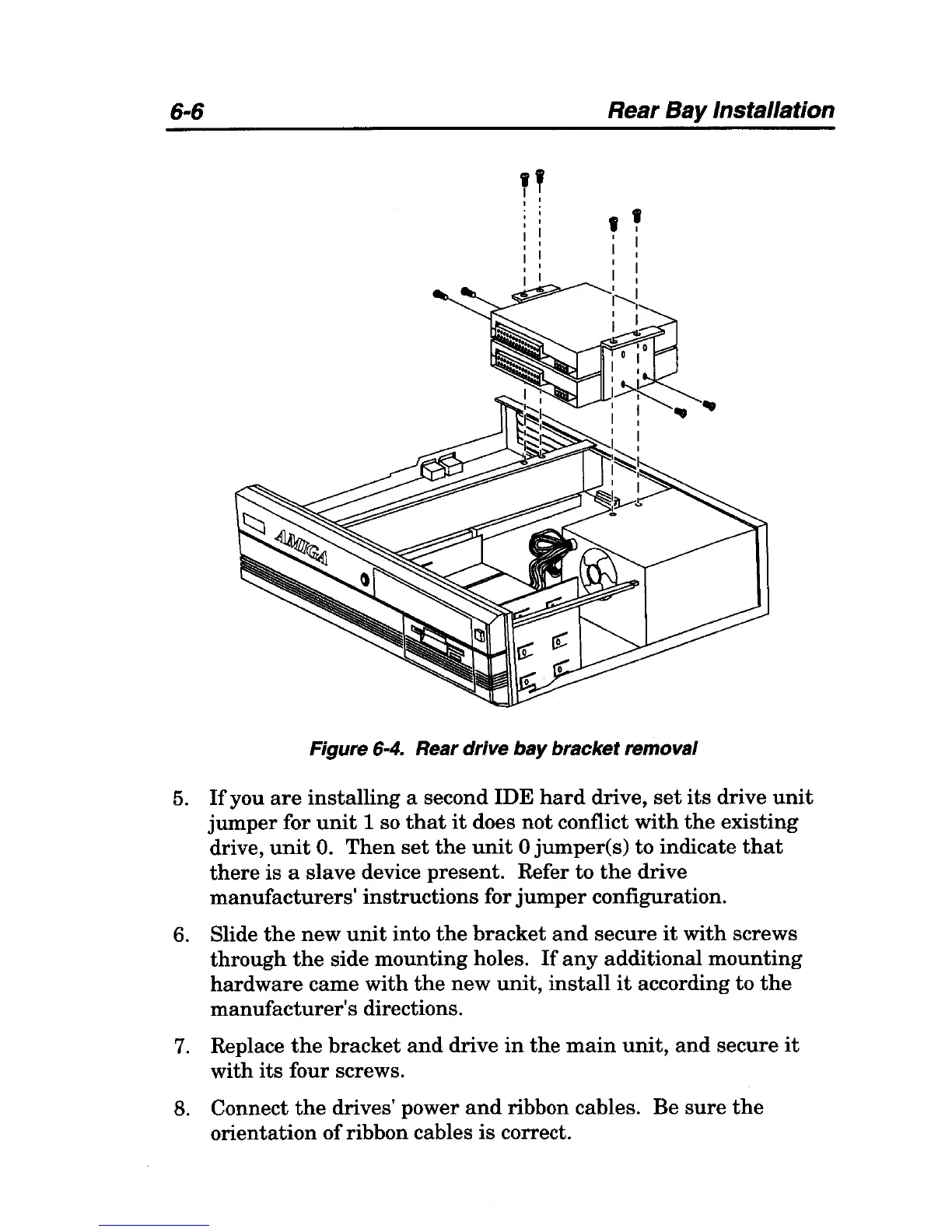
Figure 6-4. Rear drive
bay
bracket removal
5.
If
you
are
installing
a second IDE
hard
drive,
set
its
drive
unit
jumper
for
unit
1 so
that
it
does
not
conflict
with
the
existing
drive,
unit
O.
Then
set
the
unit
0 jumper(s) to indicate
that
there
is a slave device present. Refer to
the
drive
manufacturers'
instructions for
jumper
configuration.
6.
Slide
the
new
unit
into
the
bracket
and
secure
it
with
screws
through
the
side
mounting
holes.
If
any
additional
mounting
hardware
came
with
the
new
unit,
install
it
according to
the
manufacturer's
directions.
7.
Replace
the
bracket
and
drive
in
the
main
unit,
and
secure
it
with
its
four screws.
8. Connect
the
drives' power
and
ribbon cables. Be
sure
the
orientation
of
ribbon cables is correct.

Table of Contents