EasyManua.ls Logo

AMSTRAD cpc 6128 - Syntax Error

AMSTRAD cpc 6128
520 pages
Print Icon
To Next Page IconTo Next Page
To Previous Page IconTo Previous Page
Loading...
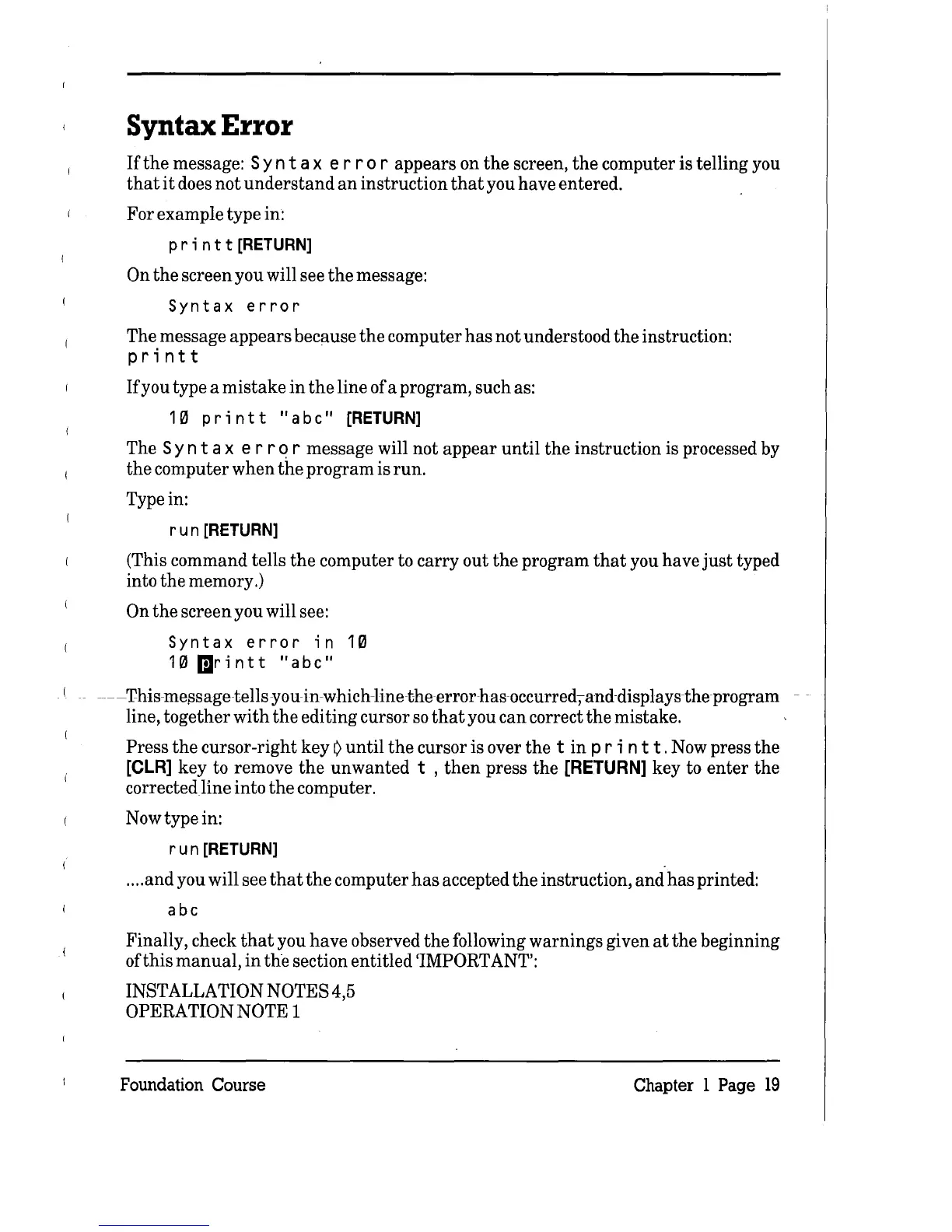
Syntax
Error
If
the
message: S y n t a x
err
0 r appears on
the
screen,
the
computer is telling you
that
it
does not
understand
an
instruction
that
you have entered.
For example type in:
pr
i n t t
[RETURN]
On
the
screen you will see
the
message:
Syntax
error
The message appears because
the
computer
has
not understood
the
instruction:
printt
If
you type a mistake
in
the
line of a program, such as:
1 0 p r i n t t
"a
be"
[RETURN]
The S y n t a x
err
q r message will not appear
until
the
instruction is processed by
the
computer when
the
program is run.
Type in:
run
[RETURN]
(This command tells
the
computer to carry out
the
program
that
you have
just
typed
into
the
memory.)
On
the
screen you will see:
Syntax
error
in
10
10
IDrintt
"abe"
---
'I'his-me~sagetellsyou
in-w hich-linethe error
has
occurred,
and
displays
the
program
--
line, together
with
the
editing cursor
so
that
you can correct
the
mistake.
Press
the
cursor-right key
~
until
the
cursor is over
the
t
in
pr
in
t
t.
Now press
the
[CLR]
key to remove
the
unwanted t ,
then
press
the
[RETURN]
key to
enter
the
corrected
line
into
the
computer.
Now type in:
run
[RETURN]
....
and
you will see
that
the
computer
has
accepted
the
instruction, and
has
printed:
abe
Finally, check
that
you have observed
the
following warnings given
at
the
beginning
ofthis
manual,
in
the
section entitled 'IMPORTANT':
INSTALLATION NOTES 4,5
OPERATION NOTE 1
Foundation Course
Chapter 1 Page
19

Table of Contents