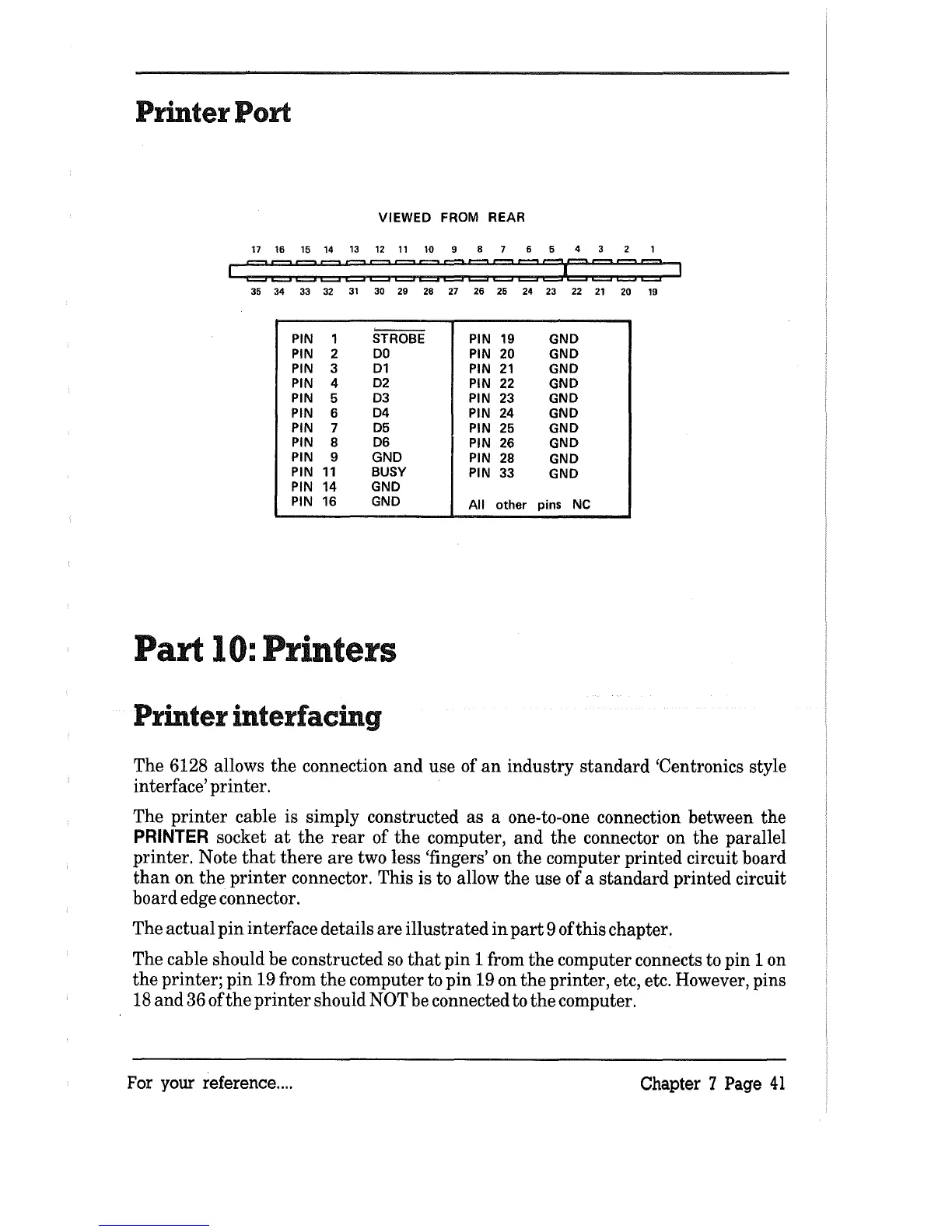
Printer Port
VIEWED
FROM
REAR
17 16 15 14
13 12
11
10 9 8 7 6 5 4 3
35
34
33 32
31
30 29 28 27
26
25 24 23 22
21
20
19
-'
--
PIN
1
STROBE
PIN
19
GND
PIN
2
DO
PIN
20 GND
PIN 3
D1
PIN
21
GND
PIN 4
D2
PIN
22
GND
PIN
5
D3
PIN
23
GND
PIN
6
D4
PIN
24
GND
PIN
7
D5
PIN
25
GND
PIN
8
D6
PIN
26
GND
PIN
9
GND
PIN
28
GND
PIN
11
BUSY
PIN
33
GND
PIN
14
GND
PIN
16
GND
All
other
pins Ne
Part
10:
Printers
Printer interfacing
The 6128 allows
the
connection and use of
an
industry standard 'Centronics style
interface' printer.
The
printer
cable is simply constructed as a one-to-one connection between the
PRINTER
socket
at
the
rear
of
the
computer, and
the
connector on the parallel
printer. Note
that
there
are two less 'fingers' on
the
computer printed circuit board
than
on
the
printer
connector. This is to allow
the
use of a standard printed circuit
board edge connector.
The actual pin interface details are illustrated
in
part
9 of this chapter.
The cable should be constructed
so
that
pin 1 from
the
computer connects to pin 1 on
the
printer; pin 19 from
the
computer to pin 19 on
the
printer, etc, etc. However, pins
18
and 36 of
the
printer
should NOT be connected to
the
computer.
For your reference
....
Chapter 7 Page
41



 To Next Page