EasyManua.ls Logo

AMSTRAD cpc 6128 - Default Settings; Paper;Pen;Mode;Ink Reference

AMSTRAD cpc 6128
520 pages
Print Icon
To Next Page IconTo Next Page
To Previous Page IconTo Previous Page
Loading...
So
it
is
with
the
computer.
Using
the
PEN
and
INK
commands, you can select
the
pen
number,
and
then
the
ink
colour for
that
pen.
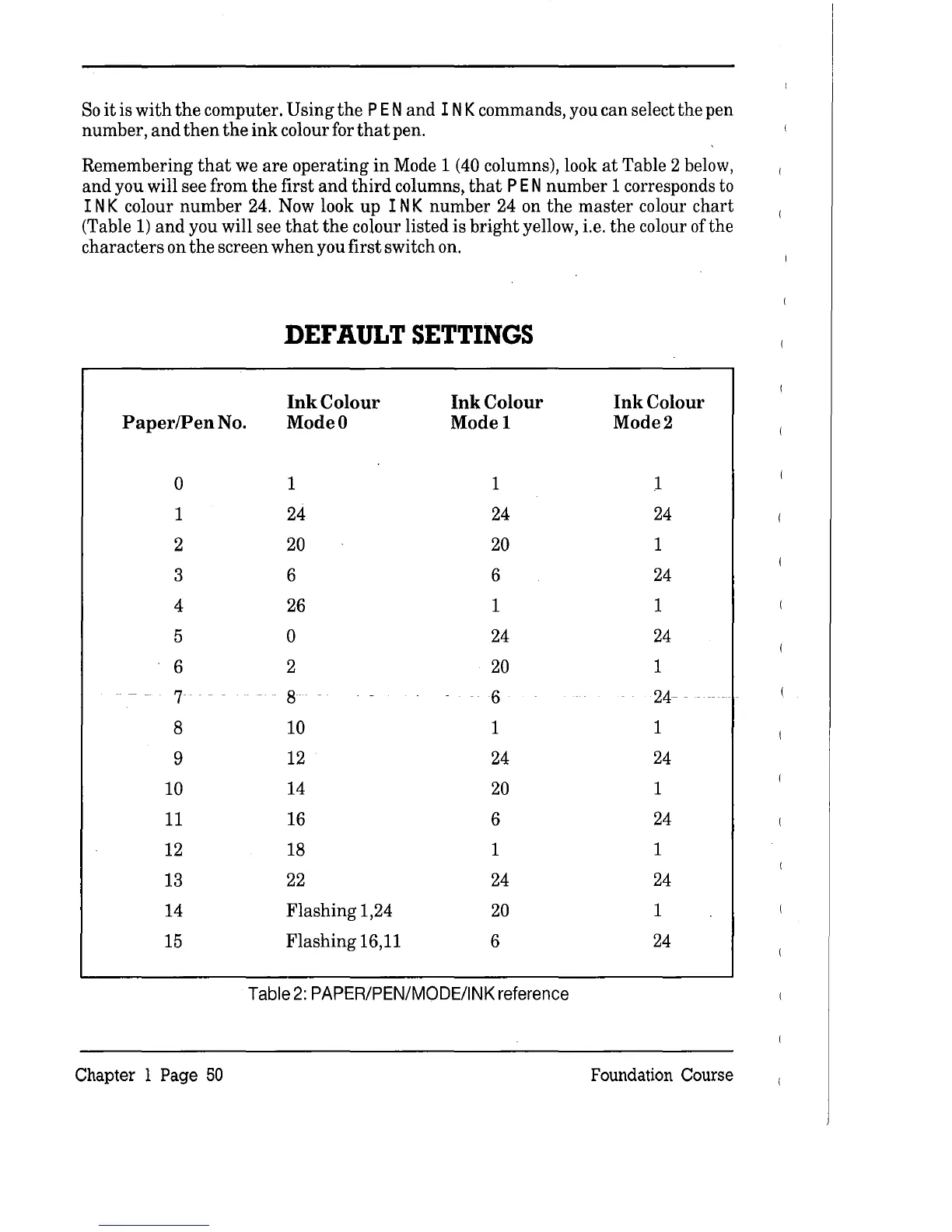
Remembering
that
we
are
operating
in
Mode 1 (40 columns), look
at
Table 2 below,
and
you will see from
the
first
and
third
columns,
that
PEN
number
1 corresponds to
INK
colour
number
24. Now look
up
INK
number
24 on
the
master
colour
chart
(Table
1)
and
you will see
that
the
colour listed is
bright
yellow, i.e.
the
colour of
the
characters
on
the
screen
when
you first switch on.
DEFAULT
SETTINGS
Ink
Colour
Ink
Colour
Ink
Colour
Paper/Pen No. Mode 0
Model
Mode2
0
1 1
1
1 24 24
24
2
20
20 1
3 6 6
24
4
26 1 1
5
0
24
24
6
2
20
1
7 8 6
24- - -
8
10 1
1
9
12 24
24
10
14
20
1
11
16
6
24
12
18 1
1
13
22
24
24
14
Flashing
1,24
20
1
15
Flashing
16,11
6
24
Table
2:
PAPER/PEN/MODE/INK
reference
Chapter 1 Page
50
Foundation Course

Table of Contents

Related product manuals