Axpert-Eazy AC Variable Frequency Drive
6-57
6
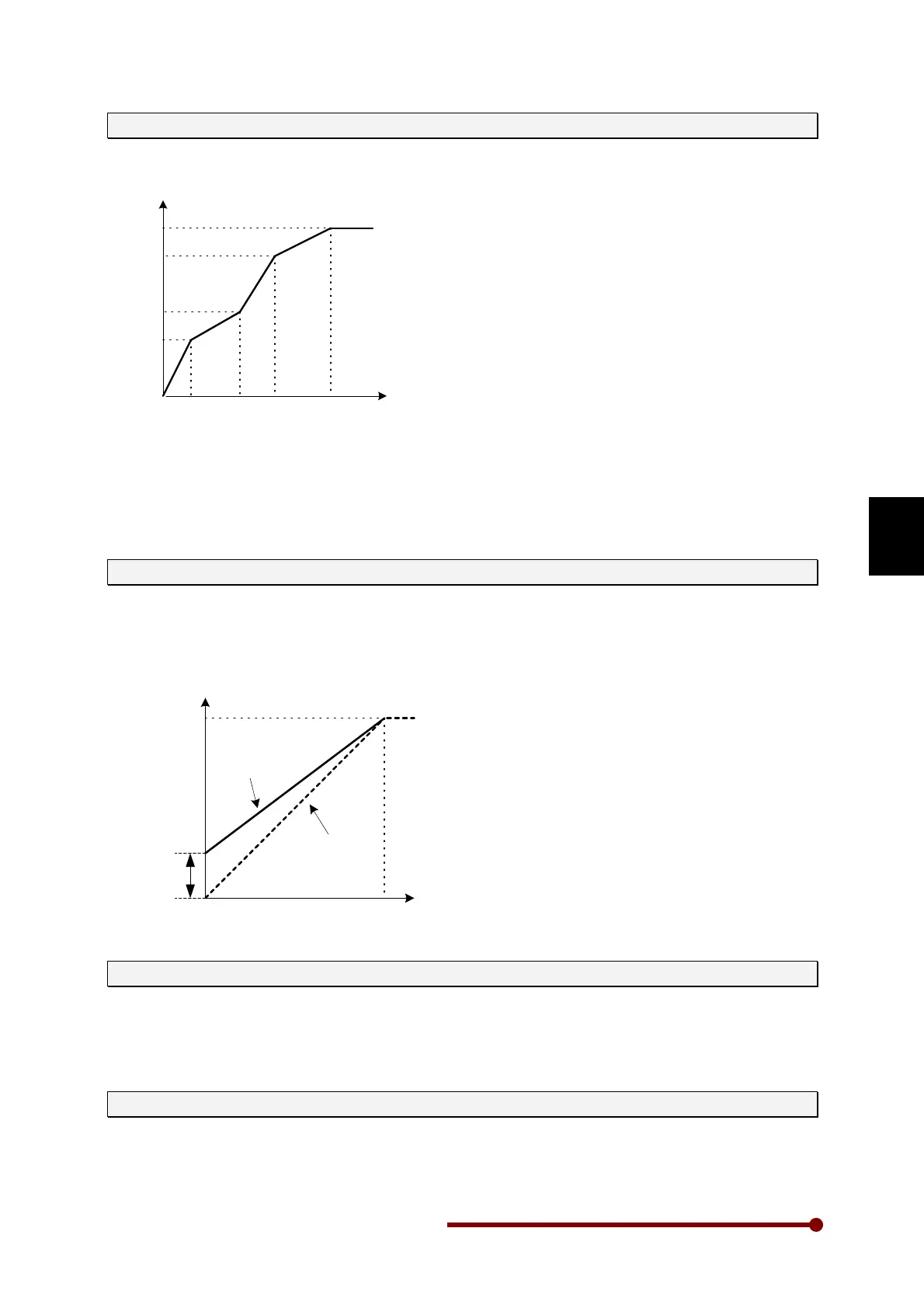
A408 ~ A410: V/F1 ~ 3 Voltage (%)
Custom three-point v/f characteristics as shown in the below figure can be set for the motors having
special v/f characteristics. Choose custom v/f curve in A402.
Vout
Fout
(A403)
(F3,V3)
(F2,V2)
(F1,V1)
(A407)(A406)(A405)
(A408)
(A409)
(A410)
(A404)
Set so that F1 (A405) ≤ F2 (A406) ≤ F3 (A407) and V1 (A408) ≤ V2 (A409) ≤ V3 (A410).
A405~A407 are percentage of A403 and A408~A410 are percentage of A404.
GROUP – 5: TORQUE BOOST
A501: Manual Torque Boost setting (%)
Set the boost voltage at 0Hz as a percentage in respect to the Motor voltage (B102), when setting
manually. When programmed to zero, it will be disabled.
When automatic torque boost is selected, manual torque boost setting will not be valid regardless of
the manual torque boost selection state. This is automatically adjusted by the automatic tuning.
Vout
Fout
Base frequency
(A403)
Base voltage
(A404)
Output voltage
with manual
torque boost
A501
Output voltage
with no torque
boost
A502: Automatic Torque Boost selection
When automatic torque boost is selected, manual torque boost setting will not be valid regardless of
the manual torque boost selection state.
The automatic torque boost function carries out voltage boosting using the current detection value.
This allows the torque to be improved when starting and at low speed regions.
A503: Slip Compensation (Hz)
Set motor’s rated slip. Set the slip frequency for the motor rated load in respect to the base frequency,
when setting manually. The output frequency changes according to the motor rated torque. The
output frequency will respond with a time constant of approximately 500msec in respect to the change
in the load torque.




 To Next Page