Axpert-Eazy AC Variable Frequency Drive
6-77
6
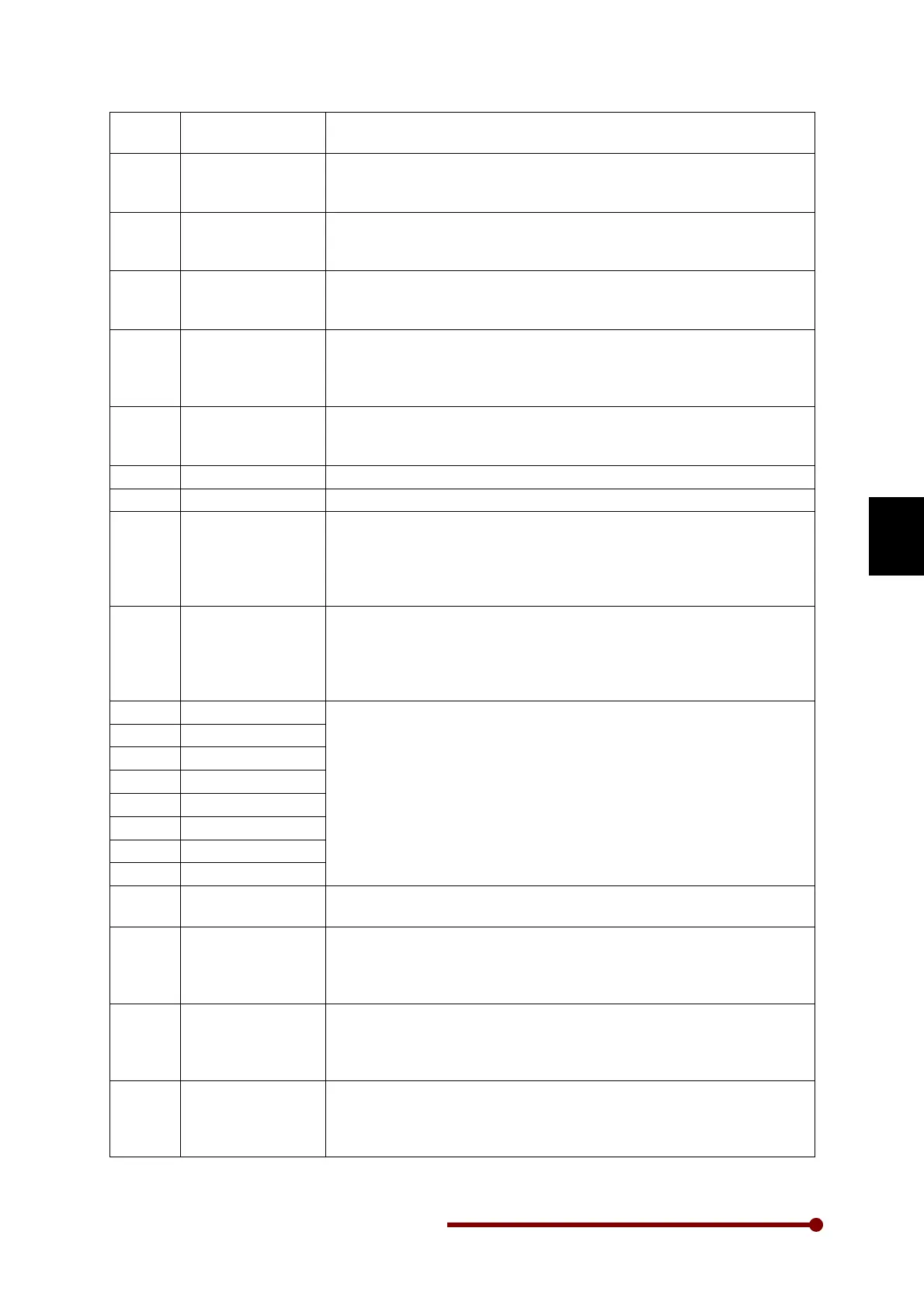
18 PR Step Hold When this input is selected, it will hold the present step during Patter
Run operation. Only applicable to Pattern Run function.
19 PR/RSF Reset
When this input is selected, it will reset the present Pattern Run
operation or Ring Spinning Frame Operation. Only applicable to
Pattern Run & Ring Spinning Frame functions.
20 PID Bypass
This is used to bypass the PID controller. When this input is selected,
the PID Reference input will be PID Output and there will not be any
effect of PID controller.
21 PID Disable This is used to disable the PID controller. When this input is s
the PID Output will remain to the last value and there will not be any
effect of PID Reference or PID Feedback on the PID Output.
22 Emergency stop
–
NC
This is used as emergency stop. This is Normally Close type. When
the digital input (connecte
d to COM in case of sink logic or to +24V in
case of source logic) is open, Emergency stop occurs as per the
selection in C503.
23 Ext. Fault - NC
This is used for the external fault function. This is Normally Close type.
When the digital input (connected
to COM in case of sink logic and to
+24V in case of source logic) is open, external fault occurs.
24 Run This is used to give RUN command from terminal.
25 Stop This is used to give STOP command from terminal.
26 Drive Enable - NO This is used for the
“Enable” function. It allows drive output when RUN
command is given. When “Enable” is not active, output will not come
even though RUN command is present. This is Normally open type.
When link (connected to COM in case of sink logic and to +24V in
case of source logic) is closed, “Enable” function activates.
27 Drive Enable - NC
This is used for the “Enable” function. It allows drive output when RUN
command is given. When “Enable” is not active, output will not come
even though RUN command is present. Th
is is Normally Closed type.
When link (connected to COM in case of sink logic and to +24V in
case of source logic) is open, “Enable” function activates.
28 PLC input 1
Option 28 ~ 35 are PLC input are use to read PSI status from Inverter
to In-built PLC.
29 PLC input 2
30 PLC input 3
31 PLC input 4
32 PLC input 5
33 PLC input 6
34 PLC input 7
35 PLC input 8
36 Torque Mode
When this input is selected the unit will work in torque mode. This is
applicable only in vector control mode.
37 Ready1 Feedback
This input is feedback of Ready1 PSO to check whether Ready1 PSO
is ON or OFF. If this input is not selected then Ready1 PSO will not
work. If this input is selected and feedback is not given then Ready1
PSO is continues ON and OFF at every 3 sec.
38 Forward Run This is used to give Forward RUN command from terminal.
set extra direction PSI. (Note: If option 24:RUN or 13:Reverse is
selected in any PSI, then 38:Forward Run PSI is not selected and vice
versa).
39 Reverse Run This is used to give Reverse RUN command from terminal.
to set extra direction PSI. (Note: If option 24:RUN or 13:Reverse is
selected in any PSI, then 39:Reverse Run PSI is not selected and vice
versa).




 To Next Page