Amtech
A.18
13
A
No.
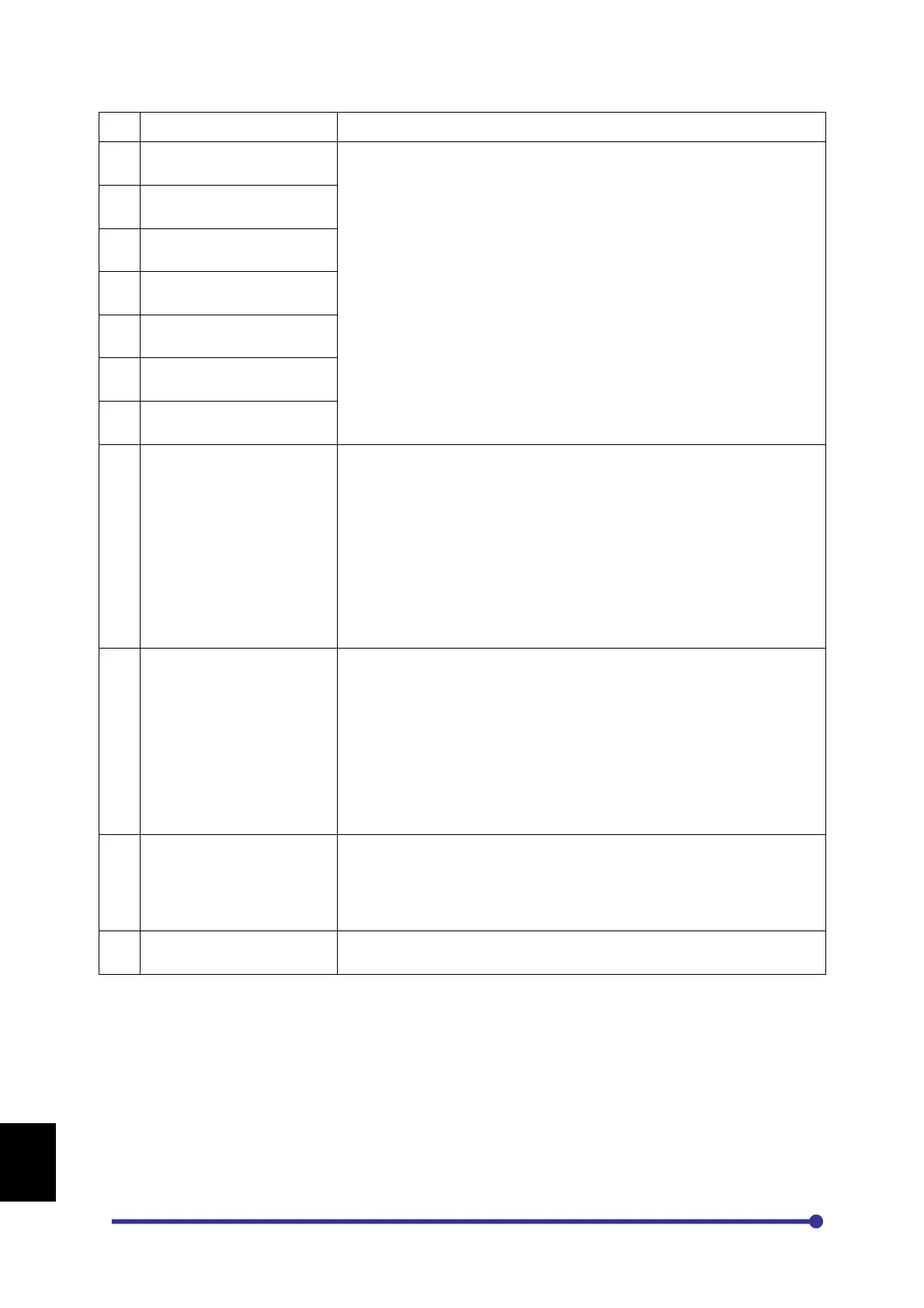
Fault Name Causes & Countermeasures
57
Sensor Fail**
58
Sensor Fail**
59
Sensor Fail**
60
Sensor Fail**
61
Sensor Fail**
62
Sensor Fail**
63
Sensor Fail**
64
1. Check whether the sensors are connected properly or not.
If the sensor of one or more Inverter Unit is not connected, this fault
may come.
2. There may be problem with the driver board or fiber optic cable.
Check the driver board and wire connections. If required replace it.
3. There may be loose connection of the cable or problem with the
Adaptor Board PCA-185.
Check the connection with Adaptor Board and if required change
the PCA-185.
4. Check the current sensor connections at Driver Interface Board
PCA-2049A. If required, change the board.
65
1. A trouble may have occurred in the cooling blower of respective
Inverter unit in case of parallel inverter. Replace it if necessary.
2. The ambient temperature may have risen.
Lower the ambient temperature (less than 50 °C for 400V series or
less than 40 °C for 500V / 600V series).
3. The carrier frequency may be set too high.
4. The thermistor is not connected or loosely connected at TB6 of
PCA-2049A respectively. Disconnect the thermistor and ensure
that the thermistor shows resistance greater than 2.2kΩ but less
than 60kΩ. Reconnect thermistor properly.
66
1. The motor current has exceeded the motor overload counter.
Ensure that motor current data are properly set in B103 and B119.
Reduce the load or increase the motor and AC Drive capacity.
If this occurs at low speed, reduce the torque boost settings (A501 /
A502) or DC braking settings (A307 / A308).
67
1. Check the Panel fan.
2. Check the Panel temperature limit in parameter C324.
** This Fault is only applicable when multiple inverter units (IU) are used.
Remote mounting of Digital Operation Panel (keypad)
The Digital Operation Panel of Axpert-Eazy Series inverter modules can be extended to remote or
panel. To extend the digital operation panel, order the display cable as per the required distance.
Follow below steps to mount the Digital Operation Panel.
1. Open the front green cover mounted with four screws.




 To Next Page