Amtech
6-8
6
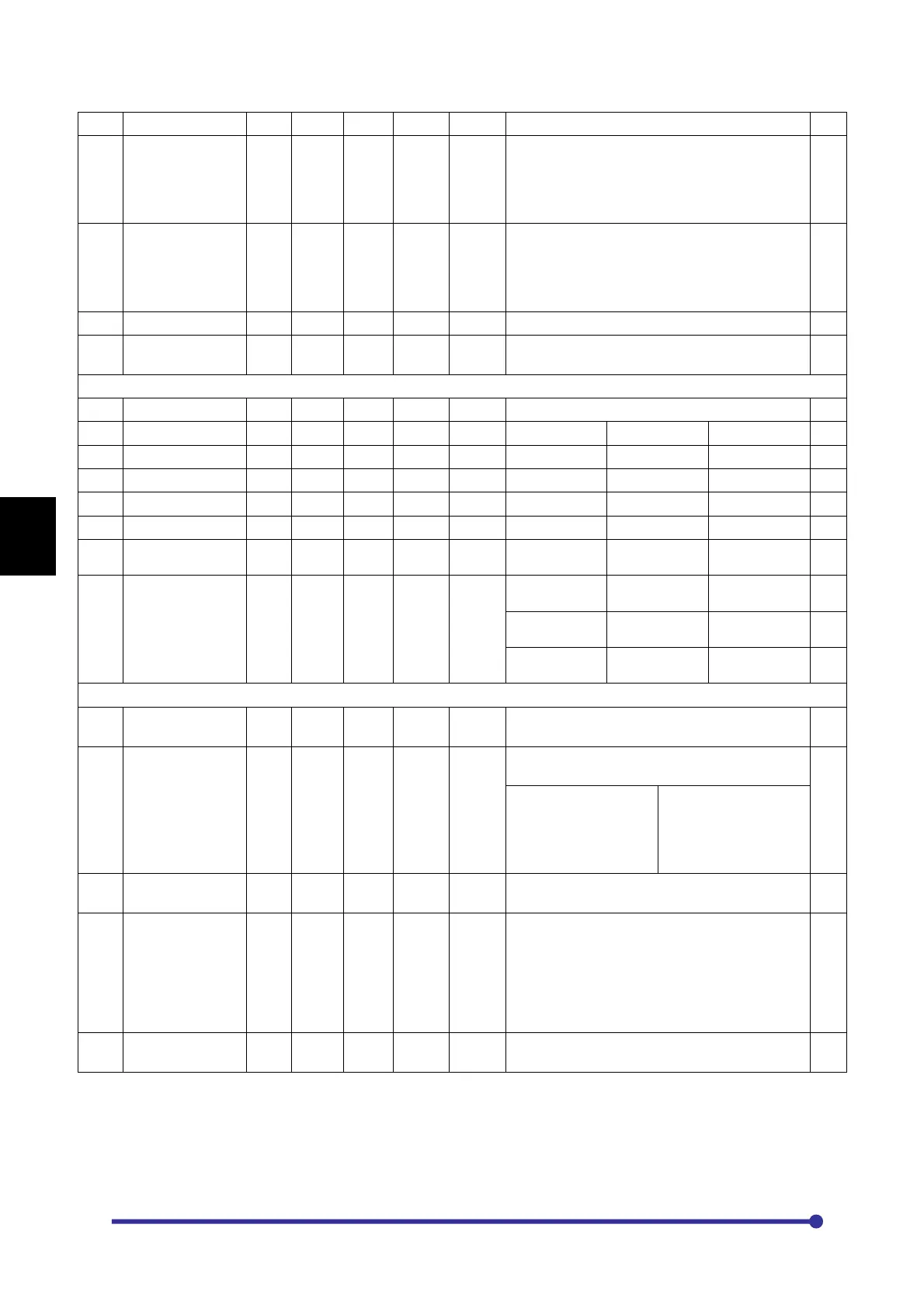
A501
Manual Torque
Boost setting
% Inv.
rating
0.0 20.0 0.1 When setting manually, set the boost voltage at
0Hz as a percentage in respect to the rated
output voltage. When programmed to zero, it
will be disabled. This is automatically adjusted
by the automatic tuning.
A502
Automatic Torque
Boost Selection
0 0 1 1 When automatic torque boost is selected, the
R1 drop compensation and slip compensation
functions will be valid.
=0: Disable
=1: Enable
A503
Slip Compensation
Hz 0.0 0.0 5.0 0.1 Set the motor’s rated slip.
2.0 This default value is applicable for V/F Closed
loop control mode only.
6: PARAMETER SELECTION FOR NORMAL DISPLAY SCREEN
A601
Norm Parameter
1
1 1 25 1 Select from this to display on normal screen.
A602
Norm Parameter
2
5 1 25 1
=1: M101 Hz
=2: M102 rpm
=3: M103 Amp
A603
Norm Parameter
3
3 1 25 1
=4: M104 %L
=5: M105 Hz*
=6: M109 PR
A604
Norm Parameter
4
4 1 25 1
=7: M110 Fb
=8: M201 Vry
=9: M202 Vyb
A605
Norm Parameter
5
8 1 25 1
=10: M203 Vo
=11: M204 Vdc
=12: M205 kW
A606
Norm Parameter
6
11 1 25 1
=13: M206 kWh
=14: M207 MWh
=15: M208 ºC
A607
Norm Parameter
7
12 1 25 1
=16: M211 ºF
=17:M217 Enc
Cnt
=18: M115 Amp
Uph
A608
Norm Parameter
8
15 1 25 1
=19: M116 Amp
Vph
=20: M117 Amp
Wph
=21: M107
Tq*
=22: M209 %Tq
=23: M210 %Ex
24: M218 ASR
O/P
25: M219 ACR
O/P
7: FREQ REFERENCE MATH OPERATIONS
A701
Multiplier-A106 1.000 -
10.000
10.000
0.001 This is a multiplier to the frequency reference
selected in A106.
A702
Math Reference
Input2
1 1 9 1 Select the second reference for the math
operations.
=1: Not Used
=3: FSI 4-20mA
=5: IIN 4-20mA
=7: PLC A-O/P 2
=9: PLC A-O/P 4
=2: FSV 0-10V
=4: VIN 0-10V
=6: PLC A-O/P 1
=8: PLC A-O/P 3
A703
Multiplier-A702 1.000 -
10.000
10.000
0.001 This is a multiplier to the math reference input2
selected in A702.
A704
Math Operator
1 1 3 1 Select the mathematical operation to be carried
out between frequency reference selected in
A106 and math reference input2 selected in
A702.
=1: + Add
=2: x Multiply
=3: / Divide
A705
Fix Bias Hz 0.00 0.00 600.00
0.01 This is fixed bias added into the output after the
math operation.




 To Next Page