ES
FR
DE
GB
IT
C13961962IDM
English
-
10
-
Use and installation manual
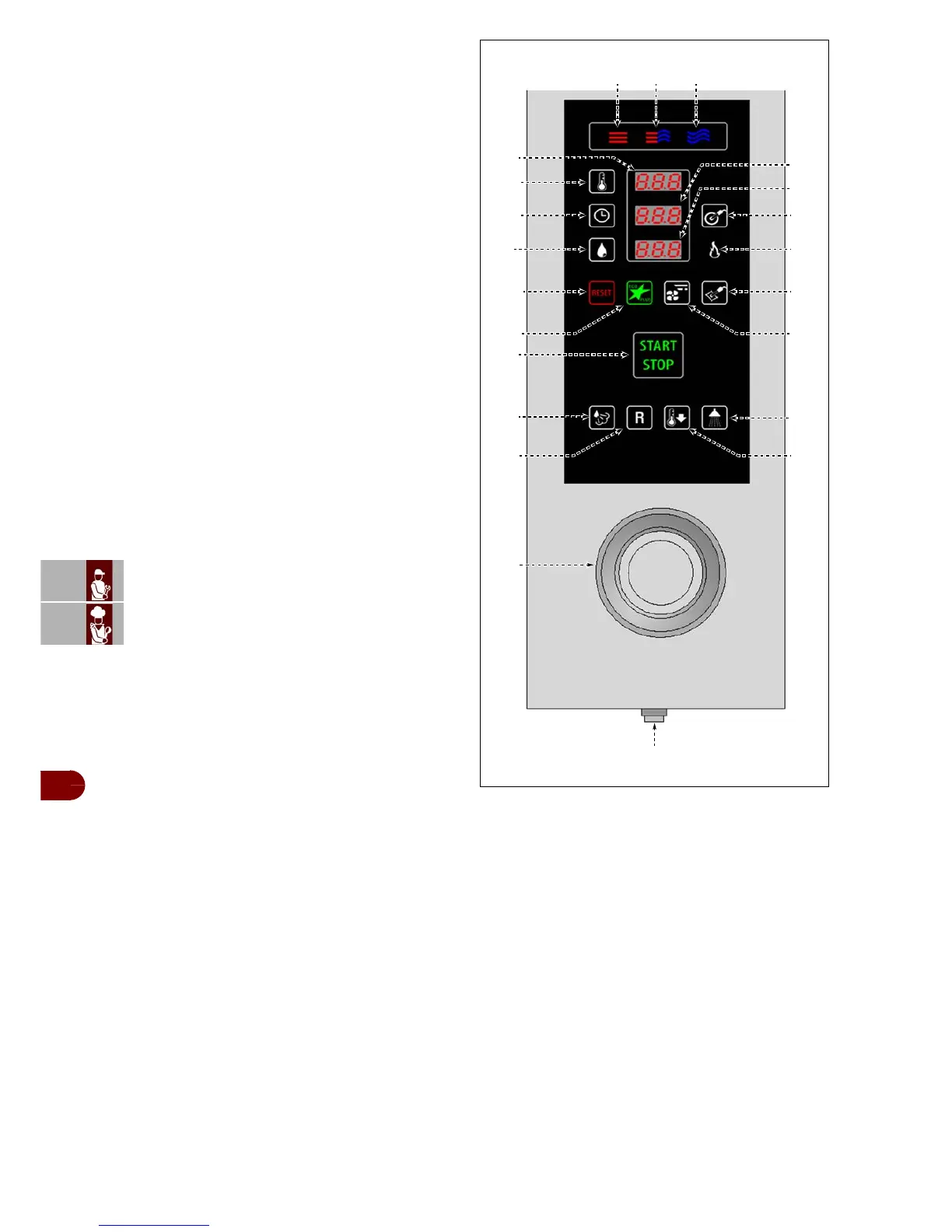
8–Time and "product core probe" display
With button (5) (timer) pressed:
-In cooking pause status it shows the value of the
time set.
-During cooking it shows the time left to the end of
the cooking cycle.
With button (10) ("product core probe" temperature
setting) pressed:
-In cooking pause status it shows the value of the
temperature set.
-During cooking it shows the value of the temper-
ature measured by the probe.
9–Humidity percentage display
-In mixed cooking mode (convection + steam) it
shows the value of the percentage humidity set.
-Shows the function set in steam cooking mode
(only if the CIBUS PLUS 1 or CIBUS PLUS 2 func-
tion has been set).
10–"Product core probe" or "vacuum" tempera-
ture setting button
-For setting the cooking temperature inside the
product measured by the core probe (optional on
level 1, standard on level 2) or with vacuum (op-
tional): press once (the icon flashes) to set the
temperature using the knob (21).
-Modifies the temperature inside the product dur-
ing cooking: press once to show the temperature
value on the display (8).
Press the button and turn the knob (21) to modify
the value set.
11–Burner icon: when lit, this indicates the burner
is on.
12–Reset button: resets the alarms (beepers and
lights).
13–"ECO" key: : used to activate or deactivate the
energy saving function (to be used for reduced loads
only).
-Press once (icon lit with a green light) to turn the
"ECO" function on.
14–Fan speed button: used to set the intermittent
speed of the fan.
15–Optional probe icon: when switched on it indicates that the vacuum probe has
been inserted.
This function excludes the use of the main probe at the core of the oven".
-Press button (10) to set the vacuum probe temperature using knob (21).
In "convection cooking" mode you can adjust the percentage of opening of the
vent , which is shown on the display (9) ("0" = vent always open; "100" = vent
always closed).
16–"START-STOP" button: Starts or ends the selected program cycle, shown on
the display (cooking cycle, washing cycle, etc.).
-Icon lit (green light): programme cycle finished.
-Icon lit (red light): programme cycle running.
17–Steam injection button: for increasing the humidity. Press the button to inject
steam (for 5 seconds) into the oven during any cooking phase.
IDM-39619500300.tif
22
1 2 3
10
11
4
5
6
12
17
21
20
13
16
18 19
8
15
14
9
7



 To Next Page