ES
FR
DE
GB
IT
C13961962IDM
English
-
12
-
Use and installation manual
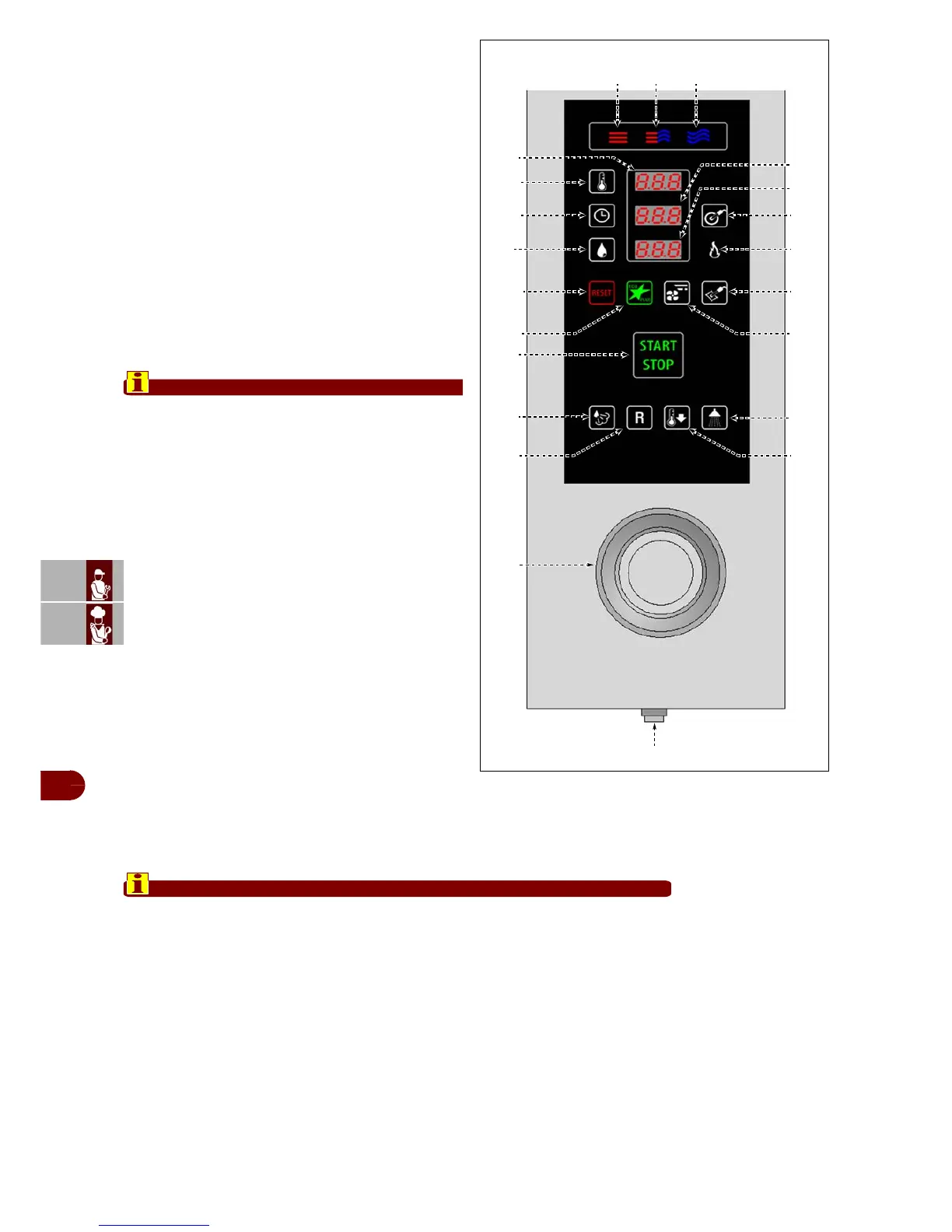
-The key modifies the preset standard regenera-
tion programs.
Press the key to show the program of choice on
the display (7).
Press the key (16) to start the program selected.
Once the program has been started only, keys (4-
5-6-10) and knob (21) can be used to modify the
values set for the current stage.
During cooking, buttons (1-2-3) can be used to
modify the cooking mode.
Note: Changes made in this way only remain ac-
tive for the current cooking process; to save
them permanently, press the button of the cook-
ing mode (1-2-3) being used for at least 3 sec-
onds.
Important
To return to the original settings, with the appli-
ance in the STOP phase (icon (16) lit with a green
light) press the button (12) and hold it down for
longer than 3 seconds (the whole panel powers
down) then press the button (18) and hold it down
for at least 3 seconds.
19–Quick cooling key: for cooling the cooking
chamber quickly with the door closed.
Press the key and the display (7) will show the mes-
sage "100°C".
Press the key (4) and turn the knob (4) to set the cool-
ing temperature required.
Press the key (16) to start the program.
At the end of the cycle the appliance shuts down and
a buzzer sounds.
- is used to enable / disable the cooldown during
cooking.
With the appliance in the STOP phase (icon (16) lit
with a green light) press the button (12) and hold
it down for longer than 3 seconds (the whole panel
powers down)
Press button (19) and turn the knob (21) to set the cooldown ON/OFF.
Important
Do not use this function while cooking is in progress.
20–Semiautomatic washing button: selects a semiautomatic wash.
21–Control knob: for varying the values of the functions selected (see buttons (4-5-
6-10)).
Turn the knob clockwise to increase the value and anti-clockwise to decrease it.
-Used to modify the cooking and washing programming parameters and the appli-
ance’s functional parameters.
-Also confirms and saves: press the knob to confirm and save the settings selected
and/or shown on the display.
22–On/off button: turns the appliance's electricity supply on and off.
IDM-39619500300.tif
22
1 2 3
10
11
4
5
6
12
17
21
20
13
16
18 19
8
15
14
9
7



 To Next Page