19
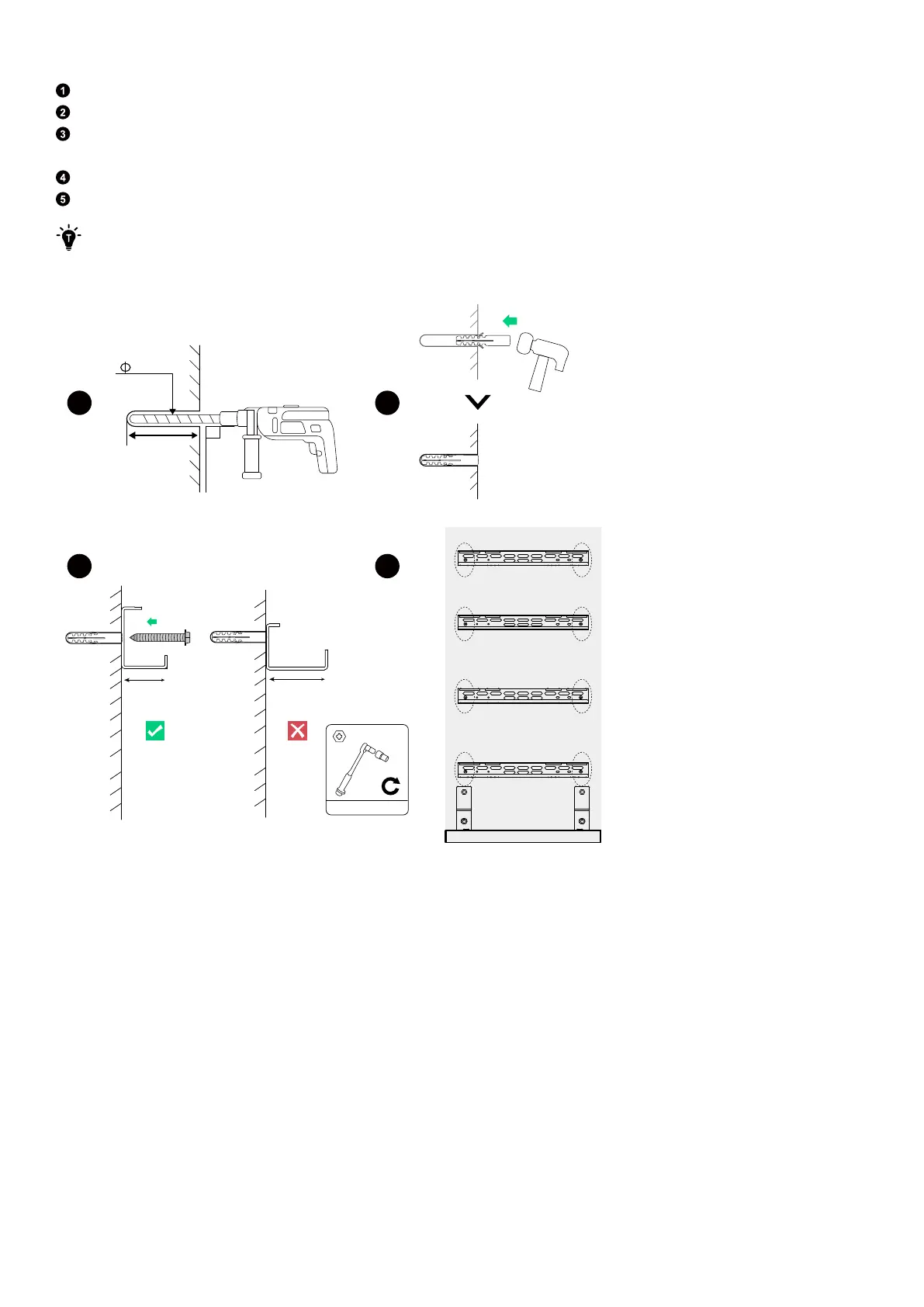
Step 3: Attach mount brackets to the wall.
Drill the marked pilot holes in the wall. Make sure the drill bit is aligned with the center of the holes.
Insert the plastic anchors (M6×50 mm, included) into the pilot holes. Make sure the anchors are flush with the wall.
Align the anchors with the corresponding slots of the mount bracket. Verify that the mount bracket is level and its wide bar
is placed against the wall.
Tighten the self-tapping screws (M6×50 mm, included with the anchors) to secure the mount bracket.
Repeat the above steps to install all of the mount brackets onto the wall.
After drilling, clean up any shavings that have accumulated inside or outside the equipment.
Figure: Attach mount brackets to the wall.
10 mm
90︒
>60 mm
3
1 2
4
30 mm
70 mm
5 N·m
M6 x 50 mm
(For two columns only) Step 4: Install conduits.
·
If installing only one column, skip this step.
·
If installing two columns, run conduits from the back of the first column to the second column.



 To Next Page