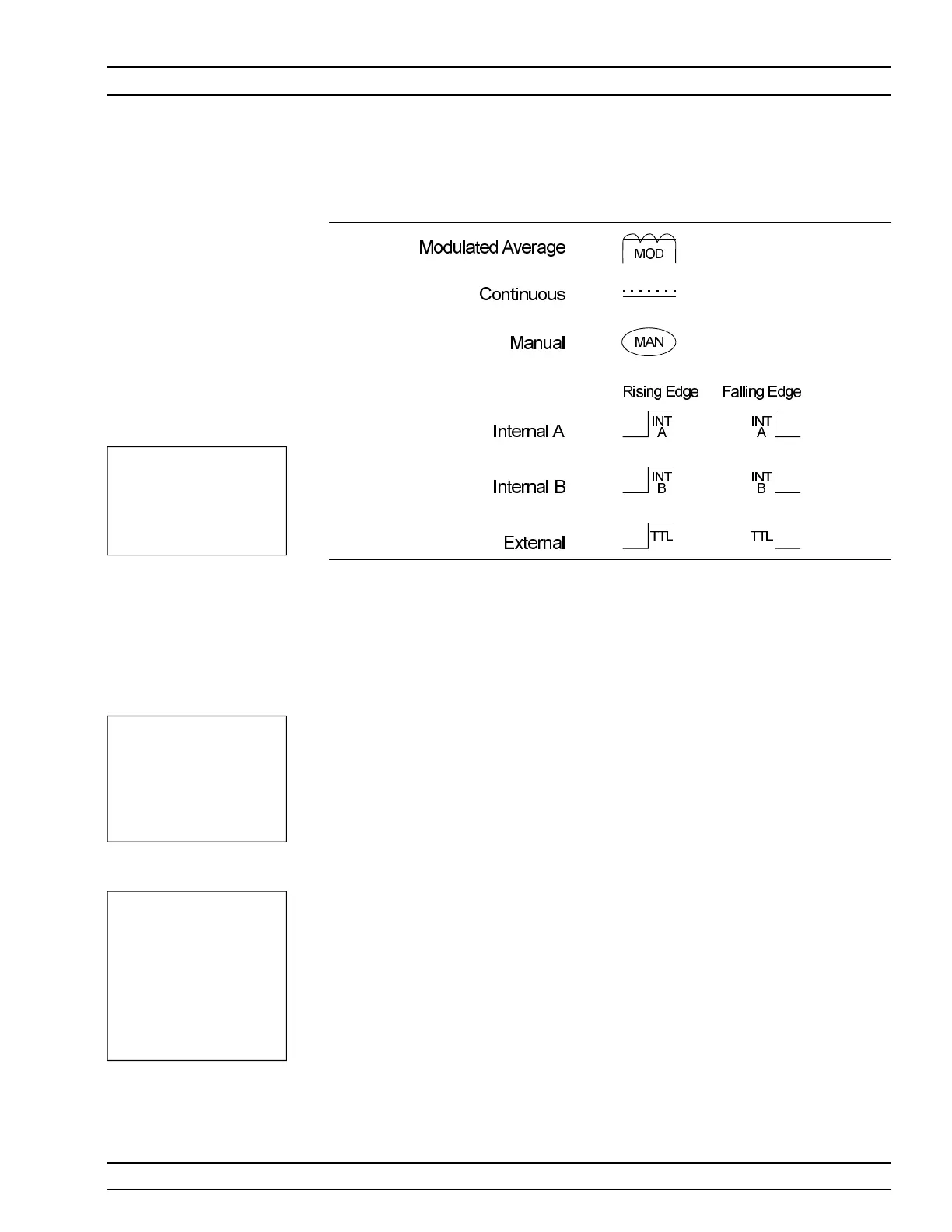
The trig ger icons ap pear as shown in Fig ure 4-2.
Only when a chan nel in put con figu ra tion in cludes a sen sor with a meas ure -
ment mode that re quires an icon, will an icon be dis played.
Setup This menu is used to set up the trig ger con di tions for the dis play chan nels. In
read out dis play mode with sen sor mode set to cus tom, the trig ger can be set to
dis play chan nel 1 and 2 sepa rately, or to gether as chan nel 1 & 2.
The chan nels are trig gered si mul ta ne ously if the trig ger con di tions are set to 1
& 2. This guar an tees the trig ger con di tions are the same, and there fore the
read ings are taken at the same time. In Read out and Power vs. Time modes, if
the menu is ex ited with the trig ger se lec tion at chan nel 1 & 2, this setup is
used for trig ger con trol. Oth er wise, if the trig ger setup dis play is left with
chan nel 1 or chan nel 2 dis played, the in di vid ual trig ger set tings are used for
trig ger con trol.
CHAN NEL
[TRGMODE]
Se lect dis play chan nel 1 or 2 (or 1&2 when set ting trig ger con di -
tions in Read out or Power vs. Time modes).
SOURCE
[TRGSRC
GTSRC]
The trig ger sources are CONTINUOUS, In ter nal A, In ter nal B
(ML2408A only), EXTTTL , or MANUAL . When the trig ger
source is set to INT A or INT B (In ter nal A or B) the power me -
ter trig gers on a ris ing or fal ling power level on the as so ci ated
sen sor. See LEVEL for the set ting of the trig ger power level.
ML2400A OM 4-17
OPERATION TRIGGER MENU
Figure 4-2. Trig ger Icons
NOTE
In CDMA read out
mode, de fault trig ger
set tings are used and
can not be changed.
NOTE
Si mul ta neous trig ger
chan nels guar an tee
iden ti cal sam pling for
both chan nels, es sen -
tial for ac cu rate ra tio
(A/B) mea sure ments.
NOTE
Ex ter nal trig ger is only
ef fec tive at 800 KHz or
lower.












 To Next Page