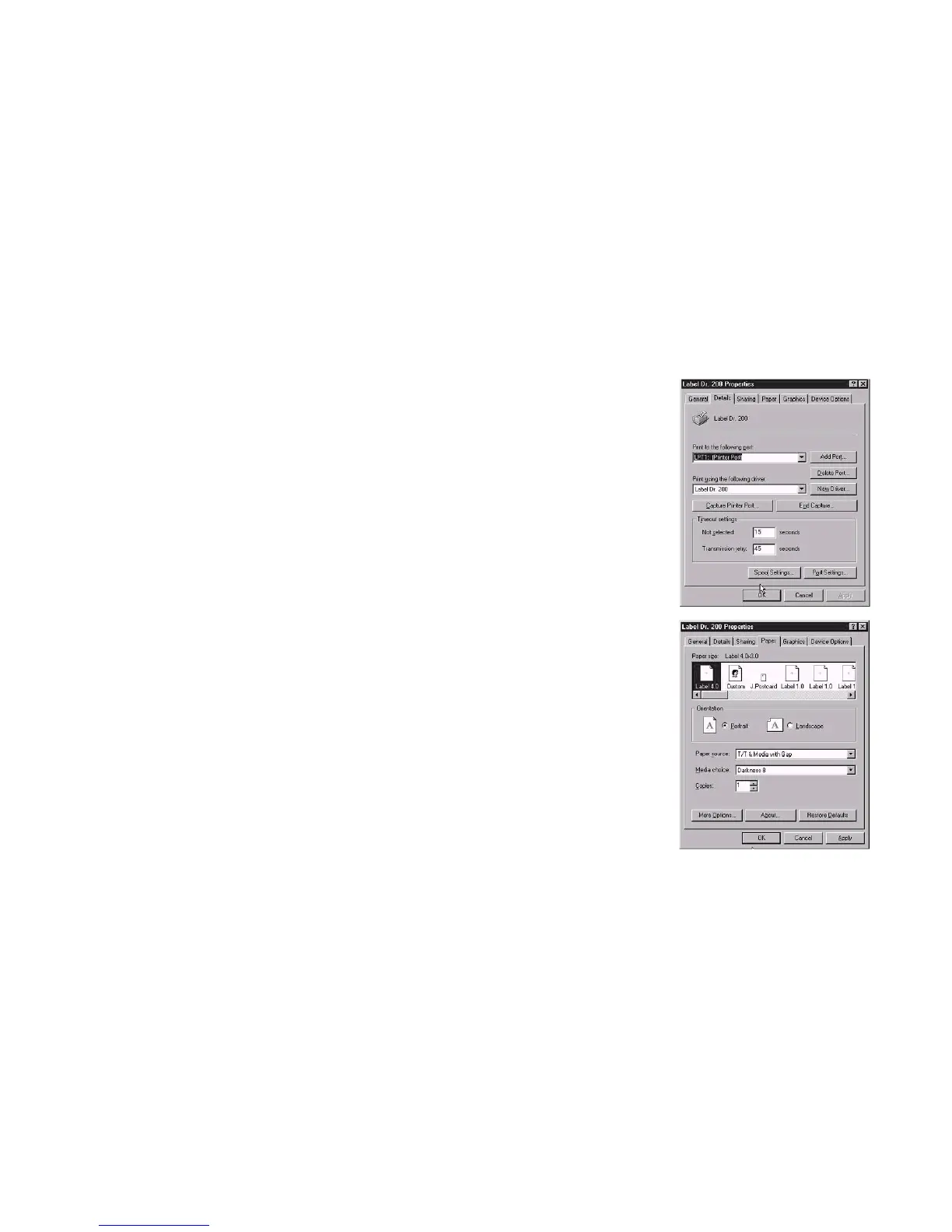
Set the Parameters
For Win 98
After installing the driver, you can follow the path below to set
parameters:
Ports
Properties menu
click “Details”
Start Settings Printers Label Dr. Properties
select the IO port
The parameters include:
click “OK”
Ports Select the IO port to link with the printer. The port may be one of
parallel (LPT), serial (COM), net work port or file.
Paper size Select the proper size on the menu. If there is no desired
size, select “Custom” (only in Win98/95/Me) to define the paper size.
Create a new size Define paper size in Win 2000/NT4.0.
Orientation Set portrait or landscape according to the print
direction.
Paper source (Media type) T/T stands for thermal transfer
(ribbon) mode and D/T for direct thermal mode (without ribbon).
Paper size
Orientation
Media choice (Darkness) Set the heat value or darkness from
this field. The darkness value ranges from 0 to 15.
Paper source
(Media type)
Media choice
Copies This function designates the number of printed copies of each
page.
(Darkness)
Copies
Properties menu
More option (Accessory setting) To use the cutter and peeler
function you still need to enter More Options and select one of the items.
(Set DIP Switch also).
click "Paper"
click each item to
select desired
parameter
Device options (Speed) Set the printer speed. Fro the X-2000 Zip
ranges from 2 to 6 IPS.
click "OK".
37
38



 To Next Page