www.arkrayusa.com 37
SettingthePost-mealAlarm(PP2Alarm)
Step1SettingthePP2alarmOn
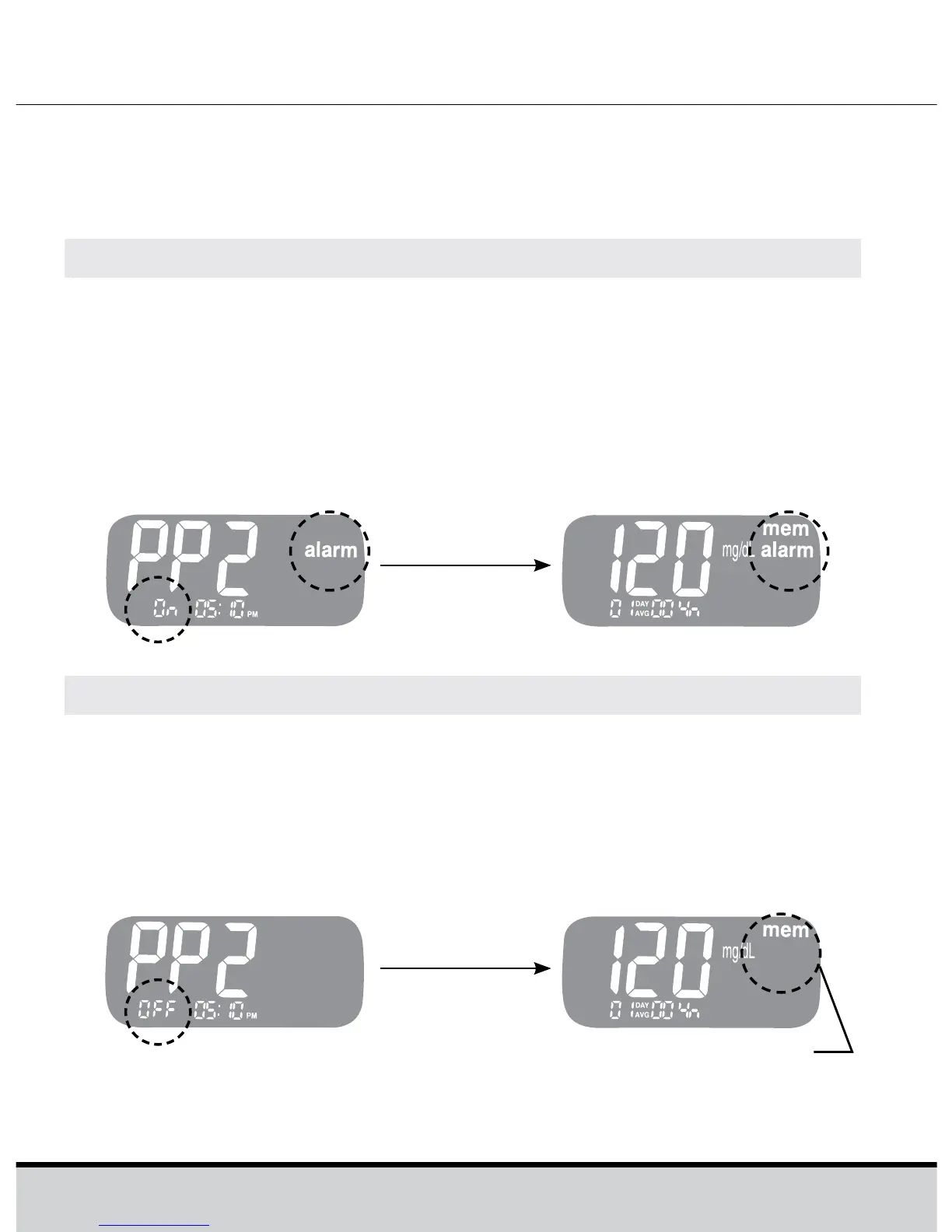
Without inserting a test strip, press and hold << for 3 seconds
to set the post-meal alarm. The “PP2”, the “alarm” and then
the “On” will be displayed.
The screen will then automatically change to the memory
check mode. At this time, the “alarm”, indicating that the PP2
alarm has been set, will be displayed on the screen.
Step2SettingthePP2alarmOFF
To turn off the PP2 alarm, press and hold << for 3 seconds.
The “PP2” and the “OFF” will appear on the screen. Then the
screen will change automatically to the memory check mode
without the “alarm” being displayed.
The PP2 alarm goes off 2 hours after setting the alarm. The
alarms ring for 15 seconds and can be silenced by pressing <<
or the >> button or by inserting a test strip.
‘alarm’ vanishes










 To Next Page