Lens Mounts and Lens Handling 32
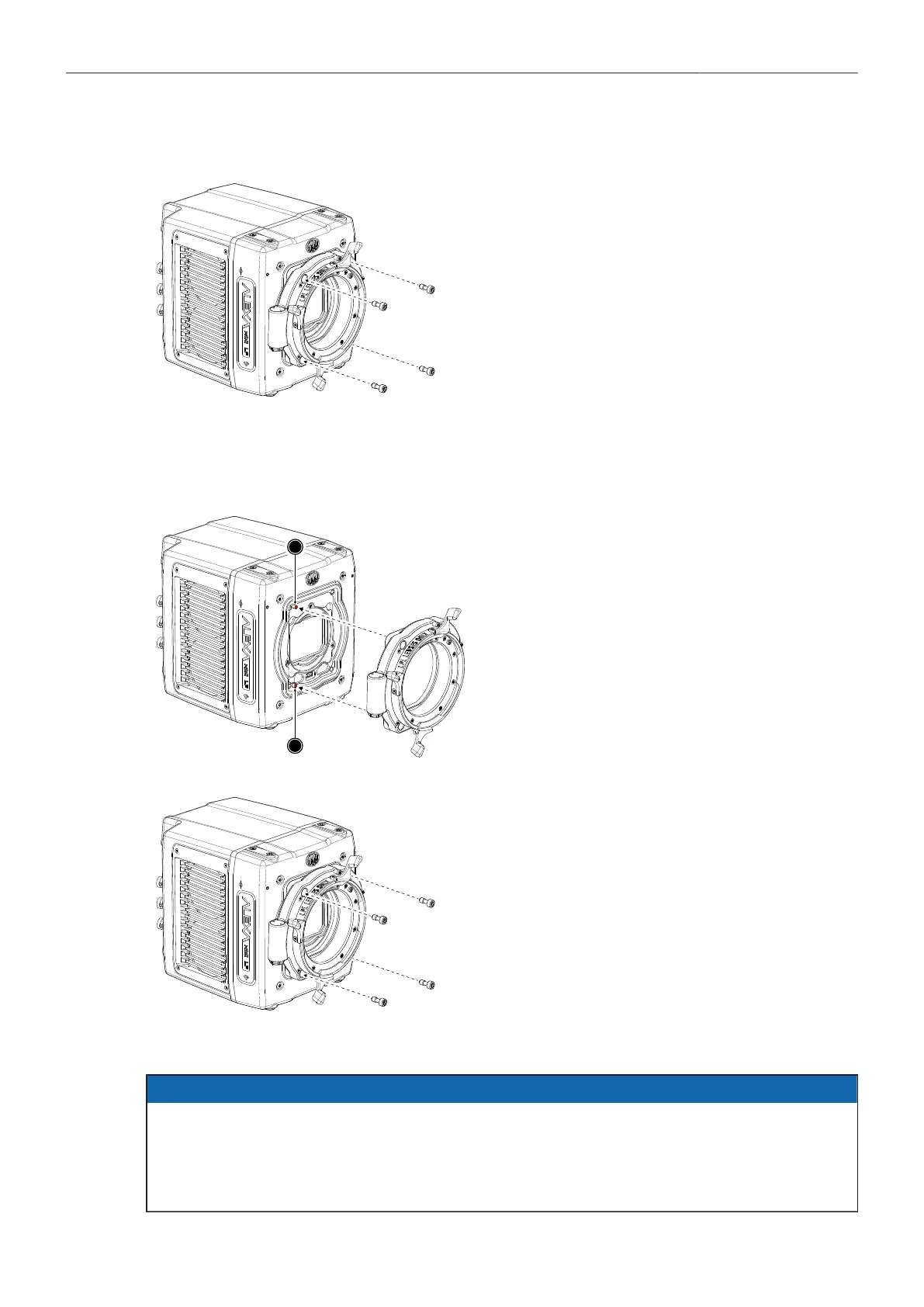
Removing a Lens Mount (here: LPL Mount)
1. Switch off the camera.
2. Crosswise, loosen all four lens mount screws
with a 3.0 mm Allen key.
3. Carefully remove the lens mount.
4. Store the lens mount in a case for dust pro-
tection and install a different lens mount.
Installing a Lens Mount (here: LPL Mount)
1. Switch off the camera.
2. Properly align the lens mount with the two
guiding pins (1) on the camera's universal
lens mount base.
3. Crosswise, hand-tighten all four lens mount
screws with a 3.0 mm Allen key.
NOTICE
After each lens mount change, always check the flange focal depth of the camera.
Have the flange focal depth always corrected by properly skilled personnel.
Flange focal depth correction requires special tools and training that meet ARRI guidelines.
For all flange focal depth issues, contact a qualified ARRI Service Center.



 To Next Page