Multi Viewfinder MVF-2 35
12 Multi Viewfinder MVF-2
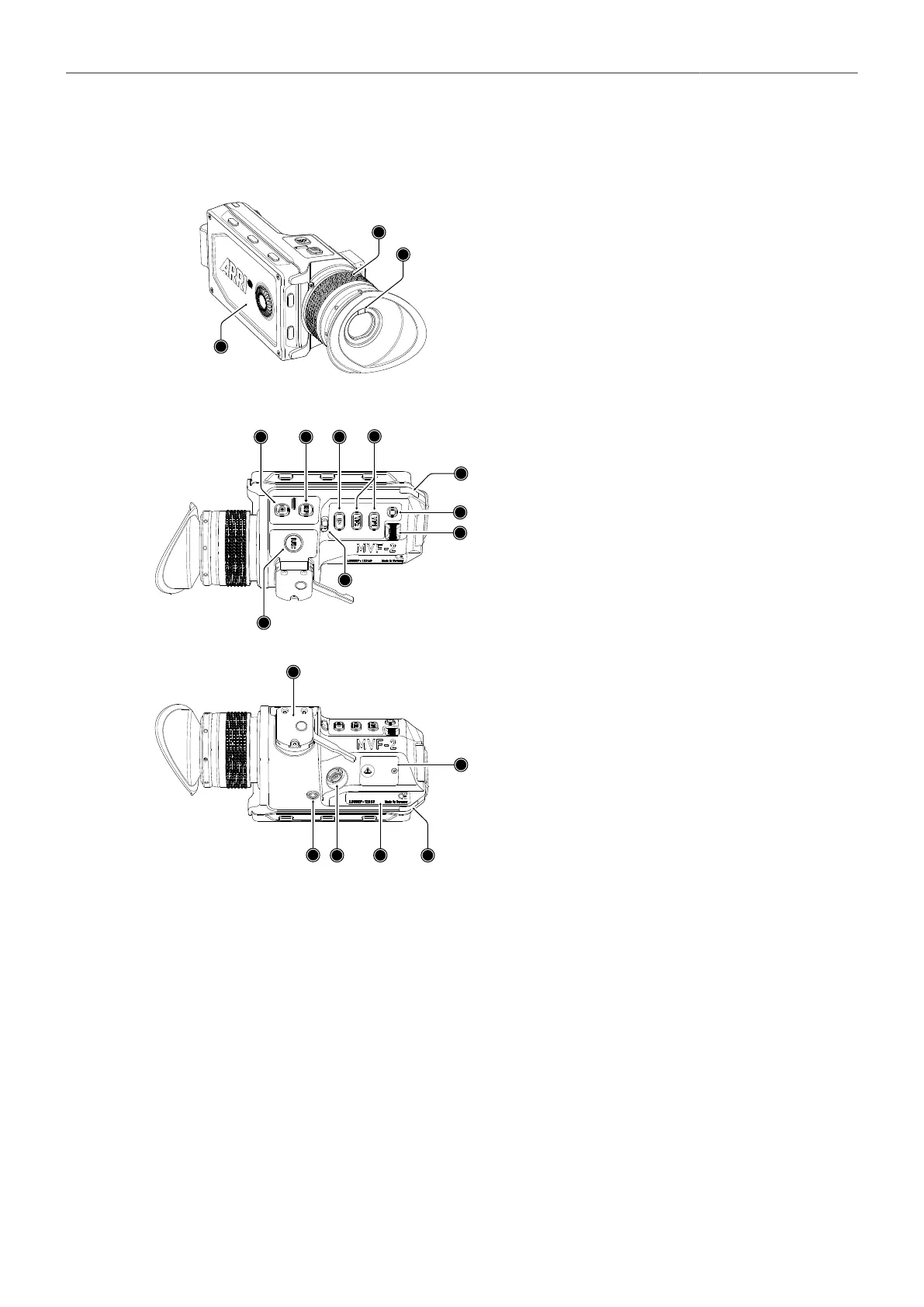
1
Flip-out Monitor
2
Diopter Adjustment
3
Proximity Sensor
4
ZOOM Button
5
EXP Button
6
PLAY Button
7
VF 1&2 User Buttons
8
Top Tally Light
9
SET Button
10
User Wheel
11
LOCK Switch
12
REC Button
13
Dove Tail
14
Service Cover
15
Bottom Tally Light
16
Product Label
17
Viewfinder Connector
18
Headphones Out
OLED Display
The MVF-2 is equipped with a high contrast, temperature controlled 1920 x 1080 OLED display.
Flip-out Monitor
The 4" flip-out monitor (1) with up-and-down tilt function can display the camera live image or the main
user interface, providing full access to camera functions and menus. See the next chapter for more
information.
Diopter Adjustment
With the camera switched on and looking into the viewfinder, twist the ring (2) left or right to adapt the
viewfinder image to your visual acuity. With the help of the scale labelled from 1 to 9 you can easily
remember your adjustment when different people are using the viewfinder. The diopter adjustment can
compensate from -5 to +5 diopters.



 To Next Page