EasyManua.ls Logo

ARRI SRH-3 - Page 22

ARRI SRH-3
54 pages
Print Icon
To Next Page IconTo Next Page
To Previous Page IconTo Previous Page
Loading...
! !22
!
8.2
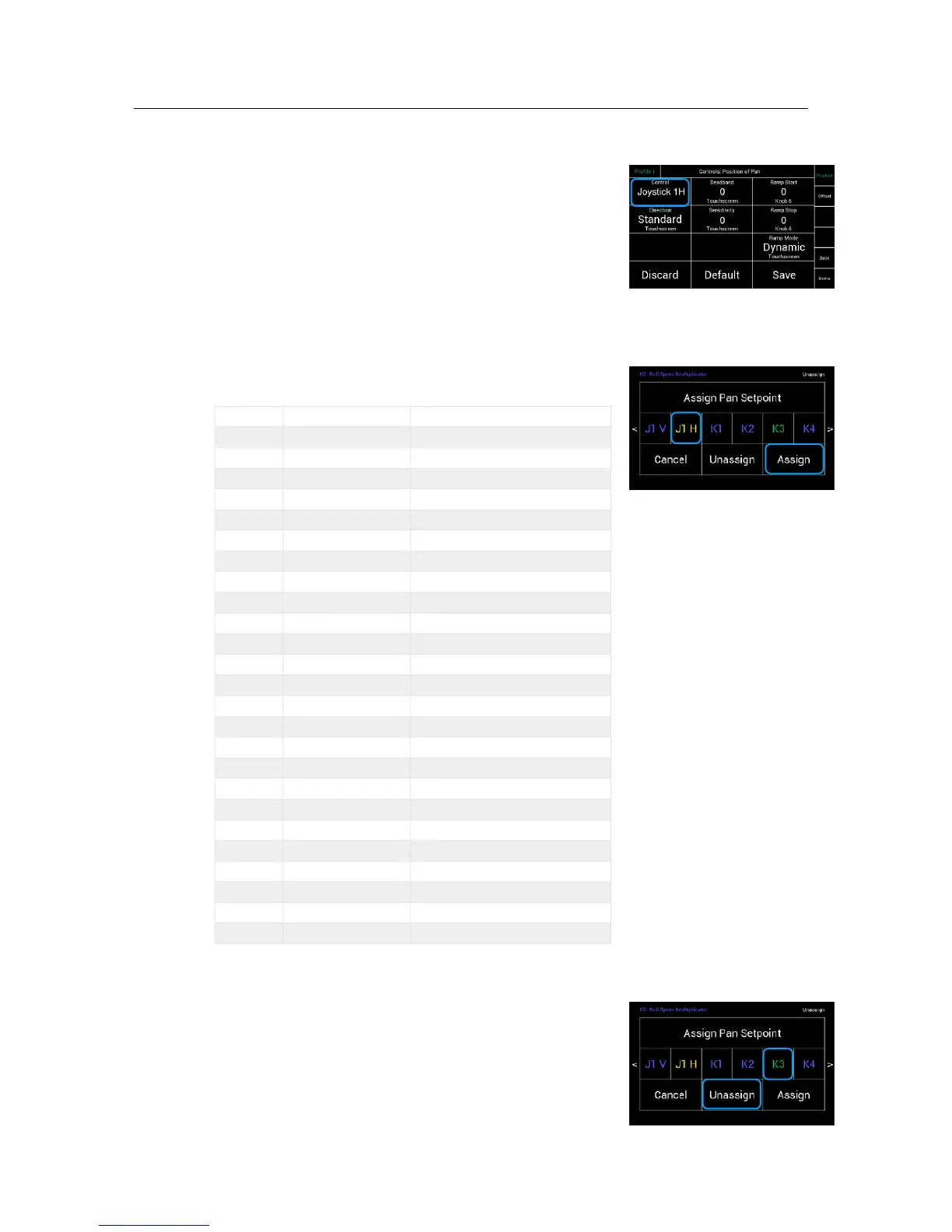
Assigning Controls
Touching Controls will open a new touchscreen display !
submenu named Assign Pan/Tilt/Roll Setpoint
(Pan, Tilt, Roll)
Select one of the available controllers and confirm
by touching Assign.
For example:
J1 H = Joystick 1 horizontal / Pan axis
Available controllers:
8.3
Unassigning Controllers
To unassign a selected controller, touch Unassign.
NOTE
After a function is unassigned, the function
will be only available through the touchscreen.
J1 V
Joystick 1 V
Joystick 1, up/down
J1 H
Joystick 1 H
Joystick 1, left /right
J2 V
Joystick 2 V
Joystick 2, up/down
J2 H
Joystick 2 H
Joystick 2, left /right
DRWP
DRW Pan
DRW-1, ARRI Wheels, Pan
DRWT
DRW Tilt
DRW-1, ARRI Wheels, Tilt
DRWR
DRW Roll
DRW-1, ARRI Wheels, Roll
V R
VCW Roll
PLC VC Wheels, Roll
V T
VCW Tilt
PLC VC Wheels, Tilt
V P
VCW Pan
PLC VC Wheels, Pan
EHDP
EHD Pan
EHD-1, ARRI Encoder Head, Pan
EHDT
EHD Tilt
EHD-1, ARRI Encoder Head, Tilt
TS
Touchscreen
Control through RCP
K1 … K8
Knob 1 … Knob 8
Knobs
B1 … B6
Button 1 … Button 6
Buttons
V SR
VCW Speed Roll
PLC VCW, Speed Roll Poti
V ST
VCW Speed Tilt
PLC VCW, Speed Tilt Poti
V SP
VCW Speed Pan
PLC VCW, Speed Pan Poti
V DR
VCW Direction Roll
PLC VCW, Direction Roll Switch
V DT
VCW Direction Tilt
PLC VCW, Direction Tilt Switch
V DP
VCW Direction Pan
PLC VCW, Direction Pan Switch
NOTE
Blue letters
indicate that the controller !
is already in use.
Green letters
indicate the current selection
Yellow letters
indicate the controller which is
assigned currently
White letters !
indicate that the controller !
is available

Controls

Other manuals for ARRI SRH-3

Related product manuals