!
!
NOTE !
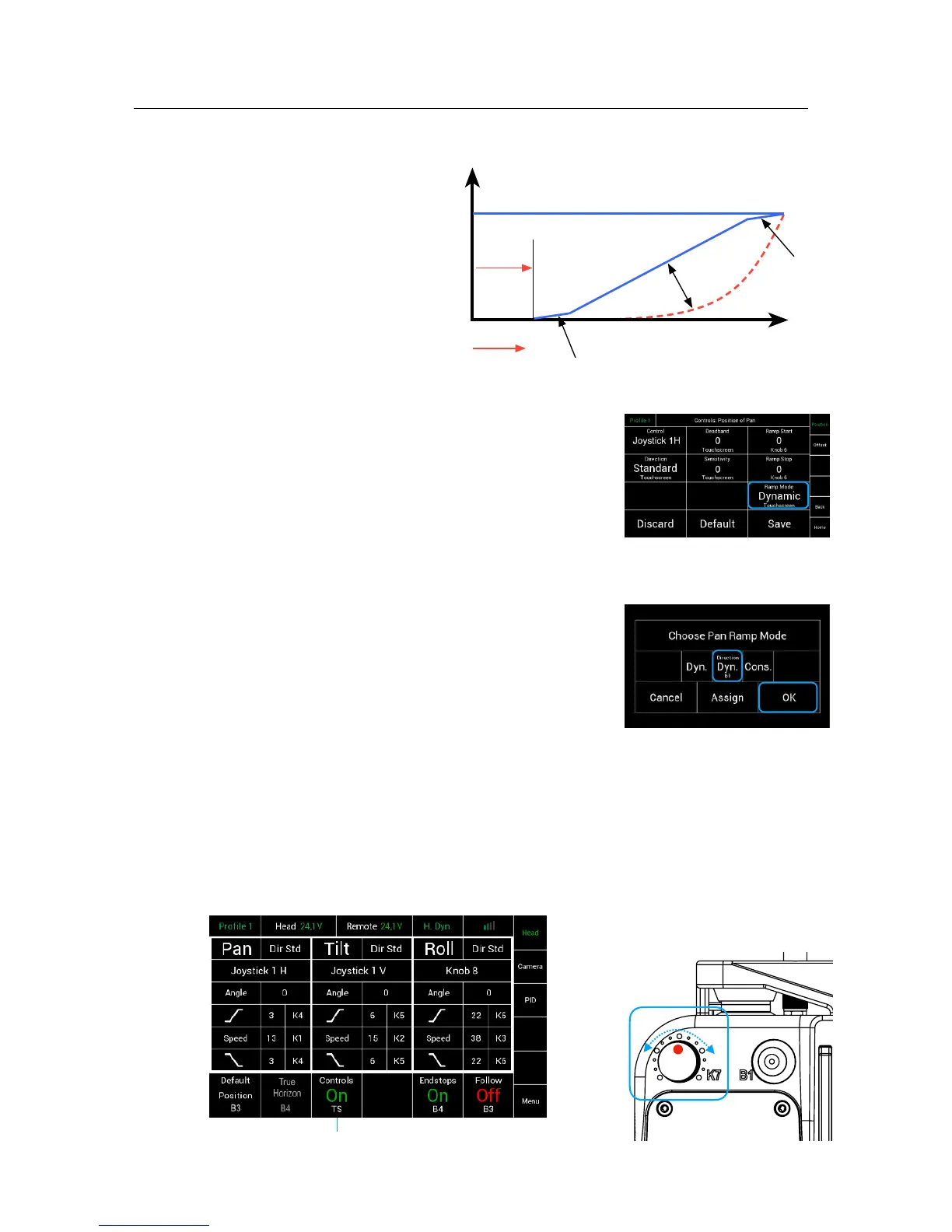
All three parameters are related
to each other.
If the speed is adjusted to a value
below 50, keep the ramp value
as low as possible.
If the value is to high, there will
be more or less NO movement
in the end.
8.7 !
Ramp Mode Dynamic or Constant Submenu!
Selecting Ramp Mode will open a new touchscreen!
that allows you to change between a dynamic ramp !
or a constant ramp. !
!
Dynamic Ramp
The dynamic ramp Dyn. is directly related the selected
tilt and pan speed.!
Higher speed will produce a slower and more flat ramp.!
Lower speed will produce a faster and steeper ramp.
!
NOTE !
This is useful for wide-angle and standard lenses.!
!
Constant Ramp
The constant ramp Cons. will keep the adjusted
ramp, regardless of the speed values.!
!
NOTE !
This is very useful for tele lenses.!
!
!
8.8
Controls On/Off
NOTE !
By touching Controls On/Off, all input devices will be activated or deactivated.
The head will remain in its last position.


 To Next Page