!
!
!
!
!
!
!
!
!
!
!
!
!
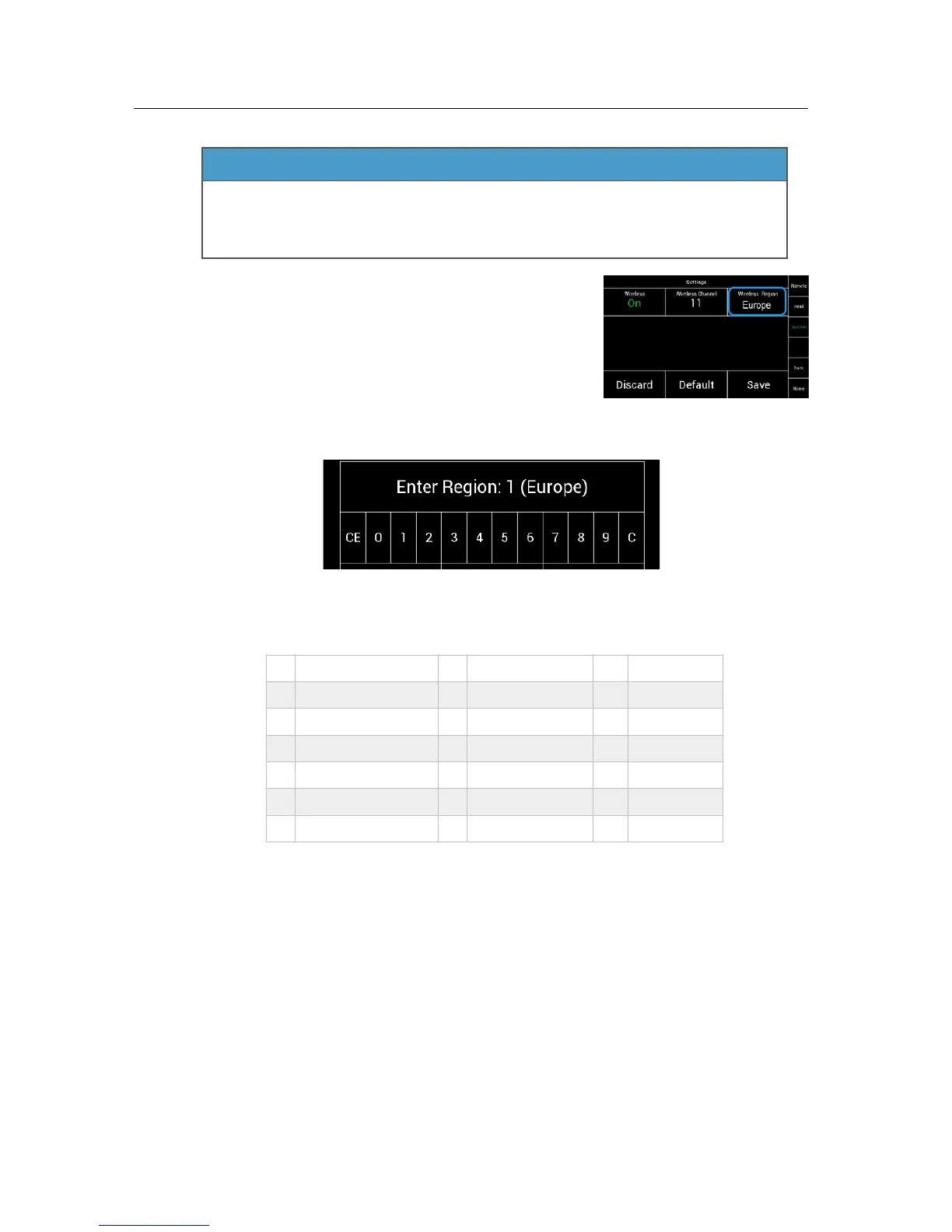
To change the regional settings, touch Wireless Region.!
!
!
!
A new menu will appear, in which you can enter the required region settings.!
!
!
!
!
!
!
!
!
!
!
NOTE!
To change the region, press C first, then enter the region code shown below.!
!
!
!
!
!
!
!
!
!
!
!
!
!
NOTE!
Select WORLD (4) if your specific region is not listed. !
(The WORLD setting provides a radio output power of 10 dBm and complies with !
Part 15 of the FCC rules. Please make sure that this complies with the local radio laws.)!
!
NOTE!
Connecting the FS Can Bus cable, will overrule the wireless connection.!
All data will now go through the FS Can Bus cable. !
The wireless connection will remain, but no telemetry data will be send as long !
the cable is plugged in.!
!
NOTE!
If you need a radio free, hardwired connection, you need to switch off the radio !
module and to connect head and remote via a FS Can Bus cable.!
Wireless region settings specify where the wireless function can be used in
compliance with local regulations. It may be illegal to use the wireless function
in a region other than specified in the setting. Please ensure that the region is
configured correctly, e. g. when traveling.


 To Next Page