Product Overview
Set-Top Entertainment Hub DCX3600-M • User Guide 5
365-095-25659 x.1
Rear Panel
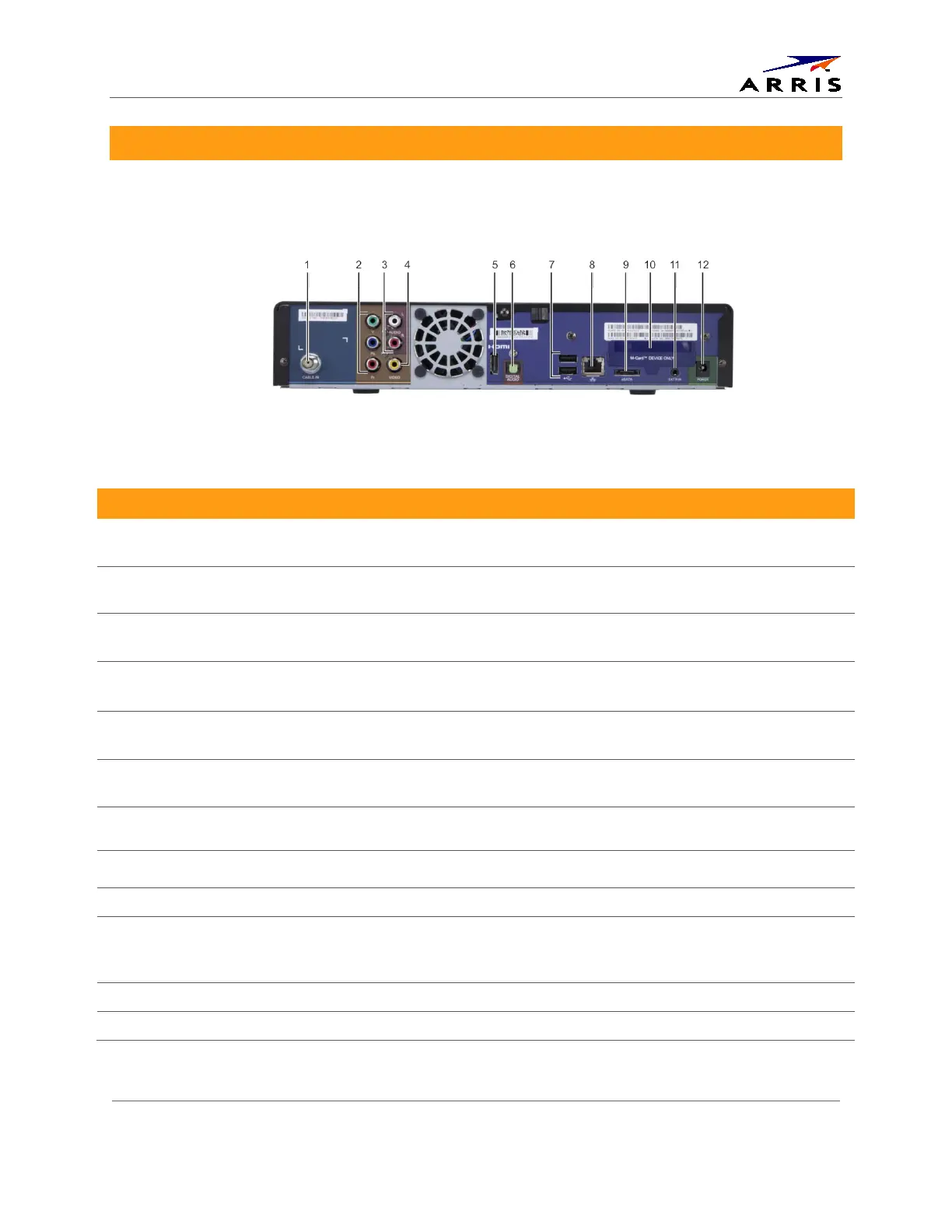
The DCX3600-M rear panel contains ports and connectors for video, audio, RF cabling, data
output, and data interface. Some connectors are not enabled and require application software
support.
Figure 3 – DCX3600-M Rear View
Table 2 – Rear Panel Ports & Connectors
Port/Connector Description
1 Cable In
(RF Coaxial Input)
Connects to a coaxial cable that delivers the cable television signal from your
service provider
2 YPbPr (optional feature)
(Component Video)
Connects to the color-coded component video input on a high-definition TV
(HDTV)
3 Audio L/R
(Baseband Analog Audio)
Connects to the analog audio left/right stereo inputs on a TV
4 Video
(Composite Video)
Connects to the standard definition video output on a SDTV
5 HDMI Connects to a high-definition TV (HDTV). Provides both audio and video to the
HDTV.
6 Digital Audio
(Optical S/PDIF)
Connects to the Dolby® Digital 5.1 audio or PCM output on a digital audio device
7 USB 2.0* Connects to a high-speed peripheral device. Two USB 2.0 ports are provided.
8 Ethernet* Connects to an Ethernet device. 10/100/1000
9 eSATA* Connects to an external Serial ATA hard disk drive
10 M-Card Device Only Cable card access panel. The M-Card is required to view television programs,
previously recorded programs on the video gateway, or interactive on-demand
programs. The M-Card should not be removed.
11 IR Remote Input Connects to a remote control set-top accessory cable
12 Power Connects the external power supply cord to the DCX3600-M
* Feature may not be supported by your service provider.













 To Next Page