Installation
Set-Top Entertainment Hub DCX3600-M • User Guide 18
365-095-25659 x.1
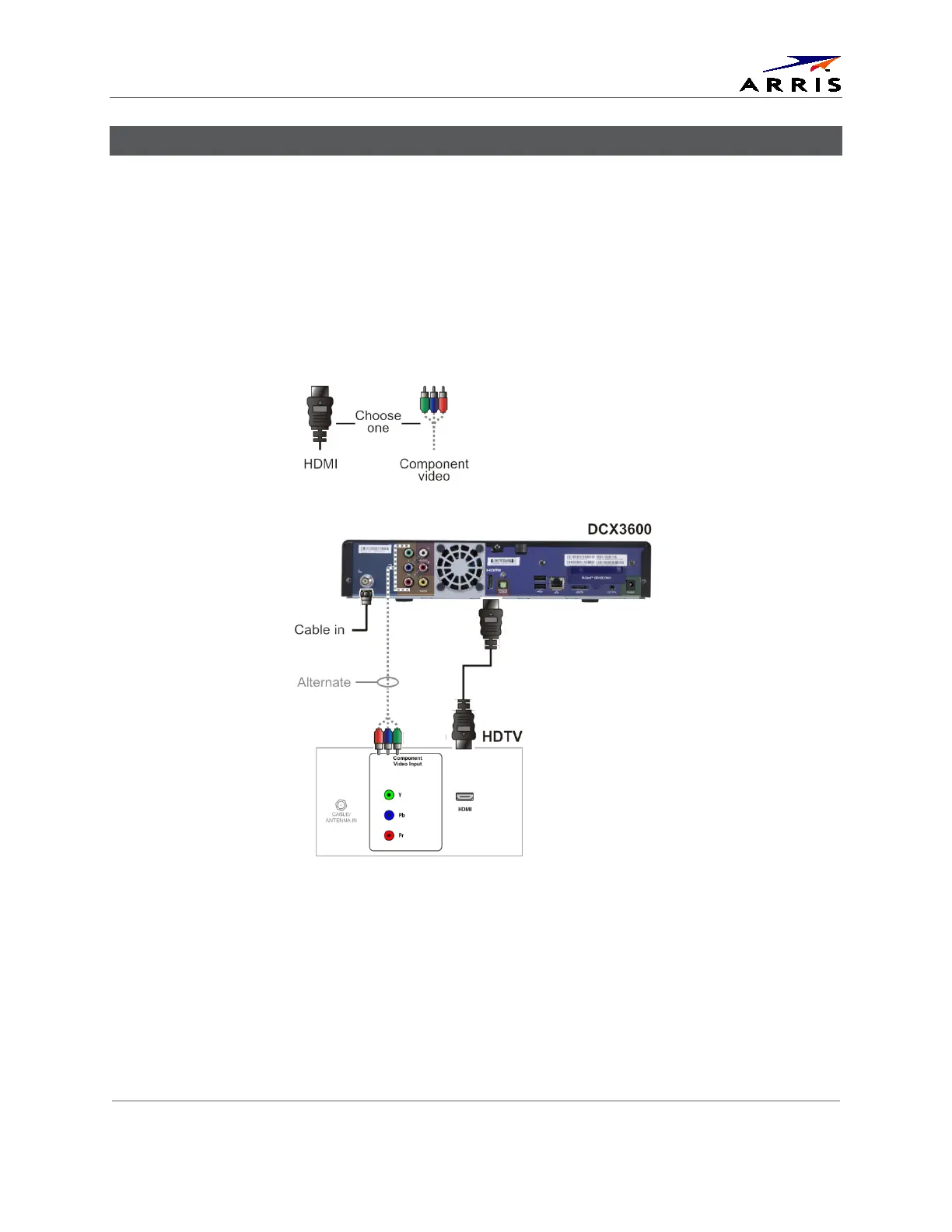
Connecting a High-Definition TV (HDTV) for Video
Do the following for the best possible HDTV video quality:
1. If the TV has an HDMI input, connect it to the HDMI output on the DCX3600-M.
2. If the TV has a DVI input, connect it to the HDMI output on the DCX3600-M using an
HDMI-to-DVI converter cable or adapter.
3. Otherwise, use the component video (YPbPr) connectors. L/R audio connection or
digital audio S/PDIF connection is required for sound with component video.
Note:
Make sure to match up each signal to the same connection on the TV or the colors will not
appear correctly on the TV.
Figure 8 – High-Definition TV (HDTV) for Video Connection
Note:
Because HDMI provides both video and audio, no additional audio connections to the TV are
required.













 To Next Page