Product Overview
Set-Top Entertainment Hub DCX3600-M • User Guide 10
365-095-25659 x.1
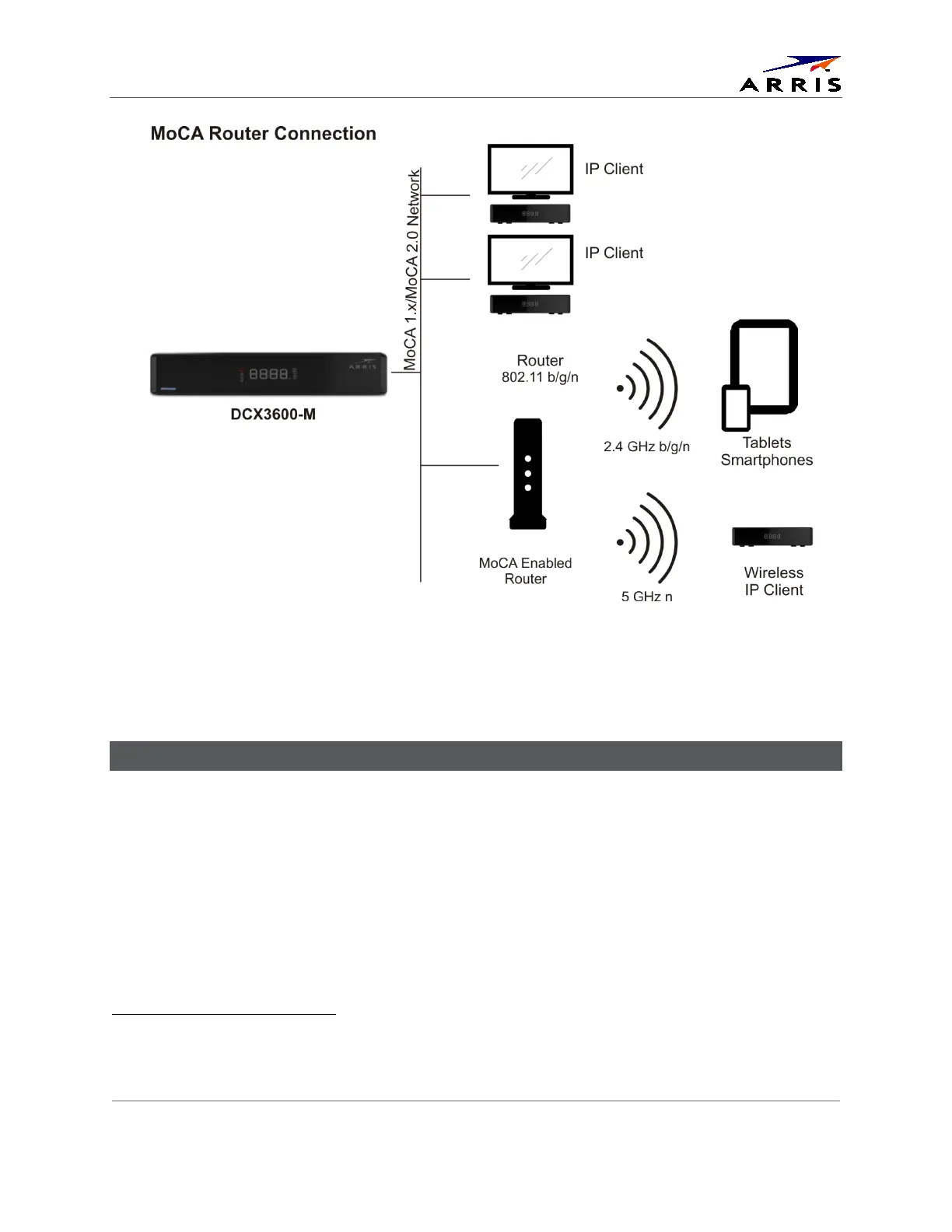
Figure 5 - A Typical Mixed MoCA/WiFi Home Network
Wi-Fi Networking Connection
The DCX3600-M is available with an optional integrated 802.11n wireless home networking
interface that can interoperate with either 2.4 GHz wireless networks or 5 GHz wireless
networks. With its dual internal antennas the DCX3600-M can achieve data transfer speeds up
to 300 Mbps
3
Since the performance of home wireless networks are highly susceptible to degradation by a
number of factors including RF interference, device proximity, and wall/floor construction
materials, it is always recommended to use a wired connection such as Ethernet or MoCA
between the DCX3600-M and the wireless router whenever possible. Recognizing that such a
wired connection is not always feasible, the DCX3600-M is available with an optional 802.11n Wi-
depending upon the capabilities of the wireless router.
3
To achieve a transfer speed of 300 Mbps between the DCX3600-M and the wireless router, the router must
support the following 802.11n features: support for at least two spatial streams, 5 GHz radio operation, 40 MHz
channels, 64-QAM modulation, and short (400 ns) guard intervals.













 To Next Page