Installation
Set-Top Entertainment Hub DCX3600-M • User Guide 25
365-095-25659 x.1
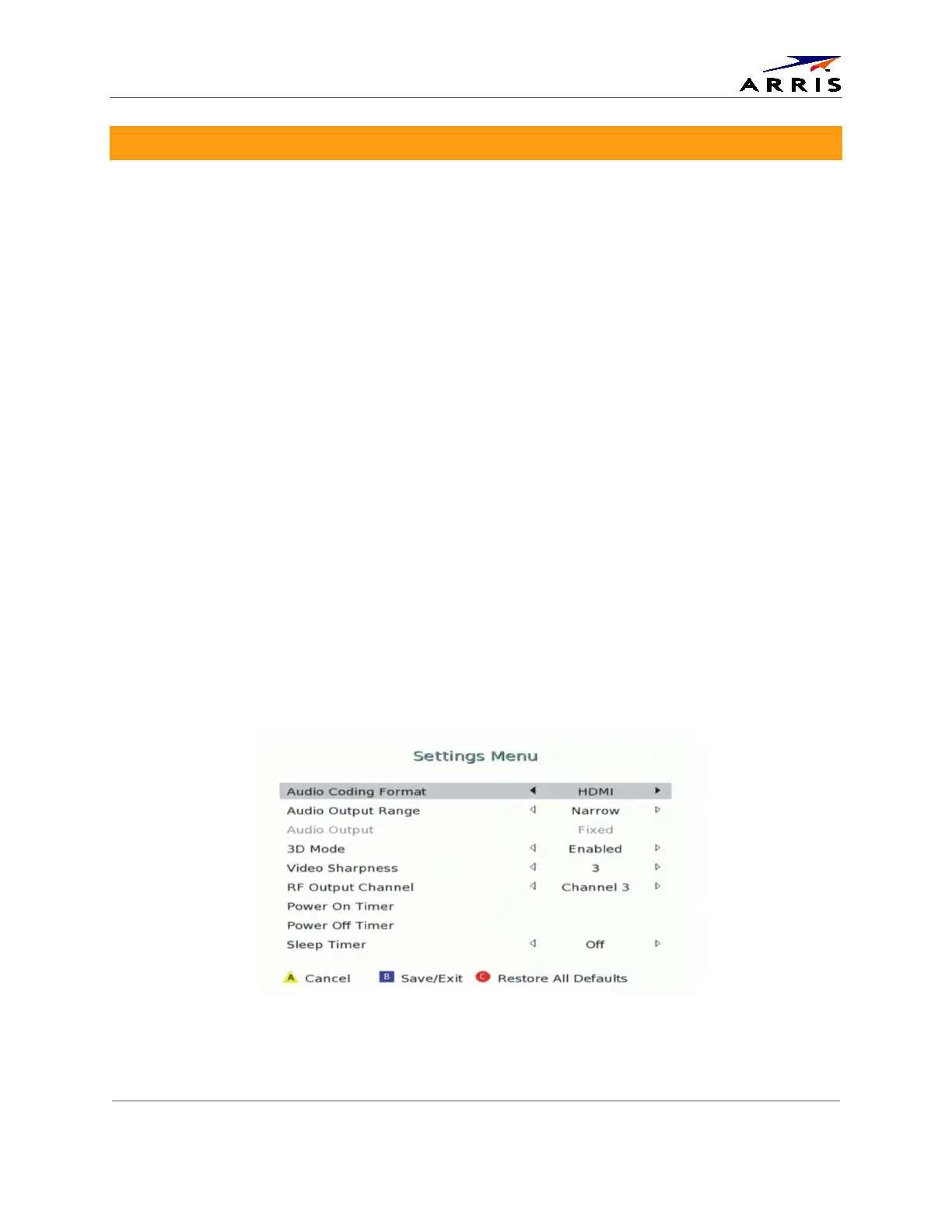
Configuring the User Settings
The following describes how to configure the audio (for HDMI connections) and SD and HD
video settings for the DCX3600-M.
Note: Additional user settings are configured through the Interactive Program Guide and not directly
through the Settings Menu.
Before you adjust the output settings:
• Connect the DCX3600-M to other home entertainment devices.
• Plug the DCX3600-M into an AC power outlet.
• Turn the TV on.
When using an HDMI connection between the DCX3600-M and the television, be sure to have
the cable connected and the TV powered on before adjusting the video settings.
To optimize the output settings:
1. Ensure the DCX3600-M is installed properly.
2. With the set-top in stand-by mode, press the MENU key on the remote control.
3. If the TV is on, the on-screen User Settings menu lists the DCX3600-M settings that can be
adjusted.
4. Use the remote control to navigate the on-screen menus:
• Press the ▲ and ▼ keys to highlight the setting you wish to change.
• Press the ► key to select an option.
• To exit the setting and move to another setting, press the ▲ or ▼ key.
• To exit the menu and save your settings, press the B key on the remote control.
Figure 13 - Settings Menu













 To Next Page