Chapter 5: Operate the Data Gateway
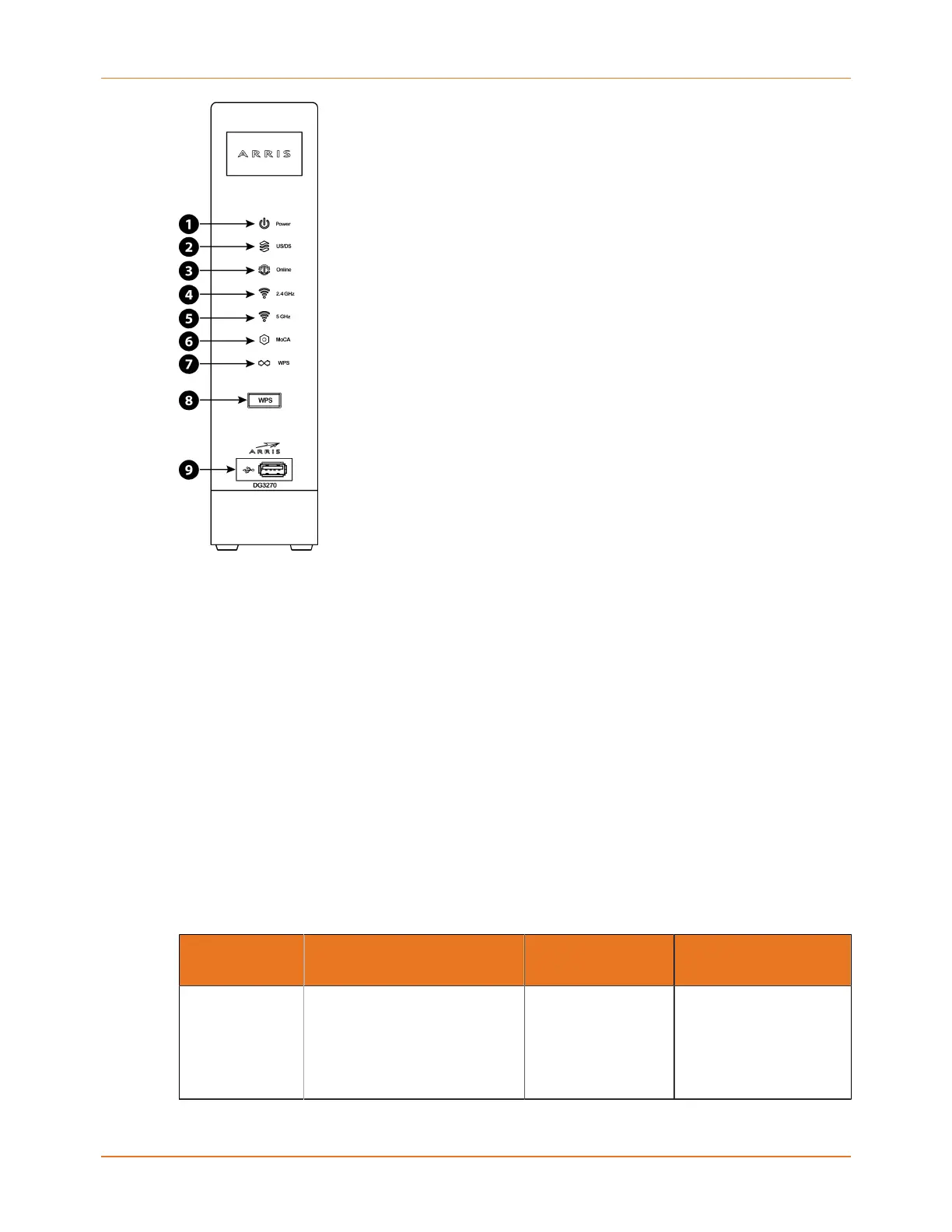
1. Power: Indicates whether power is available to the device.
2. US/DS: Indicates upstream and downstream connectivity.
3. Online: Indicates Internet data transmission status.
4. 2.4 GHz: Indicates the status of the 2.4 GHz wireless LAN.
5. 5 GHz: Indicates the status of the 5 GHz wireless LAN.
6. MoCA: Indicates connectivity between the Data Gateway and other home devices
connected via the MoCA network.
7. WPS: Indicates that Wireless Protected Setup (WPS) is active.
8. WPS button: Begins associating the Data Gateway with a wireless device..
9. USB: USB host connector. Future support for external USB devices.
Patterns: normal operation (LAN)
Table 1: Light patterns during normal operation
Mode Ethernet (LEDs on
rear panel connector)
2.4G Wi-
Fi / 5G Wi-Fi
MoCA
AC power Green LED On = Computer
with 1Gbps port connected
Amber LED On = Computer
with 100 Mbps/10Mbps
port connected
On = Wi-Fi enabled
Flash = Computer
activity
Off = Wi-Fi disabled
On = MoCA enabled
and MoCA network
device attached
Flash = MoCA network
device activity/traffic
Touchstone DG3270 Data Gateway User Guide STANDARD Revision 1.1 27















 To Next Page