ITS101 Installation Manual
Power-up the ITS101 unit and wait until the red LED DS12 is flashing fast. At that moment you
have 4 seconds to press the Back to Default switch. LED DS12 is mounted at the right side of
connector J6 at the upper side of the PCB.
Default settings are :
– Ethernet enabled and set to fixed IP address 192.168.0.240
– OpenVPN disabled
– Password restored to default : the last 4 digits of the unit's MAC address (in capital
letters)
As soon as it is possible to access the web service at the default IP address, default settings
are restored. You can then start setting up the network again.
3.2. Ethernet
The unit has a factory set IP address of 192.168.0.240.
To change this address, connect the unit via an Ethernet cable directly to your host PC or via
the LAN. Note that the connecting device must set its netmask such that 192.168.0.240 is in
the same subnet. Using any web browser, open location http://192.168.0.240. Logon via user
admin and password equal to the last 4 digits of the unit's MAC address (in capital letters).
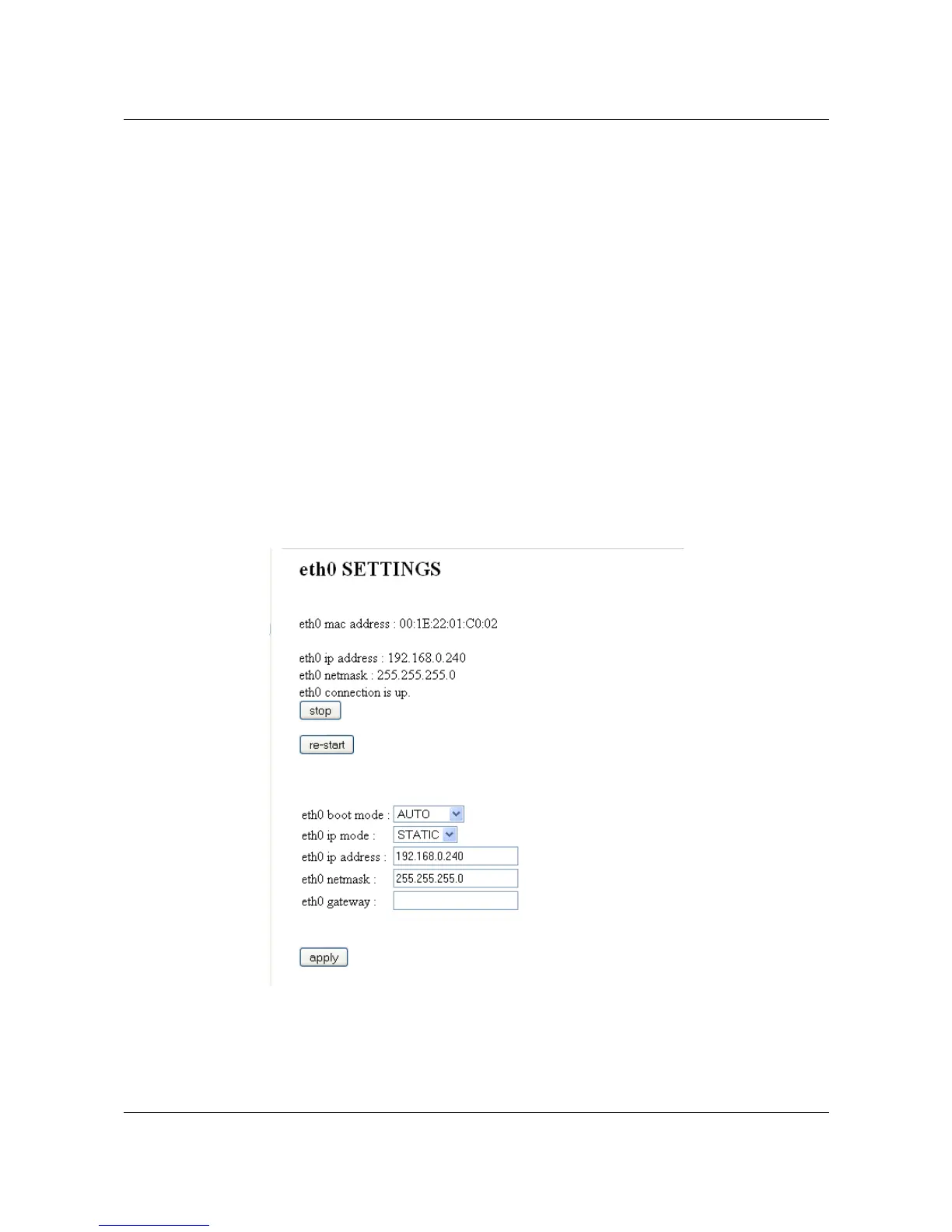
Navigate to the page 'lan settings' for changing the eth0 settings.
Explanation:
• eth0 boot mode has two options in its drop down box: Auto or Manual. Auto mode will
automatically start the LAN connection (eth0) on boot up. This is the only reasonable
ARVOO Imaging Products B.V. page 13 of 33
Figure 8: Screenshot page "lan settings".


 To Next Page