ITS101 Installation Manual
7. Troubleshooting
This chapter gives suggestions for troubleshooting.
7.1. LEDs
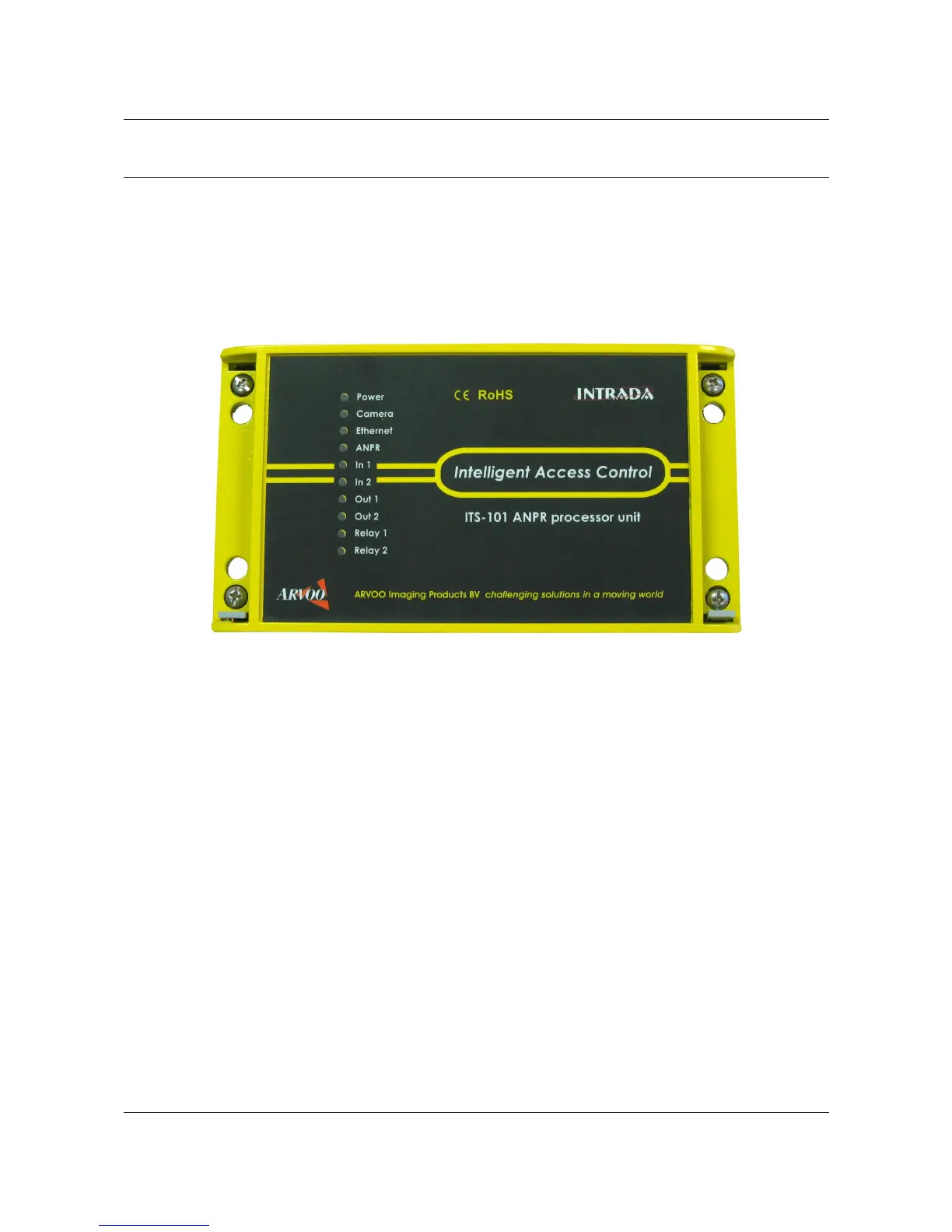
There are ten LEDs at the front-panel of the unit that indicate the status of the system.
LED Power (Green): If this LED is not green, there is a problem with the power supply. Check
that power is connected to the unit and that the supply is rated at 10-14 V DC.
LED Camera (Amber): If this LED is not amber, there is a problem with the camera signal.
Check whether the camera is properly connected and switched on.
LED Ethernet (Green): communication activity. If this LED is flashing, this means
communication, e.g. LAN, OpenVPN etc. is function properly. If not try to connect, if possible,
to the unit's web services to obtain more specific information. If communication remains a
problem you can consider to enter the procedure for going back to the default settings, as
described in section 3.1.
7.2. Communication problems
Per communication means we give a few suggestions on how to deal with communication
problems.
7.2.1. Firewall
The ANPR viewer application (Intrada graphical user interface, a Windows application)
communicates via port 50000. If you are using a firewall it may be necessary to configure the
firewall to allow access to port 50000 and to the viewer. You will need to ensure that the
OpenVPN program can penetrate your firewall, in case OpenVPN is in use.
ARVOO Imaging Products B.V. page 30 of 33
Figure 15: ITS101 front panel.


 To Next Page