ITS101 Installation Manual
3.4. Time settings
In addition to the text string that forms the license plate recognition data, the date and time of
recognition are appended to the data. The time setting is also important for OpenVPN
connections as an incorrect time can lead to an OpenVPN connection being rejected.
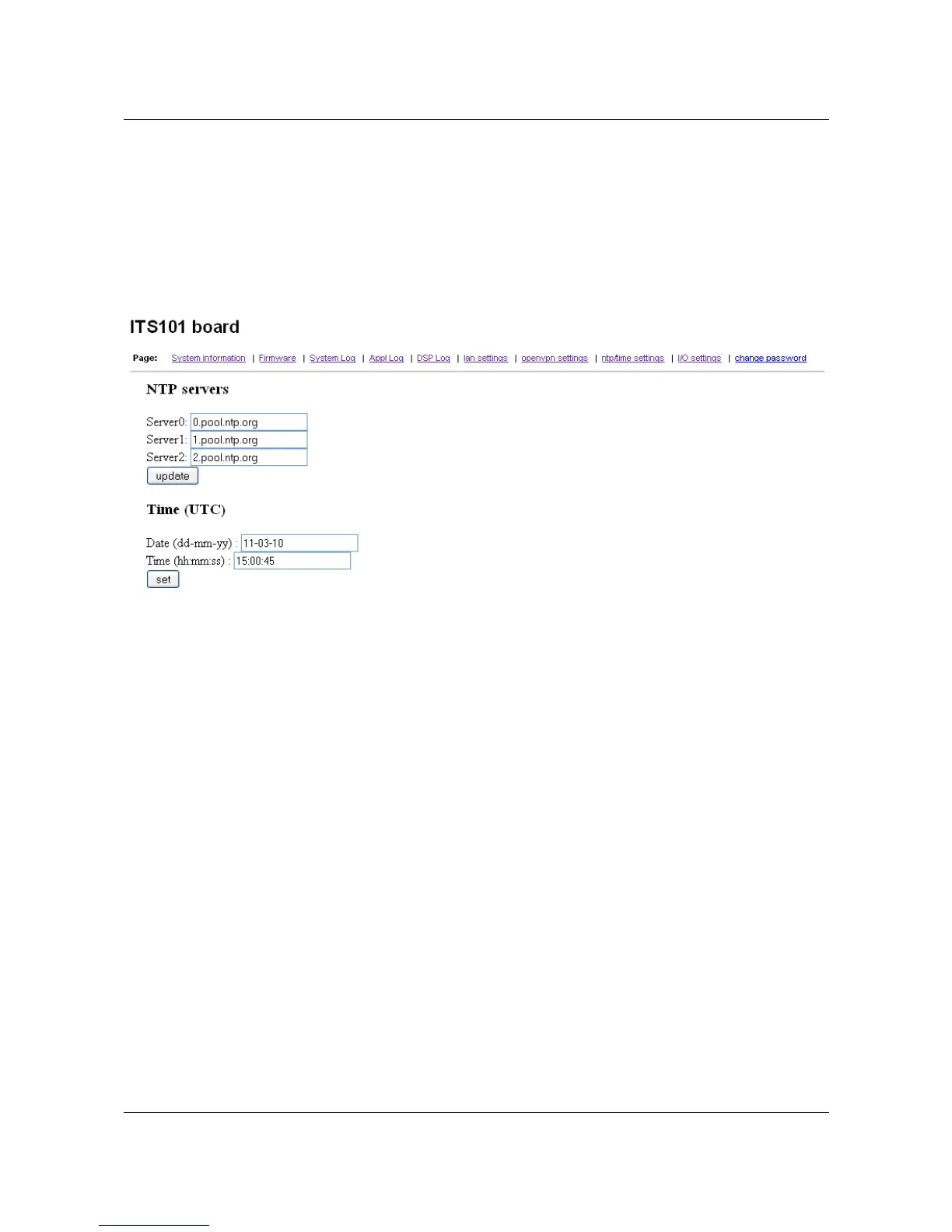
The date and time can be set using the “ntp/time settings” page on the web service as shown
below.
The time and date on the ITS101 unit can be updated automatically using a Network Time
Protocol (NTP) server or it can be set manually should an internet connection not be available.
The ITS101 will use any internet connection available for connection to the NTP server.
• Server0, Sever1 and Server2: the ITS101 interrogates up to 3 NTP servers, the internet
addresses of these servers are to be placed into the text boxes provided.
• Date (dd-mm-yy): the current date can be entered into this text box, the date should
take the format of day, month, year.
• Time (hh-mm-ss): the current time can be entered into this text box, the time should
take the format of hours, minutes and seconds.
ARVOO Imaging Products B.V. page 19 of 33
Figure 10: Screenshot page "ntp/time settings".


 To Next Page