ITS101 Installation Manual
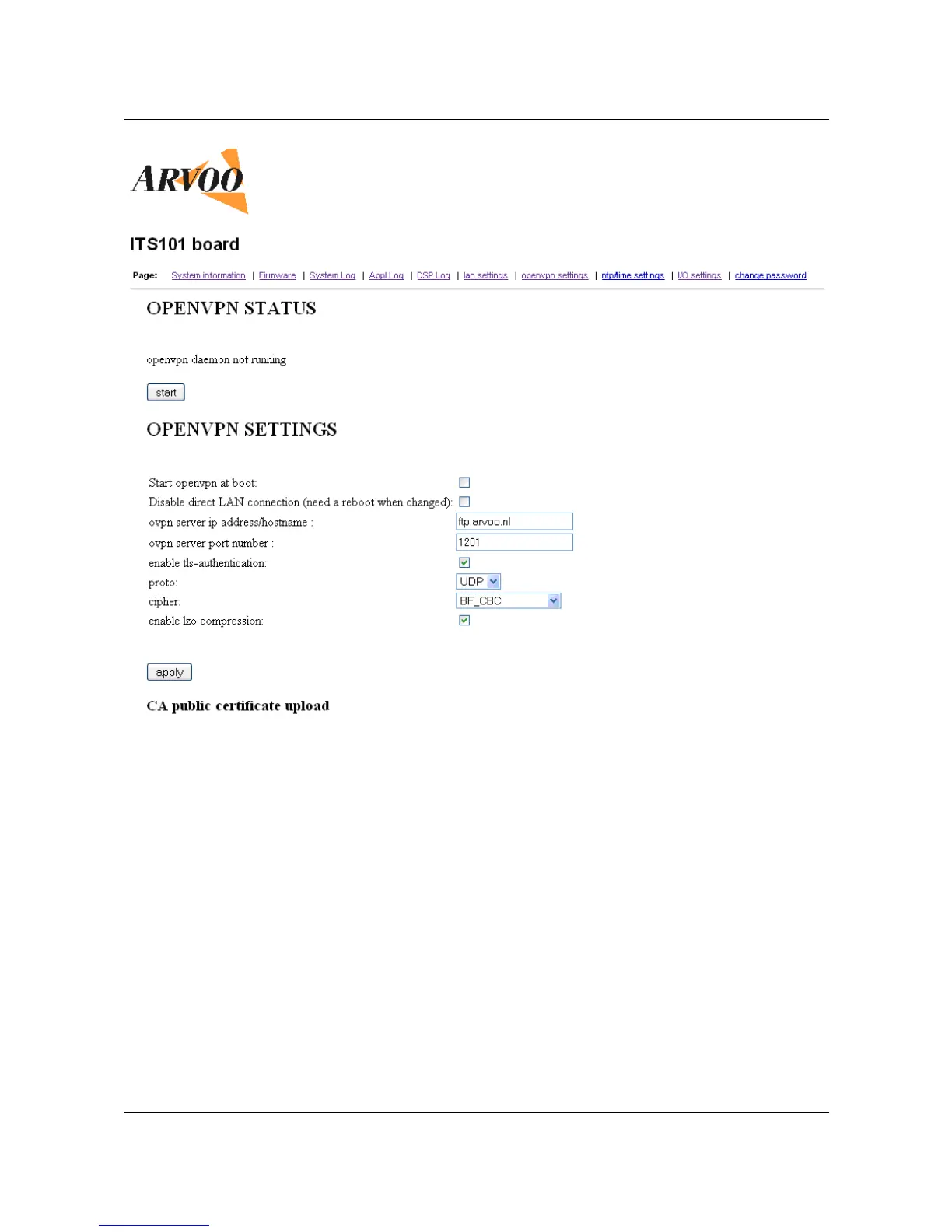
Explanation:
• Start OpenVPN at boot: Placing a tick in this tick box enables the OpenVPN daemon at
boot up. If the tick box is left blank then the OpenVPN daemon must be started
manually using the web interface.
• Disable direct LAN connection: Placing a tick in this tick box disables the direct access
to the ITS101 using its Ethernet address. Only the VPN address can be used to access
the unit.
• Ovpn server ip address/hostname: The IP address or hostname of the OpenVPN server
can be entered into this text box.
• Ovpn server port number: The port number of the OpenVPN server can be entered into
this text box.
• Enable tls-authentication: Placing a tick in this tick box enables TLS authentication on
the ITS101 unit (TLS authentication must also be enabled on the server if this option is
selected). A TLS authentication key file will need to be uploaded to the unit, this must
be the same file that is present on the server. If the tick box is left blank then the TLS
authentication procedure will be disabled.
• Proto: This drop down box is used to define which transmission protocol is to be
employed, UDP or TCP. OpenVPN is optimized for use with UDP however it is compatible
ARVOO Imaging Products B.V. page 15 of 33
Figure 9: Screenshot page "openvpn settings".


 To Next Page