20
Changing the battery
Removing the battery
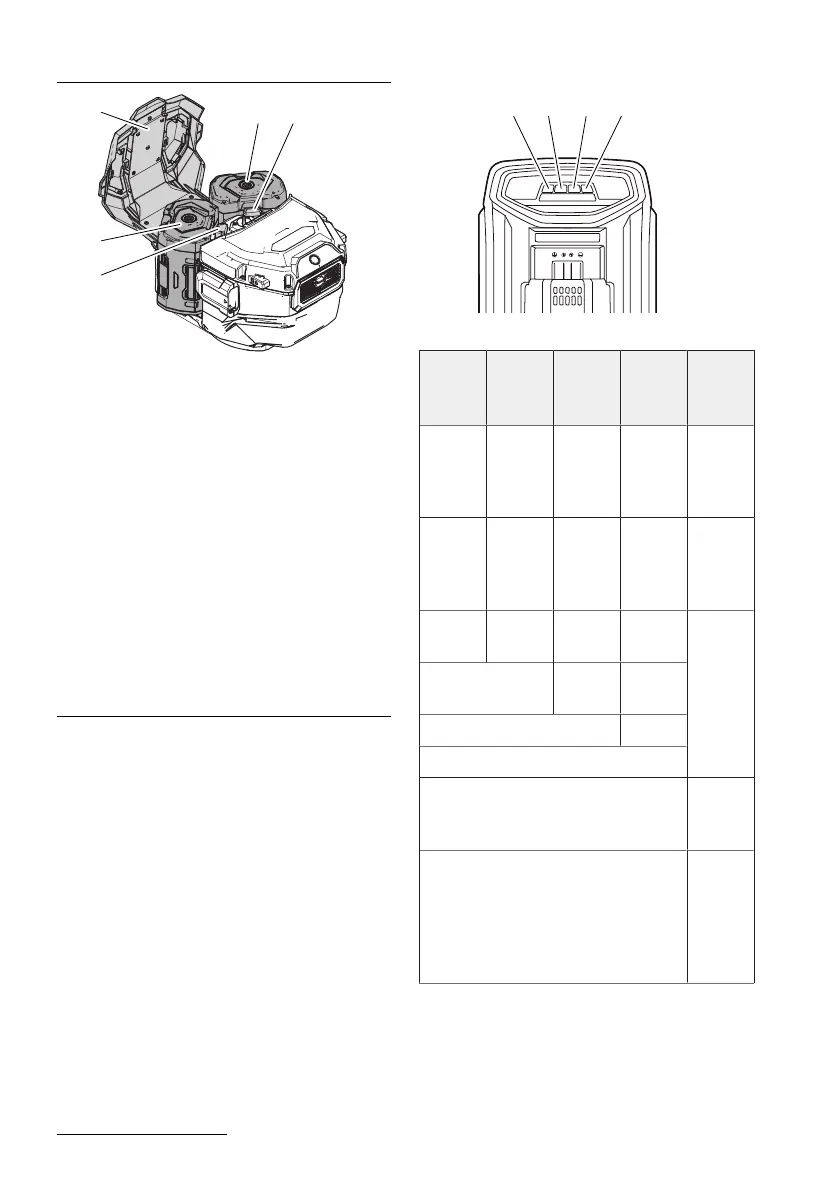
1. Open the cover of the battery compartment
(1).
2. Press the unlock button(2).
3. Remove the battery(3).
4. Close the cover of the battery compartment
(1).
Inserting the battery
1. Open the cover of the battery compartment
(1).
2. Push the battery (3) into the battery com-
partment until it audibly locks.
3. Close the cover of the battery compartment
(1).
Charging the battery
The battery can be charged at any time. Inter-
rupting the charging process will not damage
the battery.
Charge the battery before each use to take ad-
vantage of the full battery life. Let a warm bat-
tery cool down before charging.
1. Connect the power plug of the charger to a
power outlet.
2. Place the battery in the charger. Make sure
that the battery is inserted correctly.
3. When the battery is fully charged, unplug
the charger from the power outlet.
4. Remove the battery from the charger.
Status of battery and charger
The LEDs on the charger indicate the status:
LED1 LED2 LED3 LED4 De-
scrip-
tion
Flashing
red or
off
Off Off Off Battery
or char-
ger de-
fective.
Glowing
red
Off Off Off Battery
too cold
or too
warm
Flashing
green
Off Off Off Battery
is char-
ging
Alternately flash-
ing green
Off Off
Alternately flashing green Off
Alternately flashing green
Glowing green Battery
is
charged
Fast flashing green Battery
is in
self-pre-
serva-
tion
mode












 To Next Page