22
Inserting the backpack battery
1. Push the backpack battery (4) onto the ad-
apter plate until it audibly locks.
2. Check that the backpack battery (4) is se-
curely in place.
3. Plug the plug(1) of the backpack battery
into the socket (2) on the engine.
4. Secure the connection cable to the guide
rail with the Velcro fasteners so that it is not
caught by moving parts.
Charging the backpack battery
1. Connect the mains connection cable to the
charger.
2. Connect the power plug of the charger to a
power outlet.
3. Connect the connector plug of the back-
pack battery to the charger.
4. The charger starts charging in normal char-
ging mode.
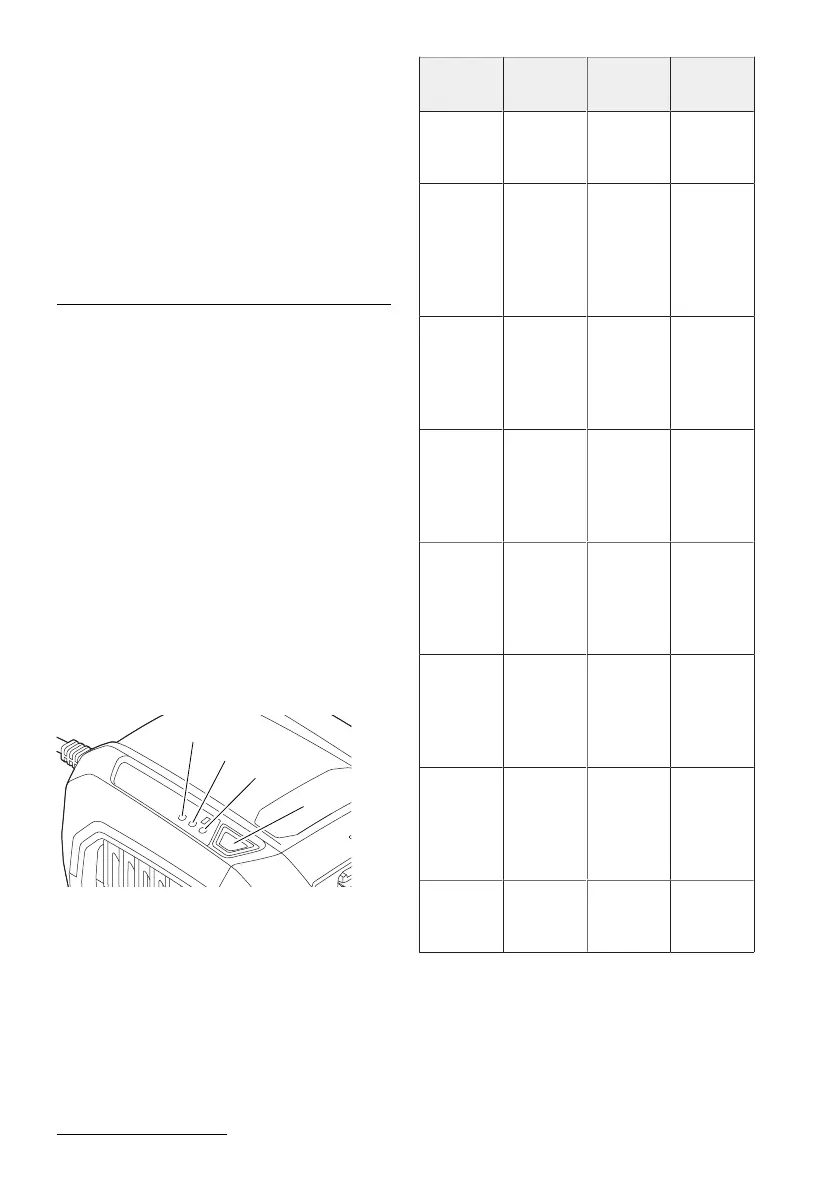
To switch to fast charging mode, press and
hold the button (4) for at least one second.
The fan in the charger switches to continu-
ous operation to cool down the charger.
5. When the backpack battery is fully
charged, unplug the charger from the
power outlet.
6. Disconnect the connector plug of the back-
pack battery from the charger.
Status of backpack battery and charger for
backpack battery
The LEDs on the charger indicate the status:
LED1 LED2 LED3 Descrip-
tion
Off Glowing
green
Flashing
red
Battery or
charger
defective.
Off Flashing
green
Glowing
red
Battery too
cold or too
warm (nor-
mal char-
ging
mode)
Flashing
green
Off Glowing
red
Battery too
cold or too
warm (fast
charging
mode)
Off Flashing
green
Off Battery is
charging
(normal
charging
mode)
Flashing
green
Off Off Battery is
charging
(fast char-
ging
mode)
Off Glowing
green
Off Battery is
charged
(normal
charging
mode)
Glowing
green
Off Off Battery is
charged
(fast char-
ging
mode)
Glowing
green
Glowing
green
Glowing
red
Self-check
was suc-
cessful.





 To Next Page