Ascon Tecnologic - X34 - OPERATING INSTRUCTIONS - PAG. 17
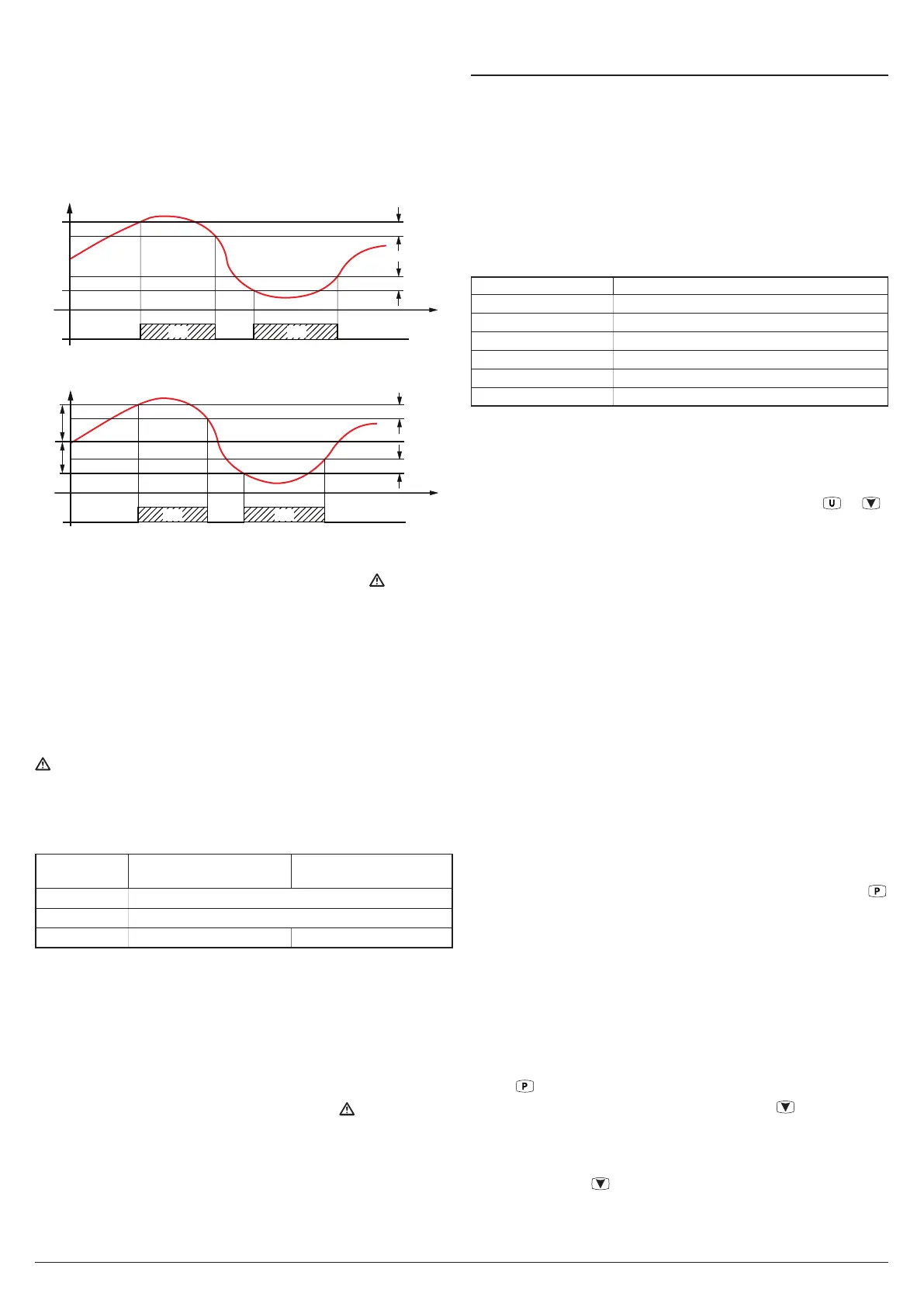
Configuring both alarms with reference to the same probe,
the instrument also allows to manage pre-alarm signals (for
example that do not activate the alarm output and/or the
buzzer) and alarm (which instead activate the alarm output
and/or the buzzer).
If the alarms are Absolute alarms (A.
oo
= 1, 3, 5, 7, 9, 10),
the alarm thresholds are the same as those set at param-
eters A.H
o
and A.L
o
.
AL
A.L1
A.H1
Temp.
A.d1
A.d1
time
offoff off
ON ON
H1 L1
If the alarms are Relative alarms (A.
oo
= 2, 4, 6, 8), the
alarm thresholds are: [SP + A.H
o
] and [SP + A.L
o
].
AL
A.L1
SP
A.H1
A.d1
A.d1
time
offoff off
ON ON
H1 L2
The maximum and minimum temperature alarms can be disa-
bled by setting the related parameters A.H
o
and A.L
o
= oF.
Triggering of the temperature alarms causes the
LED to
light up, activates outputs configured with the set alarm func-
tion, and activates the internal buzzer if configured.
5.10.2 External alarms (digital inputs)
The instrument can notify alarms external to the instrument when
one or more digital inputs configured i.oF = 4, 5, 12, 13, 14
are activated.
Simultaneously to the configured alarm signal (buzzer and/or
output), the instrument point out the alarm by lighting up the
LED and displaying the label of the alarm detected (AL,
PrA, HP, LP) alternated to the variable set at parameter i.dS.
The i.oF= 4 mode produces no action on the control outputs
whereas the other modes deactivate the ot output or deacti-
vate all control outputs at digital input intervention.
Alarm
ot output
(compressor)
Other control outputs
(Fn, dF, Au, HE)
AL (4)
Unchanged
AL (5)
OFF
PrA, HP, LP
OFF Unchanged
5.10.3 Open door alarm
The instrument can point out an Open door alarm activated
by the digital input with the function programmed as:
i.oF = 1, 2 or 3.
When the digital input is activated the instrument shows oP
and after the delay programmed at parameter A.oA, the instru-
ment signals the alarm via the activation of the configured
alarm output (buzzer/ouput), powering up the LED while
continues displaying the label oP.
At the intervention of the open door alarm the inhibited output
are immediately reactivated (fans or fans + compressor).
5.11 HACCP function (alarm recording)
The parameters associated with displaying HACCP alarms
are contained in the
]
HA group, while those associated with
the configuration are contained in the
]
Al group.
The HACCP (Hazard Analysis and Critical Control Points)
function causes the instrument to record the last 10 alarms
that have occurred together with those information useful for
determining the criticality of the alarm.
The function is available only for those instruments equipped
with the calendar clock.
The following HACCP alarms can be stored in memory:
Alarm code HACCP Alarm
H1
Maximum temperature alarm H1
L1
Minimum temperature alarm L1
H2
Maximum temperature alarm H2
L2
Minimum temperature alarm L2
bo
Power failure (black-out) alarm
AL
Alarm from digital input
HACCP alarms are stored if the correspondent enabling
parameters are configured and the preset time configured in
the same parameter has elapsed.
Furthermore, alarm recording can also be disabled through
a configured digital input (i.
o
F = 13) or through the
or /
AUX
keys, if appropriatrely configured (t.UF o t.Fb = 7).
To view these alarms, use the procedure for viewing the pro-
gramming parameters to access the H.01 ÷ H.10 parameters
contained in the
]
HA group.
Note: See paragraph “2.9 Displaying haccp alarms” a pagina
5 for details.
The instrument automatically sorts these parameters from
most recent (H.01) to oldest (H.10) whenever an alarm is
recorded or deleted.
If more than 10 alarms occur, the instrument deletes the
information about the oldest alarm by overwriting it with the
most recent alarm.
When this occurs the instrument increments by one the
value of the H.dL parameter by which it is possible to display
the number of alarms the instrument has been forced to
delete when these exceeded the permitted memory.
After selecting the parameter for the alarm which the user wish-
es to display, if the label flashes this indicates that the alarm has
never been displayed (therefore not recognized/acknowledged).
To recognise it, simply access the parameter pressing the
key and display it.
The next time it is displayed, the parameter label will be
shown solid (not flashing).
If the alarm is still active at the time it is displayed, the data are
shown but the alarm is not recognized and cannot be cancelled.
In the event of unrecognized (and therefore still ongoing)
HACCP alarms, the instrument displays the message HAC
alternated with the Normal display.
Within the parameter the data will be displayed sequentially
as the
key is repeatedly pressed.
The alarm can be deleted by holding down the
key for more
than 5 s while one of the data of the alarm is displayed. Its de-
letion is confirmed by the display indicating “---” for approx. 1 s.
Similarly the value of the H.dL parameter can be reset by
holding down the
key for more than 5 seconds while the
value is displayed.



 To Next Page