Ascon Tecnologic - X34 - OPERATING INSTRUCTIONS - PAG. 18
However, if desired, all alarms can be deleted immediately by:
– Holding down the key for 5 s if parameter t.UF = 6;
– Holding down the
key for 5 s if parameter t.Fb = 6;
– By a digital input if the relevant parameter i.
o
F = 11.
– By the parameter reset function (at the password prompt
r.P enter -48).
5.11.1 HACCP temperature alarms
Setting parameters A.r1 (for alarms H1 and L1) and Ar.2
(for alarms H2 and L2) it is possible to enable recording of
temperature alarms as HACCP alarms.
The same parameters can also be used to define the mini-
mum alarm duration that will cause the alarm to be recorded
as an HACCP alarm.
If the alarm duration is shorter than the programmed time,
the alarm is not recorded.
Setting A.r
o
= oF, recording is disabled.
For each recorded temperature alarm, the following data are
stored:
– Alarm type (A. = H1 or L1 or H2 or L2);
– HACCP alarm start time
(y. = year, M. = month, d. =day, h. = hours, n. = minutes);
– HACCP alarm duration (E. = hours, e. = minutes);
– Critical temperature reached (max. peak if Hi alarm or min.
peak if Lo alarm).
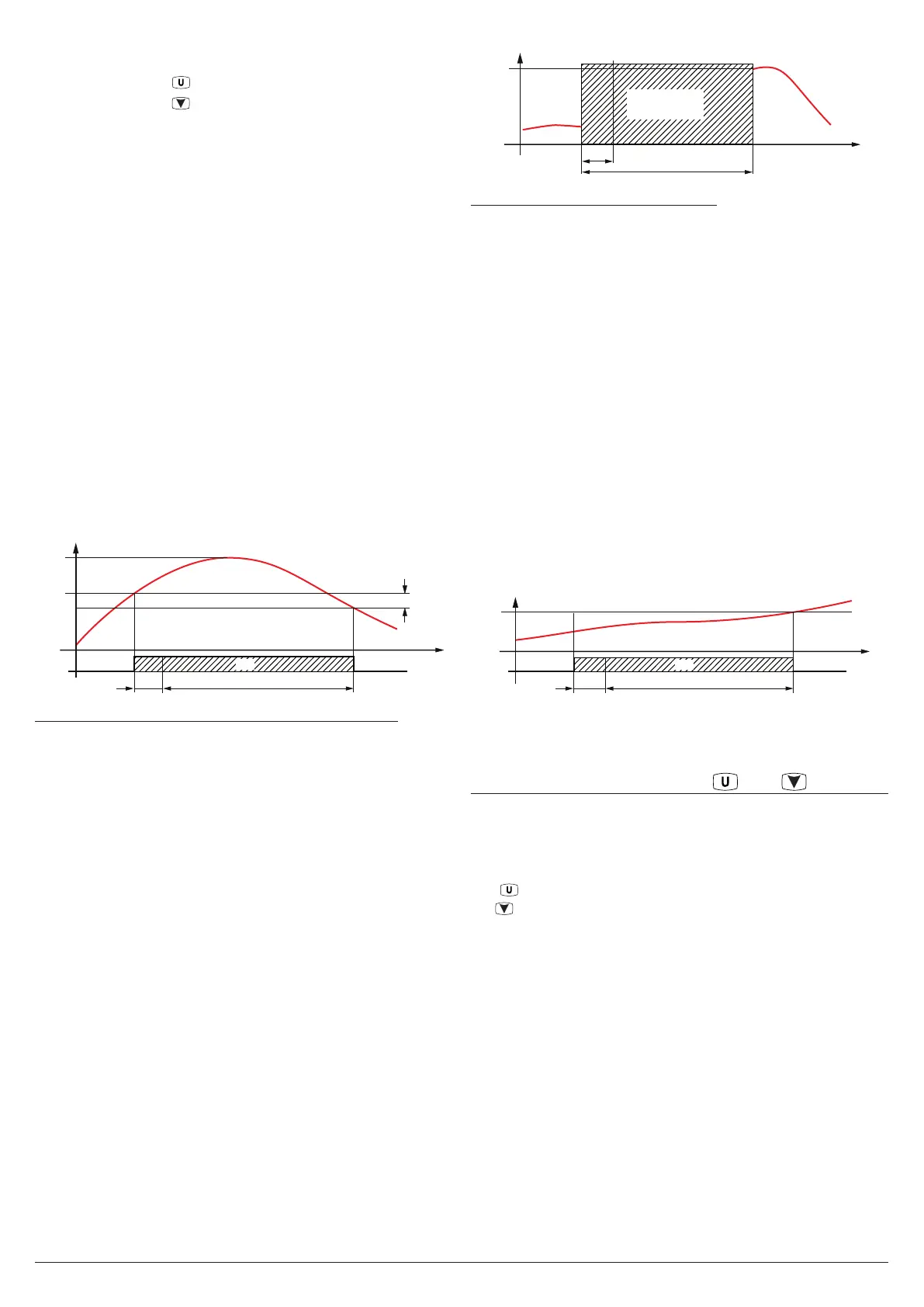
AL
A.H1
Max.
temp.
Temp.
A.d1
time
H1
A.r1 E.e. time
12 3
Example of HACCP maximum temperature alarm H1
1. Configured alarm start (in this case with A.t1 = oF);
2. HACCP alarm recording start;
3. Alarm end.
Note: If there is a power failure during a temperature alarm,
the instrument records the duration of the alarm up
until the moment the power failure began.
In order to capture correct information on the temperature
conditions which the user wishes to monitor, it is recom-
mended to set a black-out alarm and if necessary disable
the on-startup alarm delays (A.P
o
) so that if the alarm is still
active when the power returns it is recorded as a new alarm
at the end of the power failure.
5.11.2 HACCP power failure alarms
This type of alarm is recorded only if the power failure ex-
ceeds the value set at parameter A.bo.
If A.bo = oF the black-out alarm is never recorded.
For each recorded black-out alarm, the following data are
recorded:
– Alarm type (A. = bo);
– Start time
(y. = year, M. = month, d. =day, h. = hours, n. = minutes);
– Black-out duration (E. = hours, e. = minutes);
– The temperature of alarm 1 probe (see parameter A.y1)
measured at black-out end (if available; if not available the
display shows “---”).
Temp.
at end of
Black-out
time
BLACK-OUT
A.bo
E.e. time
1
2
3
Example of HACCP black-out alarm
1. Power failure;
2. Min. power failure duration that will enable HACCP black-
out alarm recording;
3. Return of power supply (alarm end).
5.11.3 HACCP alarms from digital input
HACCP alarms from digital input are recorded only if the ge-
neric alarm (AL) from a digital input is configured in modes
4 or 5 and remains for a time longer than the time set in
parameter A.di.
If A.di = oF, an alarm from a digital input is never recorded.
For each alarm from a digital input recorded, the following
data are stored:
– Alarm type (A. = AL);
– Start time
(y. = year, M. = month, d. =day, h. = hours, n. = minutes);
– Alarm duration (E. = hours, e. = minutes);
– The temperature of alarm 1 probe (see parameter A.y1)
measured at alarm end (if available, if not available the
display shows “---”).
Digital
alarm
Temp.
at alarm
end
Temp.
time
offoff
ON
A.di E.e. time
12 3
Note: If the power fails during an alarm from a digital input,
the instrument records the duration of the alarm up
until the moment the power failure began.
5.12 Functioning of keys and /Aux
All the parameters concerning keyboard functions are con-
tained in the group
]
tS.
Two of the instrument keys, in addition to their normal func-
tions, can be configured to operate other commands.
The key function can be defined by the parameter t.UF while
the /AUX key function can be defined by the parameter t.Fb.
Both the parameters have the same possibilities and can be
configured for the following functions:
oF The key carries out no function;
1 Pressing the key for at least 1 s, it is possible to enable/
disable the auxiliary output if configured (o.Fo = 2).
If are programmed activation/deactivation events of the
auxiliary output by Real Time Clock the action of the
keys force output status until the next event;
2 Pressing the key for at least 1 s, it is possible to toggle
between Eco and Normal mode (SP, SPE). Once the
selection has been made, the display shows the active
Set Point code (SP, Eco) for about 1 s.
If are pro-
grammed mode changes events by Real Time Clock the
action of the keys force status until the next event.
3 Pressing the key for at least 1 s, it is possible to switch
the instrument from ON to Stand-by status and vice-ver-
sa. If switch-ON/Stand-by events are programmed using



 To Next Page