10
Each style of the AK280 has been set with a default or
standard tempo. However, this can be changed by using the
[TEMPO +]/[TEMPO –] button.
1. Use the [TEMPO +]/[TEMPO –] button to change the
tempo. While the tempo value is flashing, use the data dial
to quickly change the tempo.
2. Press the [TEMPO +] and [TEMPO –] buttons
simultaneously to restore the default tempo setting.
Note:
When style stops, changing the style will automatically reset the
tempo. However, changing the style during style playback will
not result in tempo change.
Chord Inversion
This chord is defined by the fact that its root is not in the bass
(i.e. is not in the lowest note). When the root is in the bass, we
call the chord “Root–Position Chord”. If we put the Third and
Fifth in the root position, then it forms “Inversion”. We call this
chord “Inversion Chord”.
See the major triad diagram and its inverted chord to the right.
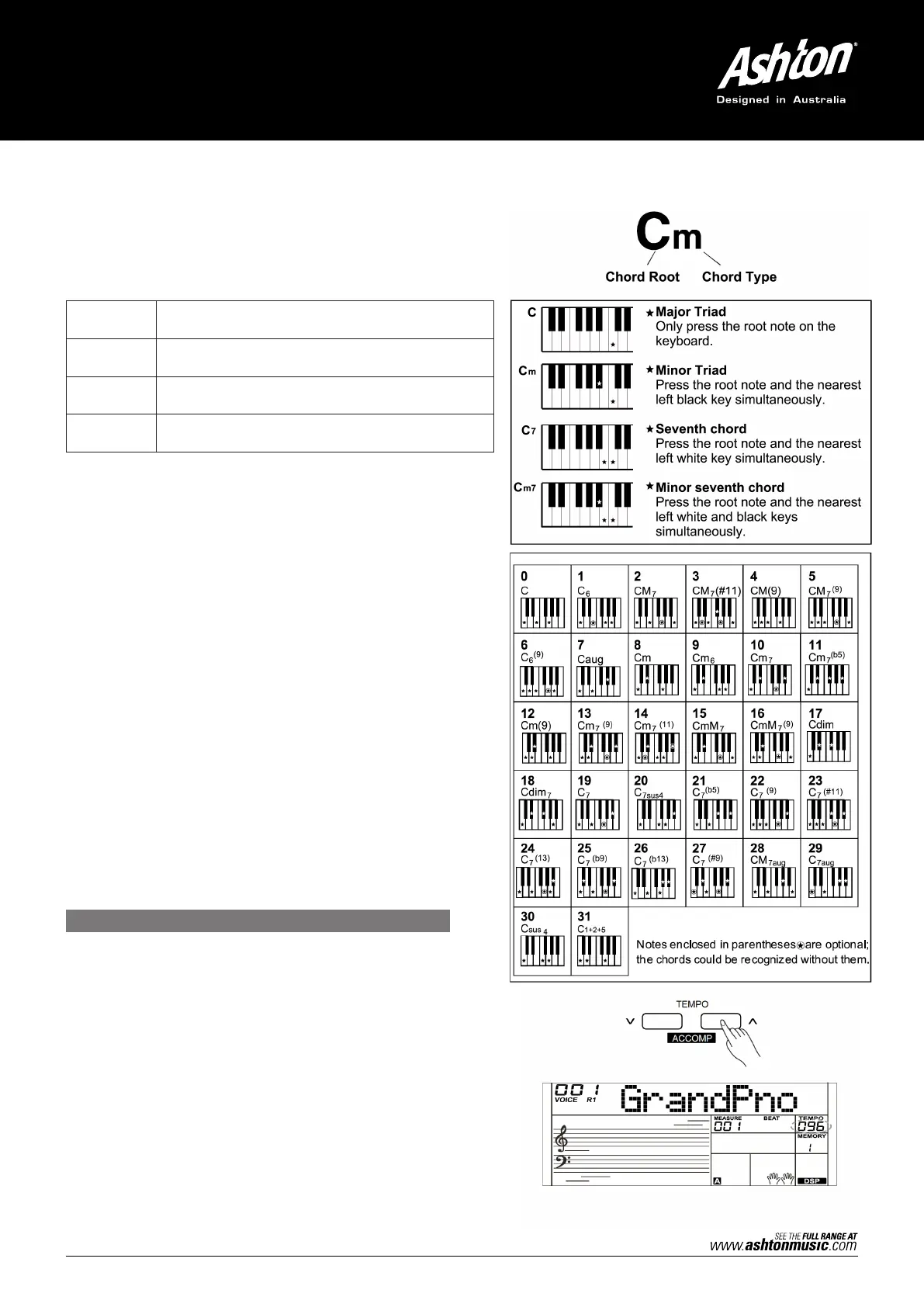
Chord Name
The chord name contains two parts: Chord root and Chord type.
Single–Finger
Single finger type not only can detect single finger but also can
detect multi finger. The single finger makes it easier to play
chords through only one, two or three keys including major,
minor, seventh, and minor seventh chord. Refer to relevant
picture on the right for details.
Multi–Finger
Multi–finger allows you to play chords in normal fingering. Try
playing the 32 chord types in C scale as listed on the right.
Note:
In full range mode, the entire keyboard will only recognice
chords played in normal fingering.
Triad Type
There are the following basic triad types:
TEMPO
Major Triad A root with a major third added above and a perfect
fifth will consist as a “Major Triad”.
Minor Triad A root with a minor third added above and a perfect
fifth will consist as a “Minor Triad”.
Augmented
Triad
A root with a major third added above and an
augmented fifth will consist as an “Augmented Triad”.
Diminished
Triad
A root with a minor third added above and a
diminished fifth will consist as a “Diminished Triad”.



 To Next Page